
✕︎
LANGUAGE ▼︎
Svenska
فارسی
Italiano
Tiếng Việt
Català
Türk
हिन्दी
Čeština
Lietuvis
Ελληνικά
Dansk
Magyar
Български
Deutsch
Bahasa Melayu
Nederlands
Русский
English
Український
Español
Polskie
ภาษาไทย
Português
ქართველი
Français
Română
한국어
Slovák
繁體中文
日本語
Indonesia
العربية
简体中文
Svenska
فارسی
Italiano
Tiếng Việt
Català
Türk
हिन्दी
Čeština
Lietuvis
Ελληνικά
Dansk
Magyar
Български
Deutsch
Bahasa Melayu
Nederlands
Русский
English
Український
Español
Polskie
ภาษาไทย
Português
ქართველი
Français
Română
한국어
Slovák
繁體中文
日本語
Indonesia
العربية
简体中文
Fuel Cost Tracking

Fuel Cost Tracking

类别 : 追踪器

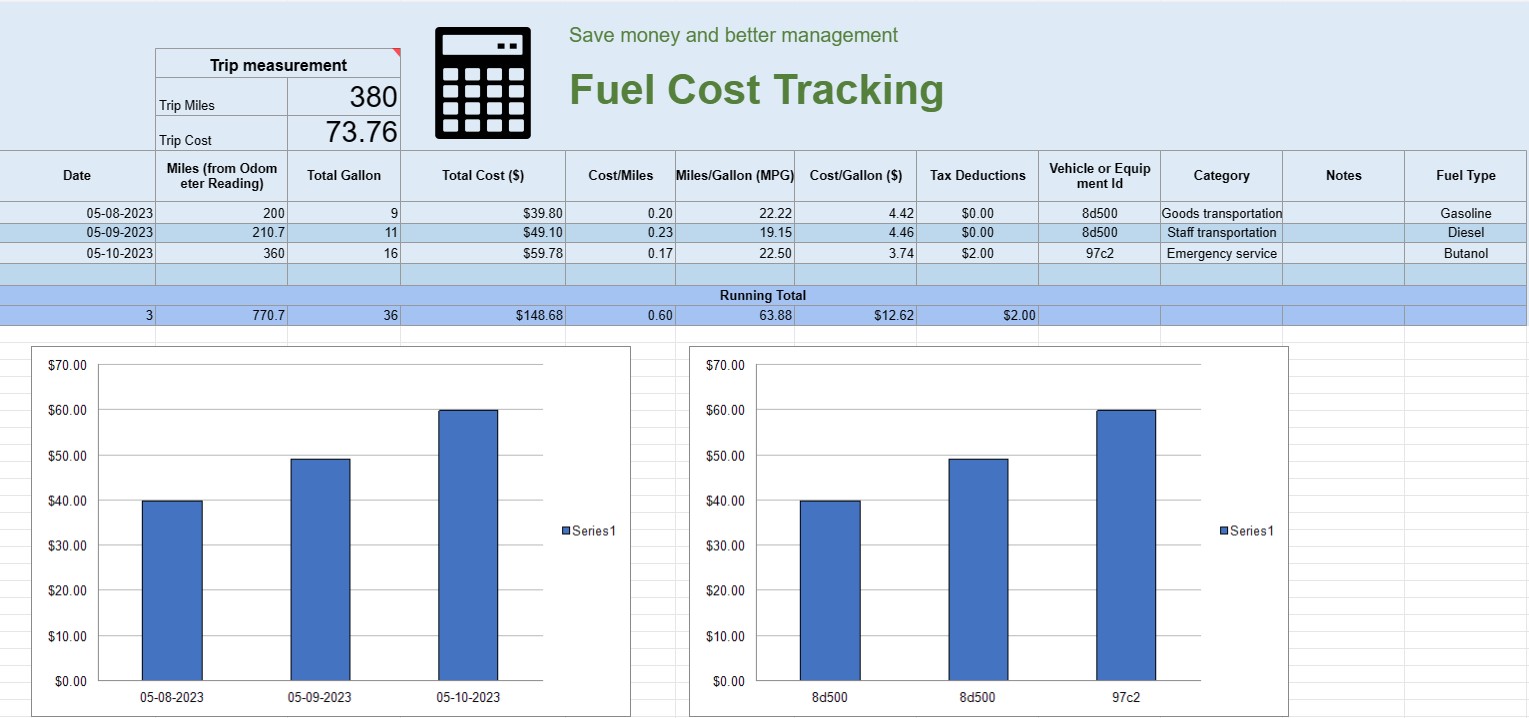
You can use this to track the operating cost of a vehicle, it offers the formulas for you to automate the calculation.

查看模板
↓︎ 现在下载
无法使用上面的按钮下载?单击此链接下载文件。
描述
0
⌨︎
评论
449
⤓︎
1
☆︎

A fuel cost tracking spreadsheet is a digital document or spreadsheet that individuals, businesses, or organizations use to record, analyze, and manage expenses related to fuel consumption for vehicles or equipment. It provides a structured format for documenting fuel purchases, calculating fuel efficiency, and tracking overall fuel costs over time.

Here are the key components typically found in a fuel cost tracking spreadsheet:

  • Date: Record the date when the fuel purchase was made. This helps establish a chronological record of transactions.
  • Vehicle or Equipment ID: Identify the specific vehicle or equipment for which the fuel is being purchased. This is especially useful for tracking expenses associated with multiple vehicles or pieces of machinery.
  • Odometer Reading: For vehicles, record the current odometer reading at the time of refueling. This allows you to track the distance traveled between refueling events.
  • Fuel Type: Specify the type of fuel being purchased (e.g., gasoline, diesel, natural gas, electric).
  • Gallons/Liters Purchased: Document the quantity of fuel purchased in gallons or liters.
  • Unit Price: Note the cost per unit of fuel, typically in dollars or the local currency.
  • Total Cost: Automatically calculate the total cost of the fuel purchase by multiplying the gallons/liters purchased by the unit price.
  • Mileage/Kilometerage: Calculate and record the distance traveled between the current and previous refueling events. This can be computed by subtracting the previous odometer reading from the current one.
  • Fuel Efficiency (MPG or L/100km): Calculate and record the fuel efficiency in miles per gallon (MPG) or liters per 100 kilometers (L/100km). To calculate MPG, divide the distance traveled by the fuel consumed. To calculate L/100km, divide the fuel consumed (in liters) by the distance traveled (in kilometers).
  • Notes: Include any relevant notes or comments about the fuel purchase, such as the location of the refueling station or any maintenance performed.
  • Running Total: Maintain a running total of fuel costs over time. This helps you track your cumulative expenses.
  • Charts and Graphs: Create visual representations of your fuel consumption and costs over time using charts or graphs to better visualize trends and patterns.
  • Category or Purpose: Categorize fuel expenses based on the purpose, such as personal use, business use, or specific projects. This can help you allocate costs accurately.
  • Tax Deductions: If applicable, document fuel expenses that are eligible for tax deductions or reimbursements.

You can create a fuel cost tracking spreadsheet using software like Microsoft Excel, Google Sheets, or specialized accounting software. Templates for fuel cost tracking are often available online and can be customized to meet your specific needs. Regularly updating and analyzing the data in your fuel cost tracking spreadsheet can help you make informed decisions about fuel consumption, budgeting, and optimizing efficiency for your vehicles or equipment.

轻松预览和下载电子表格模板

查看电子表格模板的完整版本,没有任何限制,看看您是否喜欢它,然后您可以下载 Excel 模板将其存储在您的设备上并免费使用。

从任何地方访问电子表格模板

这适用于所有流行的操作系统,例如 Windows、MacOS、Linux、iOS。您可以查看电子表格模板并下载它们,而无需其他程序。

如何使用模板

按照非常容易遵循的步骤了解如何预览、下载和使用电子表格模板

👁
1
选择发票、预算、日历、其他计划者和其他跟踪器等类别,然后单击电子表格模板以在线查看
2
预览电子表格模板后,您可以下载您认为适合您目的的模板
🗎
3
一次您的设备上有该文件,您只需将数据填充到其中或修改它以匹配用例
🗂
4
完成电子表格模板后,您可以按照您选择的方式使用它

更多类似模板

查看更多与所选模板属于同一类别的电子表格模板。












