✕︎
LANGUAGE ▼︎
Svenska
فارسی
Italiano
Tiếng Việt
Català
Türk
हिन्दी
Čeština
Lietuvis
Ελληνικά
Dansk
Magyar
Български
Deutsch
Bahasa Melayu
Nederlands
Русский
English
Український
Español
Polskie
ภาษาไทย
Português
ქართველი
Français
Română
한국어
Slovák
繁體中文
日本語
Indonesia
العربية
简体中文
Svenska
فارسی
Italiano
Tiếng Việt
Català
Türk
हिन्दी
Čeština
Lietuvis
Ελληνικά
Dansk
Magyar
Български
Deutsch
Bahasa Melayu
Nederlands
Русский
English
Український
Español
Polskie
ภาษาไทย
Português
ქართველი
Français
Română
한국어
Slovák
繁體中文
日本語
Indonesia
العربية
简体中文
Household monthly budget

Household monthly budget

类别 : 预算

Living in homes nowadays cost the money, kindly use this to manage all of the data of the fees and cashes much easier.

查看模板
↓︎ 现在下载
无法使用上面的按钮下载?单击此链接下载文件。
描述
0
⌨︎
评论
299
⤓︎
0
☆︎

A Household Monthly Spreadsheet Template is a pre-designed document or digital file that individuals or families use to track and manage their monthly household finances and expenses. These templates are readily available and can be customized to suit the specific financial needs and goals of a household. They provide a structured format for recording income, expenses, savings, and other financial transactions on a monthly basis. Here are common components and sections you might find in a Household Monthly Spreadsheet Template:

  • Income: Sources of income: List all sources of income, such as salaries, rental income, investments, and any other sources of money coming into the household.
  • Amount: Specify the amount received from each income source.
  • Total income: Automatically calculate the total income for the month.
  • Fixed Expenses:
    • Mortgage or rent payments.
    • Utilities (e.g., electricity, gas, water).
    • Insurance premiums (e.g., health, auto, home).
    • Loan payments (e.g., car loans, student loans).
    • Subscription services (e.g., cable, internet, streaming services).
    • Property taxes.
    • Other fixed monthly expenses.
  • Variable Expenses:
    • Groceries and household supplies.
    • Transportation (e.g., fuel, public transportation).
    • Dining out and entertainment.
    • Health and wellness (e.g., medical bills, prescriptions).
    • Childcare and education expenses.
    • Personal care and grooming.
    • Miscellaneous expenses.
  • Savings and Investments: Contributions to savings accounts (e.g., emergency fund, retirement savings).
    • Investments (e.g., stocks, bonds, mutual funds).
    • Contributions to college savings accounts.
    • Other savings goals or accounts.
    • Debts and Credit Cards:
    • Credit card balances and minimum payments.
    • Other outstanding debts and loan balances.
    • Interest rates on debts.
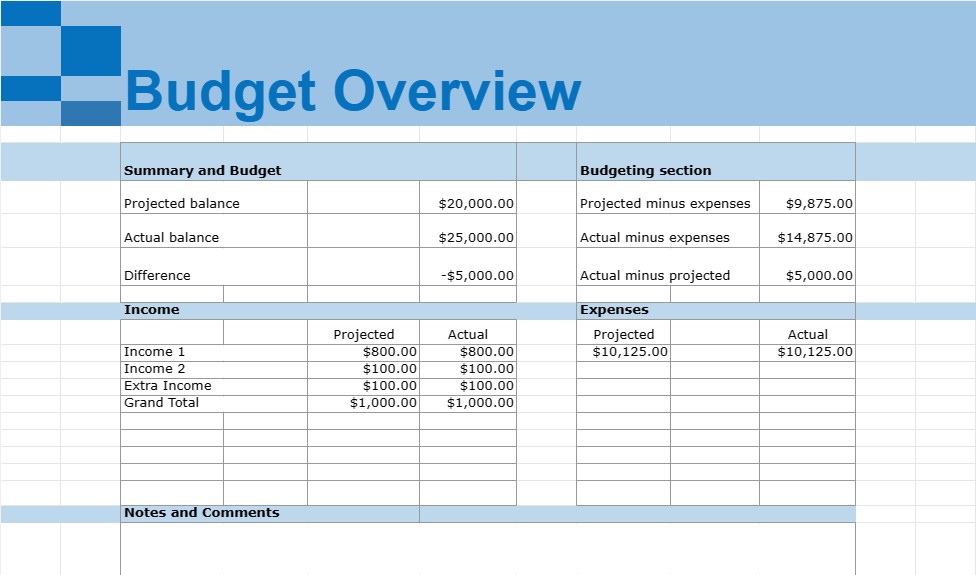
  • Summary and Budget: A summary section that calculates the total income, total expenses, and the net income (income minus expenses) for the month.
  • Budgeting section: Compare the actual expenses to a budget or spending plan, if applicable.
  • Additional Categories: Depending on the household's specific financial situation, additional categories may be included, such as charitable donations, pet expenses, home maintenance, or education savings.
  • Notes and Comments: Space for adding comments, notes, or reminders related to specific expenses or financial transactions.

Household Monthly Spreadsheet Templates are valuable tools for managing personal finances, as they help individuals and families track their income and expenses, identify spending patterns, set financial goals, and create a budget. They provide a clear overview of a household's financial health and can help with making informed financial decisions, reducing debt, increasing savings, and achieving long-term financial objectives. These templates can be created using spreadsheet software like Microsoft Excel or Google Sheets or found as ready-made templates online.

轻松预览和下载电子表格模板

查看电子表格模板的完整版本,没有任何限制,看看您是否喜欢它,然后您可以下载 Excel 模板将其存储在您的设备上并免费使用。

从任何地方访问电子表格模板

这适用于所有流行的操作系统,例如 Windows、MacOS、Linux、iOS。您可以查看电子表格模板并下载它们,而无需其他程序。

如何使用模板

按照非常容易遵循的步骤了解如何预览、下载和使用电子表格模板

👁
1
选择发票、预算、日历、其他计划者和其他跟踪器等类别,然后单击电子表格模板以在线查看
2
预览电子表格模板后,您可以下载您认为适合您目的的模板
🗎
3
一次您的设备上有该文件,您只需将数据填充到其中或修改它以匹配用例
🗂
4
完成电子表格模板后,您可以按照您选择的方式使用它