
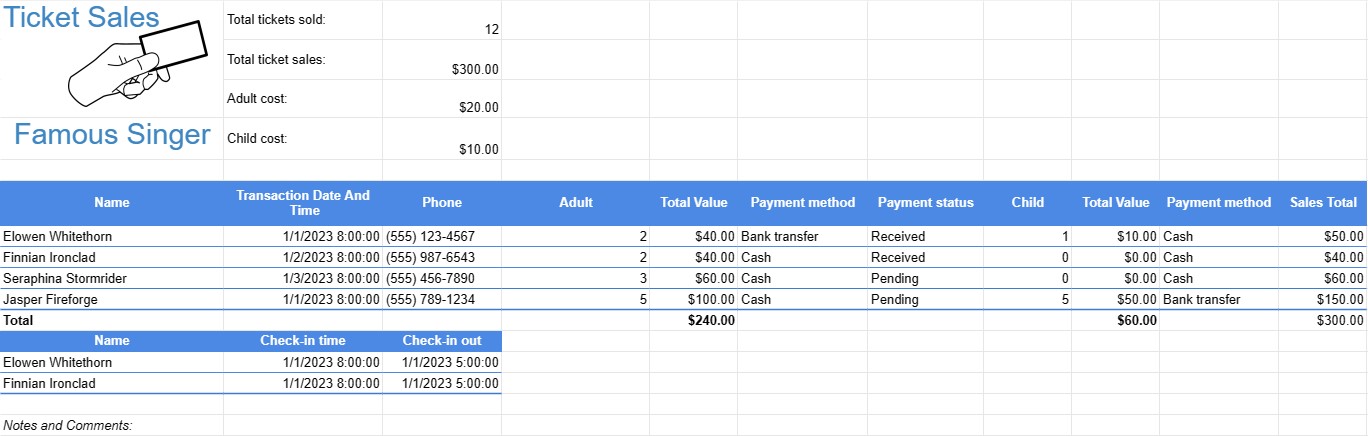
bán vé
Loại : Trình theo dõi
Sử dụng điều này để quản lý lợi nhuận và hoạt động bán hàng, điều này có thể được sử dụng để bán vé xem phim, bán vé lễ hội âm nhạc, v.v.


Mẫu bán vé là tài liệu hoặc bảng tính được các nhà tổ chức sự kiện, doanh nghiệp hoặc cá nhân sử dụng để theo dõi việc bán vé cho các sự kiện khác nhau, chẳng hạn như buổi hòa nhạc, trò chơi thể thao, hoạt động gây quỹ, hội thảo hoặc buổi biểu diễn. Mẫu này giúp quản lý lượng vé tồn kho, doanh thu bán hàng và thông tin người tham dự.
Các thành phần chính của mẫu bán vé:
- Thông tin sự kiện: Tại Ở đầu mẫu thường có một phần để ghi lại các chi tiết cần thiết về sự kiện, bao gồm tên sự kiện, ngày, địa điểm và thông tin liên hệ của người tổ chức sự kiện.
- Loại vé: Liệt kê các loại vé khác nhau có sẵn cho sự kiện, chẳng hạn như vé VIP, vé vào cửa chung, vé sinh viên hoặc vé cao cấp. Mỗi loại có thể có mức giá và tình trạng còn hàng khác nhau.
- Kho vé: Ghi lại số lượng vé ban đầu có sẵn cho mỗi loại vé. Khi vé được bán, phần này được cập nhật để phản ánh số lượng còn lại.
- Doanh số bán vé: Theo dõi doanh số bán vé của từng cá nhân, bao gồm:
- Người mua tên
- Thông tin liên hệ (email, điện thoại)
- Loại vé
- Số lượng vé đã mua
- Tổng chi phí
- Phương thức thanh toán (ví dụ: tiền mặt, thẻ tín dụng, thanh toán trực tuyến)
- Ngày và giờ giao dịch
- Tổng doanh thu:Tính tổng doanh thu được tạo ra từ việc bán vé bằng cách tính tổng doanh thu chi phí của tất cả các vé đã bán.
- Theo dõi thanh toán: Lưu giữ hồ sơ về các khoản thanh toán đã nhận, số dư chưa thanh toán và mọi thời hạn thanh toán.
- Thông tin về người tham dự: Khi ngày sự kiện đến gần, mẫu có thể được sử dụng để theo dõi việc đăng ký của người tham dự hoặc xác minh vé tại lối vào sự kiện.
- Ghi chú và nhận xét:
- Ghi chú và nhận xét: Cung cấp không gian cho các ghi chú bổ sung, hướng dẫn đặc biệt hoặc nhận xét liên quan đến việc bán vé hoặc hậu cần sự kiện.
Lợi ích của việc sử dụng Mẫu bán vé:
- Quản lý khoảng không quảng cáo: Giúp nhà tổ chức theo dõi số vé có sẵn, ngăn chặn việc bán quá mức hoặc đánh giá thấp nhu cầu.
- Theo dõi doanh thu: Cung cấp chế độ xem theo thời gian thực về việc bán vé doanh thu và giúp người tổ chức dự báo thu nhập.
- Thông tin về người tham dự: Cho phép thu thập thông tin liên hệ của người tham dự cho mục đích liên lạc và theo dõi sau sự kiện.
- Quản lý thanh toán: Hỗ trợ theo dõi các khoản thanh toán đã nhận và quản lý mọi số dư chưa thanh toán hoặc khoản hoàn trả.
- Báo cáo bán hàng: Cung cấp hồ sơ toàn diện về việc bán vé để báo cáo và mục đích kế toán.
- Lập kế hoạch sự kiện: Tạo điều kiện thuận lợi cho việc lập kế hoạch hậu cần, bao gồm nhân sự, sắp xếp chỗ ngồi và sức chứa sự kiện.
- Tính minh bạch: Mang lại sự minh bạch và trách nhiệm giải trình trong việc bán vé và quản lý doanh thu.
- Dịch vụ khách hàng: Cho phép người tổ chức hỗ trợ kịp thời cho người tham dự khi có thắc mắc hoặc vấn đề liên quan đến vé của họ.
Tóm lại, Mẫu bán vé là một công cụ có giá trị để các nhà tổ chức sự kiện và doanh nghiệp quản lý hiệu quả việc bán vé cho các sự kiện khác nhau. Nó giúp ban tổ chức theo dõi lượng vé tồn kho, doanh thu bán hàng, thông tin người tham dự và hồ sơ thanh toán, góp phần cuối cùng vào sự thành công của sự kiện.
Dễ dàng xem trước và tải xuống mẫu bảng tính
Xem phiên bản đầy đủ của mẫu bảng tính không có giới hạn để xem nếu bạn thích nó thì bạn có thể tải xuống mẫu excel để lưu trữ trên thiết bị của mình và sử dụng miễn phí.
Truy cập mẫu bảng tính từ mọi nơi
Tính năng này hoạt động trên tất cả các hệ điều hành phổ biến như Windows, MacOS, Linux, iOS. Bạn có thể xem các mẫu bảng tính và tải chúng xuống mà không cần chương trình bổ sung.
Cách sử dụng mẫu
Tìm hiểu cách xem trước, tải xuống và sau đó sử dụng mẫu bảng tính bằng cách làm theo các bước cực kỳ dễ thực hiện
Nhiều mẫu tương tự hơn
Xem thêm các mẫu bảng tính cùng danh mục với mẫu đã chọn.














