
Fuel Cost Tracking
Категория : Трекеры
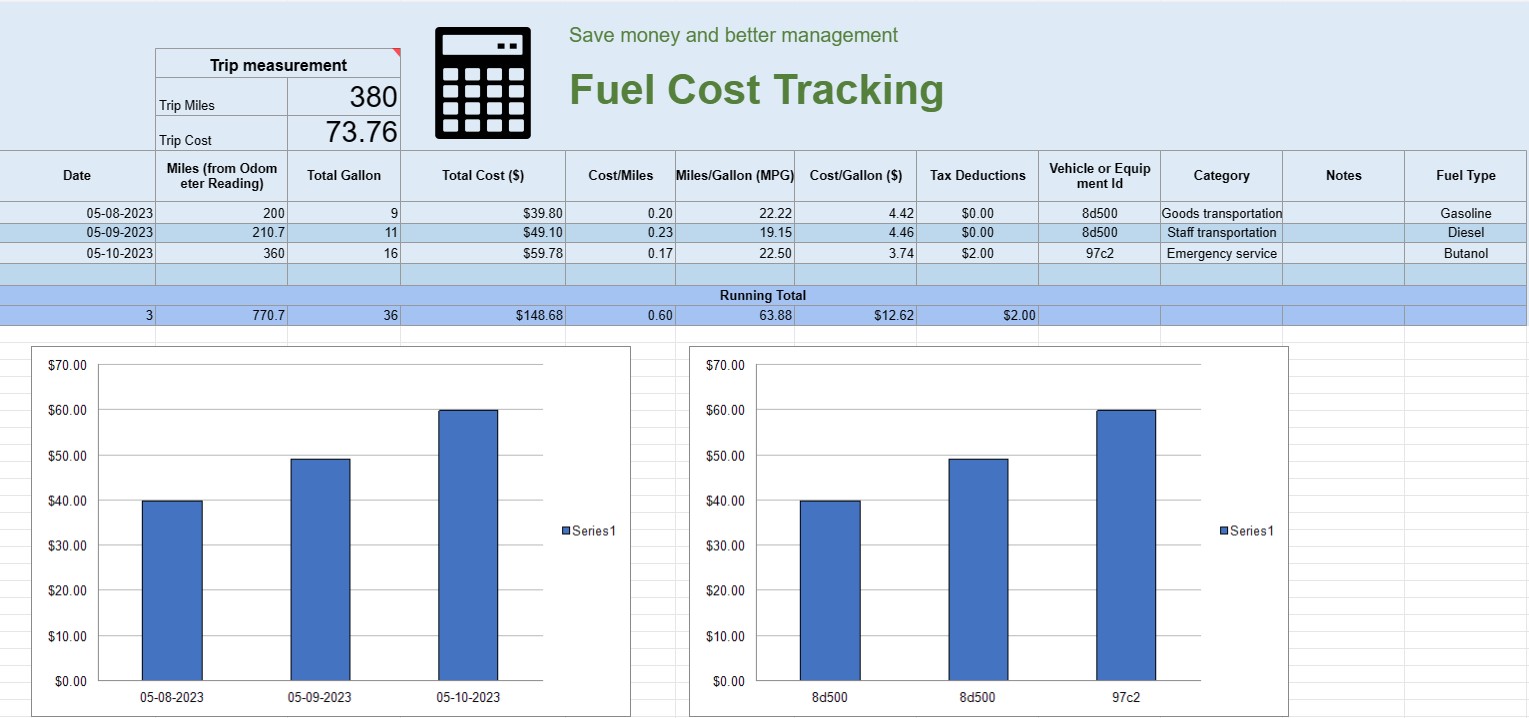
You can use this to track the operating cost of a vehicle, it offers the formulas for you to automate the calculation.
A fuel cost tracking spreadsheet is a digital document or spreadsheet that individuals, businesses, or organizations use to record, analyze, and manage expenses related to fuel consumption for vehicles or equipment. It provides a structured format for documenting fuel purchases, calculating fuel efficiency, and tracking overall fuel costs over time.
Here are the key components typically found in a fuel cost tracking spreadsheet:
- Date: Record the date when the fuel purchase was made. This helps establish a chronological record of transactions.
- Vehicle or Equipment ID: Identify the specific vehicle or equipment for which the fuel is being purchased. This is especially useful for tracking expenses associated with multiple vehicles or pieces of machinery.
- Odometer Reading: For vehicles, record the current odometer reading at the time of refueling. This allows you to track the distance traveled between refueling events.
- Fuel Type: Specify the type of fuel being purchased (e.g., gasoline, diesel, natural gas, electric).
- Gallons/Liters Purchased: Document the quantity of fuel purchased in gallons or liters.
- Unit Price: Note the cost per unit of fuel, typically in dollars or the local currency.
- Total Cost: Automatically calculate the total cost of the fuel purchase by multiplying the gallons/liters purchased by the unit price.
- Mileage/Kilometerage: Calculate and record the distance traveled between the current and previous refueling events. This can be computed by subtracting the previous odometer reading from the current one.
- Fuel Efficiency (MPG or L/100km): Calculate and record the fuel efficiency in miles per gallon (MPG) or liters per 100 kilometers (L/100km). To calculate MPG, divide the distance traveled by the fuel consumed. To calculate L/100km, divide the fuel consumed (in liters) by the distance traveled (in kilometers).
- Notes: Include any relevant notes or comments about the fuel purchase, such as the location of the refueling station or any maintenance performed.
- Running Total: Maintain a running total of fuel costs over time. This helps you track your cumulative expenses.
- Charts and Graphs: Create visual representations of your fuel consumption and costs over time using charts or graphs to better visualize trends and patterns.
- Category or Purpose: Categorize fuel expenses based on the purpose, such as personal use, business use, or specific projects. This can help you allocate costs accurately.
- Tax Deductions: If applicable, document fuel expenses that are eligible for tax deductions or reimbursements.
You can create a fuel cost tracking spreadsheet using software like Microsoft Excel, Google Sheets, or specialized accounting software. Templates for fuel cost tracking are often available online and can be customized to meet your specific needs. Regularly updating and analyzing the data in your fuel cost tracking spreadsheet can help you make informed decisions about fuel consumption, budgeting, and optimizing efficiency for your vehicles or equipment.
Простой просмотр и загрузка шаблона электронной таблицы
Просмотрите полную версию шаблона электронной таблицы без ограничений, чтобы узнать, нравится ли он вам, затем вы можете загрузить шаблон Excel, сохранить его на своем устройстве и использовать его бесплатно.
Доступ к шаблону электронной таблицы из любого места
Это работает на всех популярных операционных системах, таких как Windows, MacOS, Linux, iOS. Вы можете просмотреть шаблоны таблиц и скачать их без дополнительных программ.
Как использовать шаблон
Выясните, как просмотреть, загрузить и затем использовать шаблон электронной таблицы, выполнив чрезвычайно простые шаги.
Еще похожие шаблоны
Посмотрите больше шаблонов электронных таблиц, которые относятся к той же категории, что и выбранный.













