
Weight Tracker
Categorie : Următoarele
Pur și simplu urmăriți-vă greutatea, utilizați acest șablon pentru a vă integra cu un dispozitiv digital de măsurare a greutății sau notați datele manual.
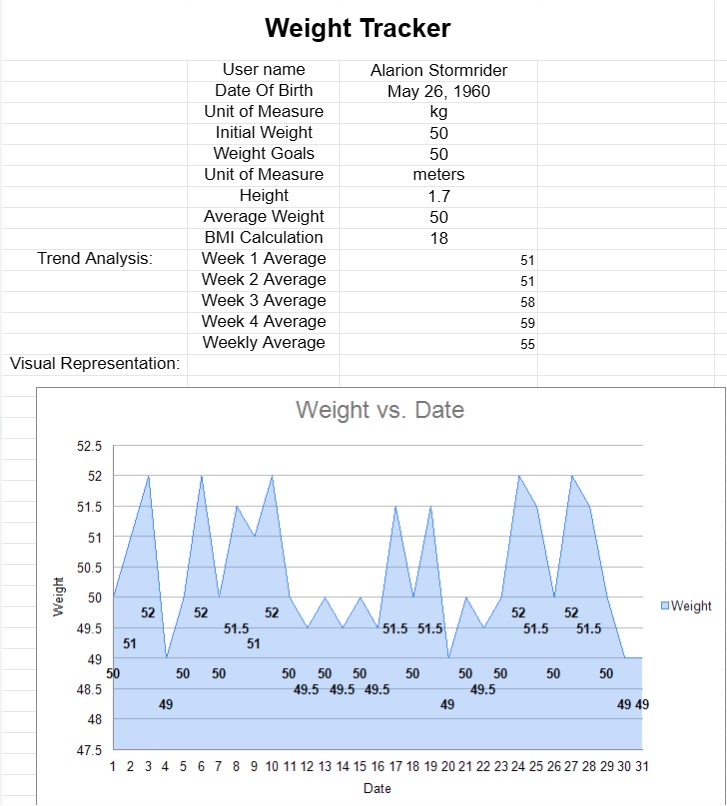
Șablonul de urmărire a greutății este un instrument util conceput pentru persoanele care se află într-o călătorie de gestionare a greutății, fie că este vorba de a pierde în greutate, de a crește în greutate sau pur și simplu de a menține o greutate sănătoasă. Acest șablon îi ajută pe utilizatori să-și monitorizeze modificările de greutate în timp, oferind o reprezentare vizuală a progresului lor. Poate fi deosebit de valoroasă pentru cei care urmează planuri de dietă și fitness, precum și pentru persoanele care lucrează cu profesioniștii din domeniul sănătății pentru a-și gestiona greutatea.
Să explorăm componentele și elementele cheie incluse de obicei într-un șablon de urmărire a greutății:
- Informații personale:
- Nume: Numele sau identificatorul utilizatorului este înregistrat pentru personalizare.
- Data nașterii: unele șabloane includ data de naștere a utilizatorului pentru referință.
- Greutate inițială: utilizatorii introduc greutatea lor inițială, care servește drept referință pentru urmărirea progresului.
- Intrari de urmărire:
- Data: șablonul include o coloană sau un rând pentru date, permițând utilizatorilor să-și înregistreze greutatea la anumite date.
- Greutate: utilizatorii introduc greutatea lor pentru fiecare dată corespunzătoare. Aceste date sunt de obicei măsurate în lire sterline (lbs) sau kilograme (kg).
- Note sau comentarii: unele șabloane oferă spațiu pentru utilizatori pentru a adăuga note sau comentarii legate de modificările lor de greutate , cum ar fi motivele fluctuațiilor sau observațiile despre progresul acestora.
- Măsurători corporale:
- Măsurători suplimentare: În Pe lângă greutate, unele șabloane permit utilizatorilor să înregistreze alte măsurători ale corpului, cum ar fi circumferința taliei, circumferința șoldului sau procentul de grăsime corporală.
- Urmărirea obiectivelor:
- Obiective de greutate: utilizatorii pot stabili și urmări obiective de greutate, fie că este vorba de a pierde un anumit număr de kilograme, de a atinge o greutate țintă sau de a-și menține greutatea actuală.
- Reprezentare vizuală:
- Grafice sau diagrame: Multe șabloane de urmărire a greutății includ grafice sau diagrame care reprezintă vizual progresul în greutate al utilizatorului în timp. Aceste ajutoare vizuale facilitează identificarea tendințelor și modelelor.
- Caracteristici de calcul:
- Calcul IMC: Unele șabloanele calculează automat indicele de masă corporală (IMC) al utilizatorului pe baza greutății și înălțimii acestuia, oferind o măsură suplimentară a stării de sănătate și a condiției fizice.
- Semnătură sau recunoaștere:
- Recunoaștere: utilizatorilor li se poate cere să își confirme intrările de greutate sau obiectivele prin semnarea sau datarea șablonului.
- Confidențialitatea datelor și consimțământul :
- Consimțământul utilizării datelor: Unele șabloane includ o secțiune care descrie politicile de utilizare și confidențialitate ale datelor de urmărire a greutății și solicită consimțământul utilizatorului.
- Analiza tendințelor:
- Rezumat și analiză: O secțiune poate fi inclusă pentru a rezuma tendințele de greutate, cum ar fi modificarea medie a greutății pe săptămână sau lună , pentru a oferi informații suplimentare.
Șablonul de urmărire a greutății oferă mai multe avantaje cheie pentru indivizi:
- Monitorizarea progresului: Permite utilizatorilor să urmărească modificările de greutate în timp, ajutându-i să înțeleagă modul în care eforturile lor le afectează greutatea.
- Setarea obiectivelor: utilizatorii își pot stabili anumite obiective de greutate și își pot monitoriza progrese către atingerea acestora.
- Motivație: Reprezentările vizuale ale progresului pot fi motivante și pot ajuta persoanele să rămână angajate în atingerea obiectivelor lor de gestionare a greutății.
- Date -Decizii determinate: prin înregistrarea consecventă a datelor privind greutatea, utilizatorii pot lua decizii informate cu privire la dieta lor, exercițiile fizice și sănătatea generală.
- Comunicarea cu furnizorii de servicii medicale: utilizatorii pot împărtășiți datele de urmărire a greutății cu profesioniștii din domeniul sănătății pentru a primi îndrumări și asistență personalizate.
- Responsabilitate: Păstrarea unei evidențe a schimbărilor de greutate stimulează un sentiment de responsabilitate și conștientizare.
În rezumat, șablonul de urmărire a greutății este un instrument valoros pentru persoanele care doresc să-și gestioneze greutatea în mod eficient. Acesta oferă o modalitate structurată de a monitoriza schimbările de greutate, de a stabili obiective și de a lua decizii informate în călătoria lor către o sănătate și o formă mai bună.
Previzualizare ușoară și descărcare șablon de foaie de calcul
Vizualizați versiunea completă a unui șablon de foaie de calcul fără limitări pentru a vedea dacă vă place, apoi puteți descărca șablonul Excel pentru a-l stoca pe dispozitiv și a-l utiliza gratuit.
Accesați șablonul de foaie de calcul de oriunde
Acesta funcționează pe toate sistemele de operare populare, cum ar fi Windows, MacOS, Linux, iOS. Puteți vedea șabloanele foilor de calcul și le puteți descărca fără programe suplimentare.
Cum se folosește un șablon
Aflați cum să previzualizați, să descărcați și apoi să utilizați șablonul foii de calcul urmând pașii care sunt extrem de ușor de urmat
Mai multe șabloane similare
Vedeți mai multe șabloane de foi de calcul care se află în aceeași categorie cu cel ales.














