
Śledzenie kosztów paliwa
Kategoria : Trackery
Możesz użyć tego do śledzenia kosztów eksploatacji pojazdu, oferuje formuły do automatyzacji obliczeń.


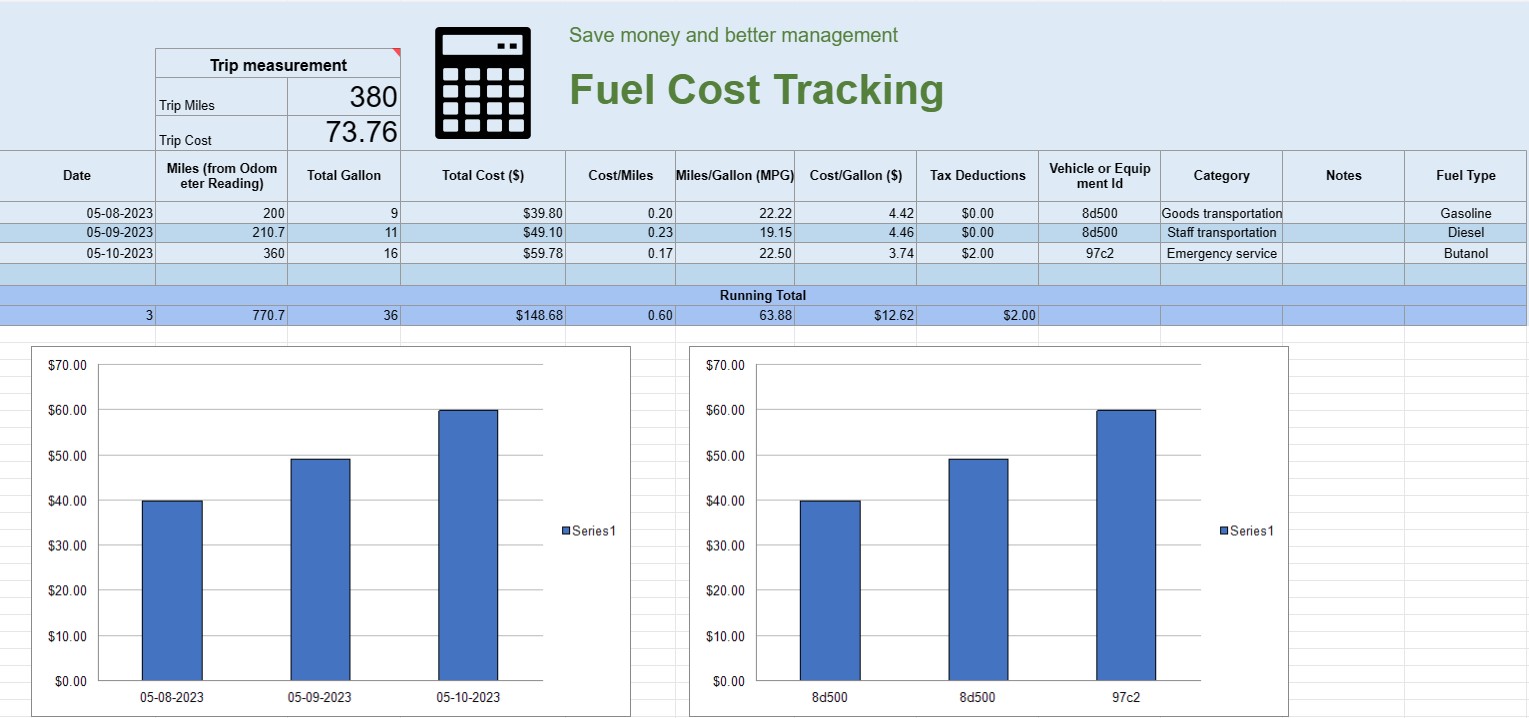
Arkusz kalkulacyjny śledzenia kosztów paliwa to cyfrowy dokument lub arkusz kalkulacyjny używany przez osoby prywatne, firmy lub organizacje do rejestrowania, analizowania i zarządzania wydatkami związanymi ze zużyciem paliwa przez pojazdy lub sprzęt. Zapewnia ustrukturyzowany format dokumentowania zakupów paliwa, obliczania efektywności paliwowej i śledzenia całkowitych kosztów paliwa w czasie.
Oto kluczowe elementy zwykle spotykane w arkuszu kalkulacyjnym śledzenia kosztów paliwa:
- Data: zapisz datę zakupu paliwa. Pomaga to w ustaleniu chronologicznego zapisu transakcji.
- Identyfikator pojazdu lub sprzętu: identyfikuje konkretny pojazd lub sprzęt, do którego kupowane jest paliwo. Jest to szczególnie przydatne do śledzenia wydatków związanych z wieloma pojazdami lub elementami maszyn.
- Odczyt licznika kilometrów: W przypadku pojazdów zapisz aktualny stan licznika kilometrów w momencie tankowania. Umożliwia to śledzenie odległości przebytej pomiędzy kolejnymi tankowaniami.
- Typ paliwa: Określ rodzaj kupowanego paliwa (np. benzyna, olej napędowy, gaz ziemny, elektryczny).
- Zakupione galony/litry: Udokumentuj ilość zakupionego paliwa w galonach lub litrach.
- Cena jednostkowa: Zanotuj koszt za sztukę jednostka paliwa, zwykle w dolarach lub lokalnej walucie.
- Koszt całkowity: automatycznie oblicza całkowity koszt zakupu paliwa, mnożąc zakupione galony/litry przez cenę jednostkową.
- Przebieg/kilometr: oblicz i zapisz dystans przebyty pomiędzy bieżącym i poprzednim tankowaniem. Można to obliczyć, odejmując poprzedni odczyt licznika kilometrów od bieżącego.
- Zużycie paliwa (MPG lub l/100 km): Oblicz i zapisz zużycie paliwa w milach na galon ( MPG) lub litry na 100 kilometrów (L/100km). Aby obliczyć MPG, należy podzielić przebytą odległość przez zużyte paliwo. Aby obliczyć l/100 km, podziel zużyte paliwo (w litrach) przez przebytą odległość (w kilometrach).
- Uwagi: Dołącz wszelkie istotne uwagi lub komentarze dotyczące zakupu paliwa, takie jak lokalizacja stacji tankowania lub wykonane prace konserwacyjne.
- Suma bieżąca: Utrzymuj bieżącą sumę kosztów paliwa w czasie. Pomaga to śledzić skumulowane wydatki.
- Wykresy i diagramy: twórz wizualne reprezentacje zużycia paliwa i kosztów w czasie za pomocą wykresów, aby lepiej zobrazować trendy i wzorce.
- Kategoria lub cel: kategoryzuj wydatki na paliwo na podstawie celu, takiego jak użytek osobisty, użytek biznesowy lub konkretne projekty. Może to pomóc w dokładnym przypisaniu kosztów.
- Odliczenia podatkowe: w stosownych przypadkach dokumentuj wydatki na paliwo, które kwalifikują się do odliczeń lub zwrotów podatku.
Możesz utworzyć arkusz kalkulacyjny śledzenia kosztów paliwa, korzystając z oprogramowania takiego jak Microsoft Excel, Arkusze Google lub specjalistycznego oprogramowania księgowego. Szablony do śledzenia kosztów paliwa są często dostępne w Internecie i można je dostosować do konkretnych potrzeb. Regularne aktualizowanie i analizowanie danych w arkuszu kalkulacyjnym śledzenia kosztów paliwa może pomóc w podejmowaniu świadomych decyzji dotyczących zużycia paliwa, budżetowania i optymalizacji wydajności pojazdów lub sprzętu.
Łatwy podgląd i pobranie szablonu arkusza kalkulacyjnego
Zobacz pełną wersję szablonu arkusza kalkulacyjnego bez ograniczeń, aby sprawdzić, czy Ci się podoba, a następnie możesz pobrać szablon Excela, aby zapisać go na swoim urządzeniu i używać go za darmo.
Uzyskaj dostęp do szablonu arkusza kalkulacyjnego z dowolnego miejsca
Działa to na wszystkich popularnych systemach operacyjnych, takich jak Windows, MacOS, Linux, iOS. Możesz zobaczyć szablony arkuszy kalkulacyjnych i pobrać je bez dodatkowych programów.
Jak korzystać z szablonu
Dowiedz się, jak wyświetlić podgląd, pobrać i następnie używać szablonu arkusza kalkulacyjnego, wykonując niezwykle łatwe do wykonania kroki
Więcej podobnych szablonów
Zobacz więcej szablonów arkuszy kalkulacyjnych, które należą do tej samej kategorii co wybrany.













