Jaarkalender 1
Categorie : Kalenders
Je geeft het een jaar, en het zal je een kalender maken, deze is heel gemakkelijk te gebruiken en heeft een netjes en professioneel ontwerp.


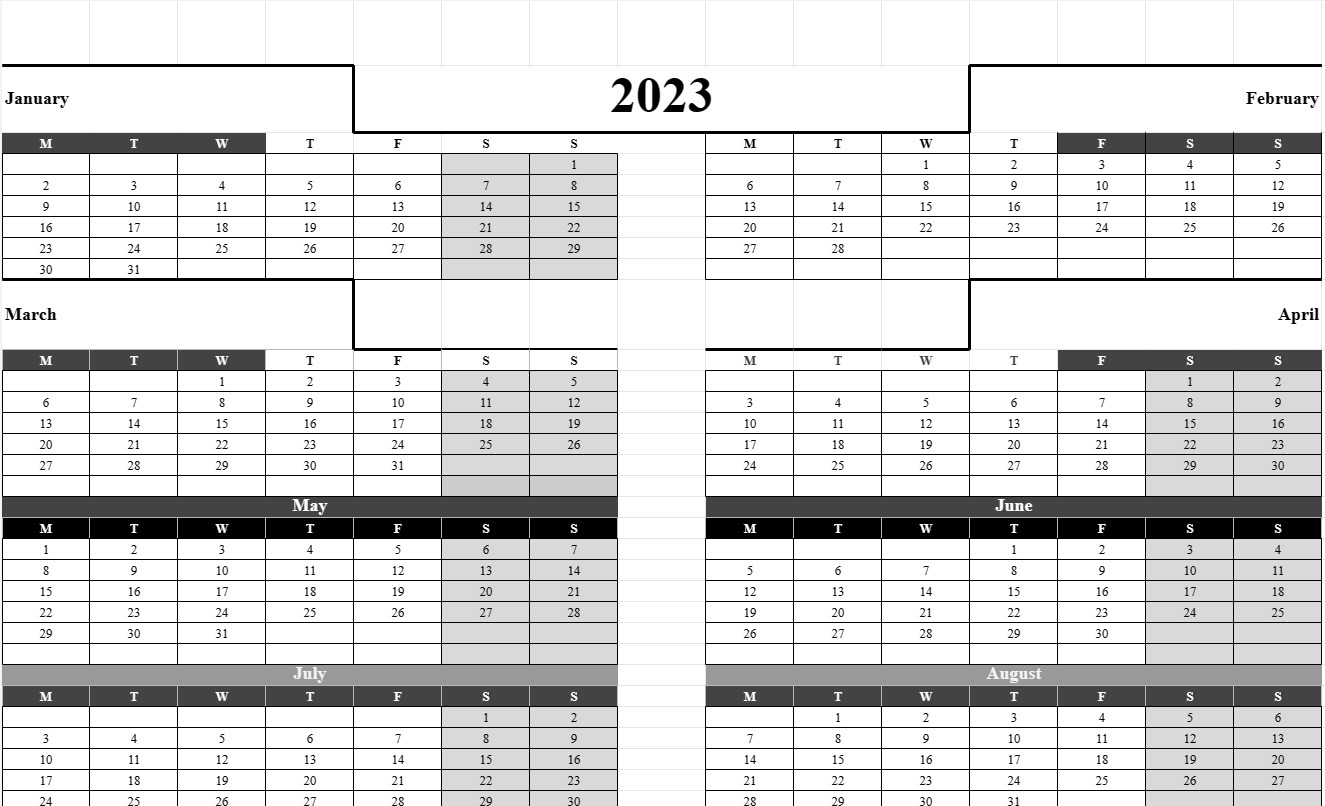
De Jaarkalendersjabloon is een veelzijdige en essentiële tool die op één pagina een overzicht biedt van een heel jaar. Deze sjabloon wordt veel gebruikt voor persoonlijke, professionele en organisatorische planning, waardoor individuen en groepen belangrijke datums, evenementen, feestdagen en deadlines in de loop van een jaar kunnen visualiseren. Of het nu gaat om persoonlijke planning, projectplanning of coördinatieactiviteiten, de Jaarkalendersjabloon biedt een uitgebreid overzicht van het komende jaar.
Laten we de belangrijkste componenten en elementen verkennen die doorgaans in een Jaarkalendersjabloon zijn opgenomen:
- Jaar: De sjabloon geeft prominent het jaar weer waarvoor de kalender is gemaakt, zodat gebruikers snel het specifieke jaar waarin ze geïnteresseerd zijn kunnen identificeren en ernaar kunnen verwijzen.
- Maanden: De kalender verdeelt het jaar doorgaans in twaalf maanden, waarbij elke maand wordt weergegeven door een afzonderlijke sectie of kolom. Elke maand bevat de naam van de maand en de bijbehorende dagen en datums.
- Weekdagen: De dagen van de week (maandag, dinsdag, woensdag, enz.) worden overal vermeld bovenaan de kalender, zodat u gemakkelijk kunt identificeren op welke dagen bepaalde datums vallen.
- Datumraster: Het belangrijkste kenmerk van de sjabloon is het datumraster, waarin elke dag van de kalender maand wordt weergegeven door een genummerde cel. Gebruikers kunnen evenementen, afspraken of andere belangrijke informatie invoeren in de cellen die overeenkomen met specifieke datums.
- Vakanties en speciale datums: Sommige sjablonen bevatten markeringen of indicatoren voor feestdagen en speciale vieringen , of andere belangrijke data. Dit helpt gebruikers bij het plannen van vakanties en speciale evenementen.
- Opmerkingen- of memogedeelte: Er is vaak ruimte onderaan of aan de zijkant van de sjabloon waar gebruikers notities, doelen, of herinneringen voor het jaar.
- Gemarkeerde of aanpasbare datums: Gebruikers kunnen de optie hebben om bepaalde datums te markeren of aan te passen om de aandacht te vestigen op specifieke gebeurtenissen, mijlpalen of deadlines.
- Kleurcodering: Om de organisatie te vergemakkelijken, gebruiken sommige gebruikers kleurcoderingsschema's om soorten evenementen of verplichtingen te categoriseren en te onderscheiden.
- Weekendschaduw: Weekends (zaterdagen en zondagen) zijn vaak gearceerd of visueel onderscheiden van weekdagen om een duidelijk onderscheid te maken.
- Afdrukopties: De sjabloon is printervriendelijk ontworpen , zodat gebruikers eenvoudig een hardcopy kunnen afdrukken ter referentie of om met anderen te delen.
De Jaarkalender-sjabloon biedt verschillende belangrijke voordelen voor individuen en organisaties:
- Jaarlange planning: Het biedt een uitgebreid overzicht van het hele jaar, waardoor gebruikers evenementen en verplichtingen ruim van tevoren kunnen plannen en plannen.
- Organisatie: Gebruikers kunnen belangrijke datums, deadlines en afspraken bijhouden, waardoor het risico wordt verkleind dat ze worden vergeten of over het hoofd worden gezien.
- Tijdbeheer: De kalender vergemakkelijkt effectief tijdbeheer door een visuele weergave van hoe tijd gedurende het jaar wordt toegewezen.
- Doelen instellen: Het ondersteunt het stellen en volgen van doelen, waardoor gebruikers doelstellingen kunnen instellen en tijd kunnen toewijzen om deze te bereiken.
- Communicatie: Jaarkalenders kunnen worden gedeeld met familieleden, collega's of teamleden om planningen en activiteiten te coördineren.
- Vakantieplanning: Gebruikers kunnen vakanties en activiteiten rond feestdagen en speciale gelegenheden plannen.
Samenvattend is de Jaarkalendersjabloon een veelzijdige en gebruiksvriendelijke tool voor het plannen en organiseren van het komende jaar. Het verbetert het tijdmanagement, vergemakkelijkt het stellen van doelen en bevordert een effectieve planning voor zowel persoonlijk als professioneel gebruik.
Eenvoudig een spreadsheetsjabloon bekijken en downloaden
Bekijk de volledige versie van een spreadsheetsjabloon zonder beperkingen om te zien of u deze leuk vindt. Vervolgens kunt u de Excel-sjabloon downloaden om deze op uw apparaat op te slaan en gratis te gebruiken.
Krijg overal toegang tot de spreadsheetsjabloon
Dit werkt op alle populaire besturingssystemen zoals Windows, MacOS, Linux, iOS. U kunt de spreadsheetsjablonen bekijken en downloaden zonder extra programma's.
Hoe u een sjabloon gebruikt
Ontdek hoe u de spreadsheetsjabloon kunt bekijken, downloaden en vervolgens kunt gebruiken door de stappen te volgen die uiterst eenvoudig te volgen zijn
Meer vergelijkbare sjablonen
Bekijk meer spreadsheetsjablonen die onder dezelfde categorie vallen als de gekozen.