
Penjejakan Kos Bahan Api
kategori : Penjejak
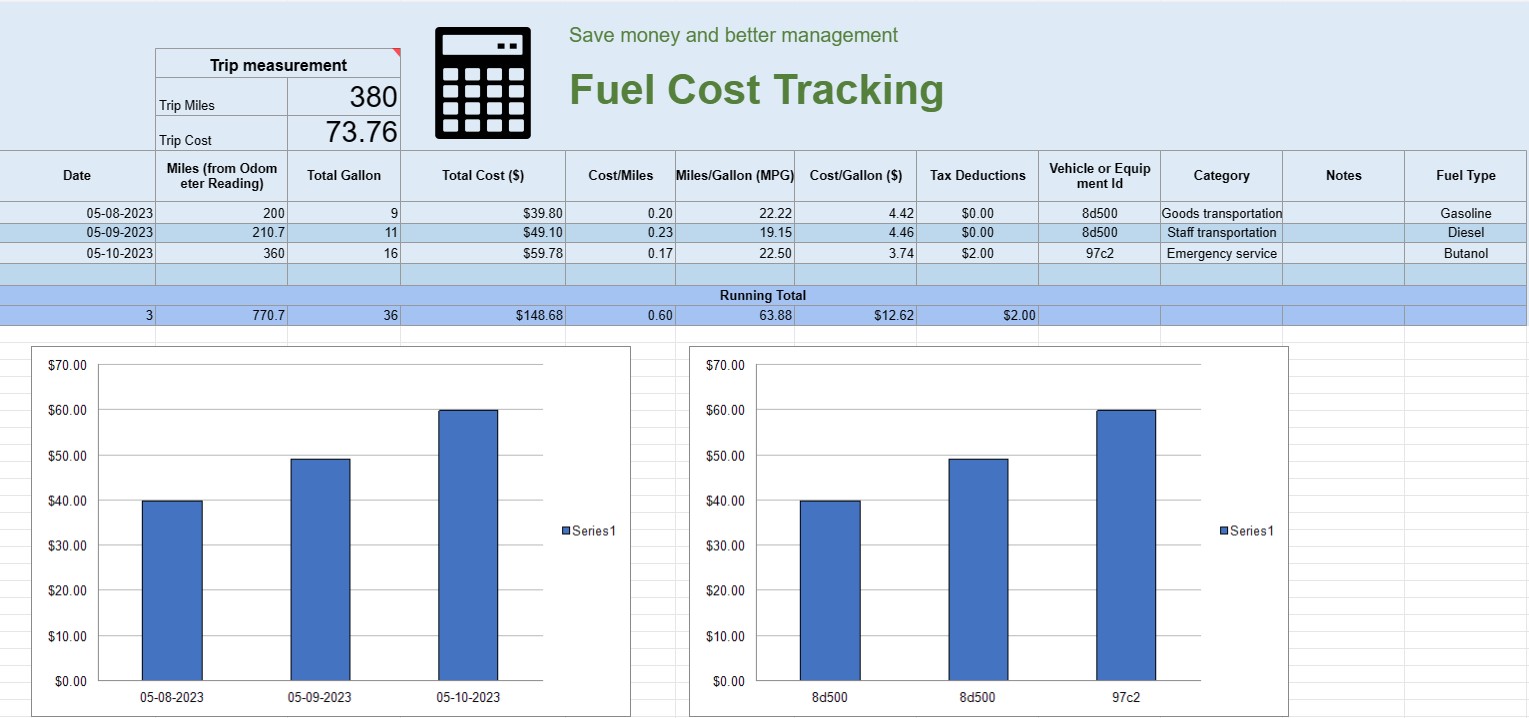
Anda boleh menggunakan ini untuk menjejaki kos operasi kenderaan, ia menawarkan formula untuk anda mengautomasikan pengiraan.


Hamparan penjejakan kos bahan api ialah dokumen atau hamparan digital yang digunakan oleh individu, perniagaan atau organisasi untuk merekod, menganalisis dan mengurus perbelanjaan yang berkaitan dengan penggunaan bahan api untuk kenderaan atau peralatan. Ia menyediakan format berstruktur untuk mendokumentasikan pembelian bahan api, mengira kecekapan bahan api dan menjejaki kos bahan api keseluruhan dari semasa ke semasa.
Berikut ialah komponen utama yang biasanya ditemui dalam hamparan penjejakan kos bahan api:
- Tarikh: Catatkan tarikh pembelian bahan api dibuat. Ini membantu mewujudkan rekod kronologi urus niaga.
- ID Kenderaan atau Peralatan: Kenal pasti kenderaan atau peralatan khusus untuk bahan api itu dibeli. Ini amat berguna untuk mengesan perbelanjaan yang berkaitan dengan berbilang kenderaan atau kepingan jentera.
- Bacaan Odometer: Untuk kenderaan, rekod bacaan odometer semasa semasa mengisi minyak. Ini membolehkan anda menjejaki jarak yang dilalui antara acara mengisi minyak.
- Jenis Bahan Api: Nyatakan jenis bahan api yang dibeli (cth, petrol, diesel, gas asli, elektrik).
- Gelen/Liter Dibeli: Dokumenkan kuantiti bahan api yang dibeli dalam gelen atau liter.
- Harga Seunit: Perhatikan kos setiap unit bahan api, biasanya dalam dolar atau mata wang tempatan.
- Jumlah Kos: Kira secara automatik jumlah kos pembelian bahan api dengan mendarabkan gelen/liter yang dibeli dengan harga unit.
- Perbatuan/Kilometer: Kira dan rekod jarak perjalanan antara peristiwa mengisi minyak semasa dan sebelumnya. Ini boleh dikira dengan menolak bacaan odometer sebelumnya daripada bacaan semasa.
- Kecekapan Bahan Api (MPG atau L/100km): Kira dan rekod kecekapan bahan api dalam batu per gelen ( MPG) atau liter setiap 100 kilometer (L/100km). Untuk mengira MPG, bahagikan jarak yang dilalui dengan bahan api yang digunakan. Untuk mengira L/100km, bahagikan bahan api yang digunakan (dalam liter) dengan jarak perjalanan (dalam kilometer).
- Nota: Sertakan sebarang nota atau ulasan yang berkaitan tentang pembelian bahan api, seperti lokasi stesen mengisi minyak atau sebarang penyelenggaraan yang dilakukan.
- Jumlah Berjalan: Mengekalkan jumlah kos bahan api yang berjalan dari semasa ke semasa. Ini membantu anda menjejaki perbelanjaan terkumpul anda.
- Carta dan Graf: Cipta perwakilan visual penggunaan bahan api dan kos anda dari semasa ke semasa menggunakan carta atau graf untuk menggambarkan arah aliran dan corak dengan lebih baik.
- Kategori atau Tujuan: Kategorikan perbelanjaan bahan api berdasarkan tujuan, seperti kegunaan peribadi, kegunaan perniagaan atau projek tertentu. Ini boleh membantu anda memperuntukkan kos dengan tepat.
- Potongan Cukai: Jika berkenaan, dokumenkan perbelanjaan bahan api yang layak untuk potongan cukai atau pembayaran balik.
Anda boleh membuat hamparan penjejakan kos bahan api menggunakan perisian seperti Microsoft Excel, Helaian Google atau perisian perakaunan khusus. Templat untuk penjejakan kos bahan api selalunya tersedia dalam talian dan boleh disesuaikan untuk memenuhi keperluan khusus anda. Mengemas kini dan menganalisis data secara kerap dalam hamparan penjejakan kos bahan api anda boleh membantu anda membuat keputusan termaklum tentang penggunaan bahan api, belanjawan dan kecekapan pengoptimuman untuk kenderaan atau peralatan anda.
Pratonton Mudah dan Muat Turun Templat Hamparan
Lihat versi penuh templat hamparan tanpa had untuk melihat sama ada anda menyukainya kemudian anda boleh memuat turun templat excel untuk menyimpannya pada peranti anda dan menggunakannya secara percuma.
Akses Templat Hamparan dari Mana-mana
Ini berfungsi pada semua sistem pengendalian popular seperti Windows, MacOS, Linux, iOS. Anda boleh melihat templat hamparan dan memuat turunnya tanpa program tambahan.
Cara menggunakan templat
Ketahui cara untuk pratonton, muat turun dan kemudian gunakan templat hamparan dengan mengikuti langkah-langkah yang sangat mudah diikuti
Lebih banyak templat serupa
Lihat lebih banyak templat hamparan yang berada di bawah kategori yang sama dengan yang dipilih.













