Bajet bulanan isi rumah
kategori : Belanjawan
Tinggal di rumah pada masa kini memerlukan wang, sila gunakan ini untuk menguruskan semua data yuran dan wang tunai dengan lebih mudah.


Templat Hamparan Bulanan Isi Rumah ialah dokumen atau fail digital yang direka bentuk terlebih dahulu yang digunakan oleh individu atau keluarga untuk menjejak dan mengurus kewangan dan perbelanjaan isi rumah bulanan mereka. Templat ini sedia ada dan boleh disesuaikan untuk memenuhi keperluan kewangan dan matlamat tertentu isi rumah. Mereka menyediakan format berstruktur untuk merekodkan pendapatan, perbelanjaan, simpanan dan transaksi kewangan lain setiap bulan. Berikut ialah komponen dan bahagian biasa yang mungkin anda temui dalam Templat Hamparan Bulanan Isi Rumah:
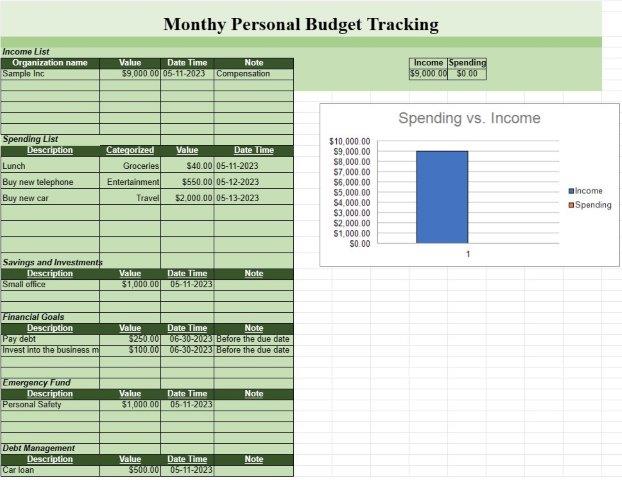
- Pendapatan: Sumber pendapatan: Senaraikan semua sumber pendapatan, seperti gaji, sewa pendapatan, pelaburan dan sebarang sumber wang lain yang masuk ke dalam isi rumah.
- Amaun: Nyatakan amaun yang diterima daripada setiap sumber pendapatan.
- Jumlah pendapatan: Kirakan jumlah pendapatan untuk bulan tersebut secara automatik.
- Perbelanjaan Tetap:
- Bayaran gadai janji atau sewa.
- Utiliti (cth, elektrik, gas, air).
- Premium insurans (cth, kesihatan, kereta, rumah).
- Bayaran pinjaman (cth, pinjaman kereta, pinjaman pelajar).
- Perkhidmatan langganan (cth, kabel, internet, perkhidmatan penstriman).
- Cukai harta.
- Perbelanjaan bulanan tetap lain.
- Perbelanjaan Boleh Ubah:
- Barang runcit dan bekalan rumah.
- Pengangkutan (cth, bahan api, pengangkutan awam).
- Makan di luar dan hiburan.
- Kesihatan dan kesejahteraan (cth, bil perubatan, preskripsi).
- Perbelanjaan penjagaan kanak-kanak dan pendidikan.
- Penjagaan dan dandanan diri.
- Pelbagai perbelanjaan.
- Simpanan dan Pelaburan: Caruman kepada akaun simpanan (cth, tabung kecemasan, simpanan persaraan).
- Pelaburan (cth, saham, bon, dana bersama).
- Sumbangan kepada akaun simpanan kolej.
- Matlamat atau akaun simpanan lain.
- Hutang dan Kredit Kad:
- Baki kad kredit dan pembayaran minimum.
- Hutang tertunggak dan baki pinjaman lain.
- Kadar faedah ke atas hutang.
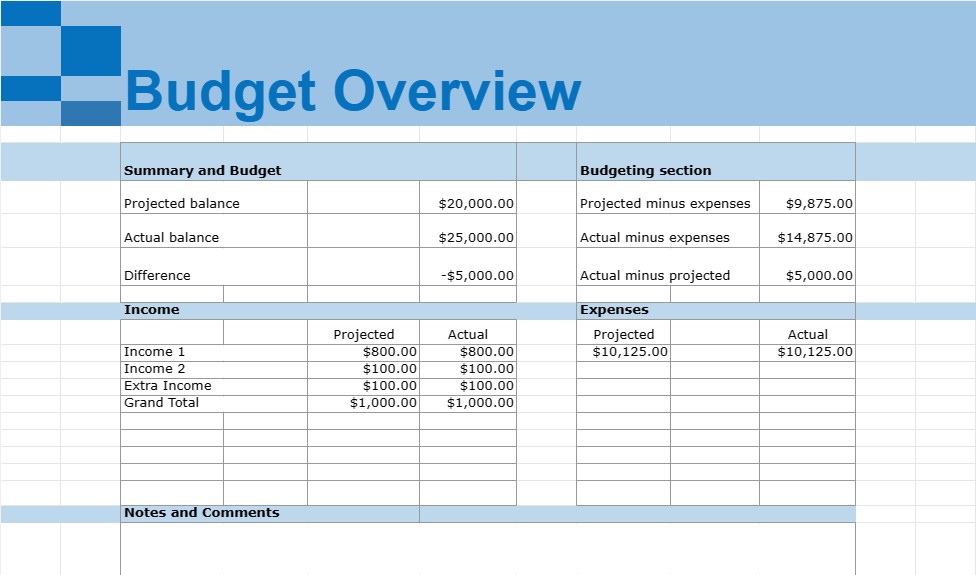
- Ringkasan dan Belanjawan: Bahagian ringkasan yang mengira jumlah pendapatan, jumlah perbelanjaan dan pendapatan bersih (pendapatan tolak perbelanjaan) untuk bulan tersebut.
- Bahagian belanjawan: Bandingkan perbelanjaan sebenar dengan belanjawan atau rancangan perbelanjaan, jika berkenaan.
- Kategori Tambahan: Bergantung pada khusus isi rumah keadaan kewangan, kategori tambahan mungkin disertakan, seperti derma amal, perbelanjaan haiwan peliharaan, penyelenggaraan rumah atau simpanan pendidikan.
- Nota dan Ulasan: Ruang untuk menambah ulasan, nota atau peringatan yang berkaitan dengan perbelanjaan tertentu atau urus niaga kewangan.
Templat Hamparan Bulanan Isi Rumah ialah alat yang berharga untuk mengurus kewangan peribadi, kerana ia membantu individu dan keluarga menjejaki pendapatan dan perbelanjaan mereka, mengenal pasti corak perbelanjaan, menetapkan kewangan matlamat, dan buat belanjawan. Mereka memberikan gambaran keseluruhan yang jelas tentang kesihatan kewangan isi rumah dan boleh membantu dengan membuat keputusan kewangan termaklum, mengurangkan hutang, meningkatkan simpanan dan mencapai objektif kewangan jangka panjang. Templat ini boleh dibuat menggunakan perisian hamparan seperti Microsoft Excel atau Helaian Google atau ditemui sebagai templat siap dalam talian.
Pratonton Mudah dan Muat Turun Templat Hamparan
Lihat versi penuh templat hamparan tanpa had untuk melihat sama ada anda menyukainya kemudian anda boleh memuat turun templat excel untuk menyimpannya pada peranti anda dan menggunakannya secara percuma.
Akses Templat Hamparan dari Mana-mana
Ini berfungsi pada semua sistem pengendalian popular seperti Windows, MacOS, Linux, iOS. Anda boleh melihat templat hamparan dan memuat turunnya tanpa program tambahan.
Cara menggunakan templat
Ketahui cara untuk pratonton, muat turun dan kemudian gunakan templat hamparan dengan mengikuti langkah-langkah yang sangat mudah diikuti
Lebih banyak templat serupa
Lihat lebih banyak templat hamparan yang berada di bawah kategori yang sama dengan yang dipilih.