
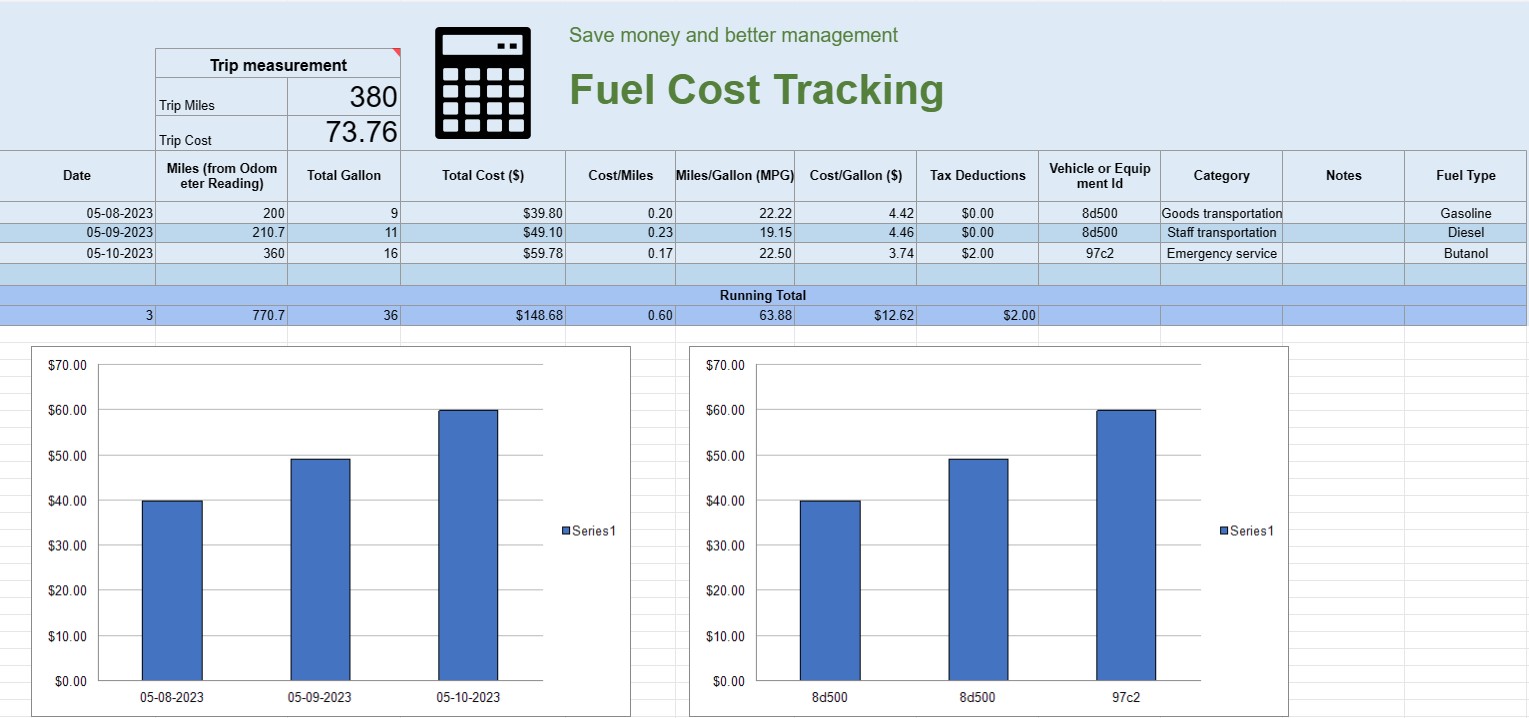
Kuro sąnaudų stebėjimas
Kategorija : Trackeriai
Tai galite naudoti norėdami stebėti transporto priemonės eksploatavimo išlaidas, jame pateikiamos formulės, leidžiančios automatizuoti skaičiavimą.


Degalų sąnaudų stebėjimo skaičiuoklė yra skaitmeninis dokumentas arba skaičiuoklė, kurią asmenys, įmonės ar organizacijos naudoja norėdami įrašyti, analizuoti ir valdyti išlaidas, susijusias su transporto priemonių ar įrangos degalų sąnaudomis. Jame pateikiamas struktūrinis formatas, leidžiantis dokumentuoti degalų įsigijimą, apskaičiuoti degalų efektyvumą ir stebėti bendras degalų sąnaudas laikui bėgant.
Štai pagrindiniai komponentai, paprastai randami degalų sąnaudų stebėjimo skaičiuoklėje:
- Data: įrašykite datą, kada buvo įsigytas kuras. Tai padeda sudaryti chronologinį operacijų įrašą.
- Transporto priemonės arba įrangos ID: identifikuokite konkrečią transporto priemonę ar įrangą, kuriai perkamas kuras. Tai ypač naudinga stebint išlaidas, susijusias su keliomis transporto priemonėmis ar mechanizmais.
- Odometro rodmenys: transporto priemonėms užrašykite esamą odometro rodmenį degalų papildymo metu. Tai leidžia sekti atstumą, nuvažiuotą tarp degalų papildymo įvykių.
- Degalų tipas: nurodykite perkamo kuro rūšį (pvz., benzinas, dyzelinas, gamtinės dujos, elektra).
- Galonai / Litrai įsigyti: dokumentuokite įsigyto degalų kiekį galonais arba litrais.
- Vieneto kaina: atkreipkite dėmesį į kainą už degalų vienetas, paprastai doleriais arba vietine valiuta.
- Bendra kaina: automatiškai apskaičiuokite bendrą degalų pirkimo kainą, padaugindami įsigytus galonus / litrus iš vieneto kainos.
- Rida / Kilometras: apskaičiuokite ir užrašykite atstumą, nuvažiuotą tarp dabartinio ir ankstesnio degalų papildymo įvykių. Tai galima apskaičiuoti iš dabartinio atėmus ankstesnį odometro rodmenį.
- Degalų efektyvumas (MPG arba L/100 km): Apskaičiuokite ir užrašykite degalų efektyvumą myliomis viename galone ( MPG) arba litrų 100 kilometrų (L/100 km). Norėdami apskaičiuoti MPG, nuvažiuotą atstumą padalinkite iš sunaudoto kuro. Norėdami apskaičiuoti L/100 km, sunaudotą kurą (litrais) padalinkite iš nuvažiuoto atstumo (kilometrais).
- Pastabos: įtraukite visas susijusias pastabas ar komentarus apie degalų pirkimą, pvz., kuro degalinės vieta ar bet kokia atlikta techninė priežiūra.
- Bendra eksploatacija: išlaikykite bendras einamąsias degalų sąnaudas laikui bėgant. Tai padeda sekti sukauptas išlaidas.
- Diagramos ir grafikai: kurkite vaizdinius degalų sąnaudų ir sąnaudų vaizdus laikui bėgant naudodami diagramas arba grafikus, kad geriau įsivaizduotumėte tendencijas ir modelius.
- Kategorija arba tikslas: suskirstykite išlaidas degalams pagal paskirtį, pvz., asmeninį, verslo naudojimą ar konkrečius projektus. Tai gali padėti tiksliai paskirstyti išlaidas.
- Mokesčių atskaitymai: jei taikoma, dokumentuokite kuro išlaidas, kurios yra tinkamos mokesčių atskaitymui arba kompensavimui.
Galite sukurti kuro sąnaudų stebėjimo skaičiuoklę naudodami programinę įrangą, pvz., Microsoft Excel, Google Sheets arba specializuotą apskaitos programinę įrangą. Degalų sąnaudų sekimo šablonus dažnai galima rasti internete ir juos galima pritaikyti pagal jūsų konkrečius poreikius. Reguliariai atnaujindami ir analizuodami degalų sąnaudų stebėjimo skaičiuoklės duomenis, galite priimti pagrįstus sprendimus dėl degalų sąnaudų, biudžeto sudarymo ir transporto priemonių ar įrangos efektyvumo optimizavimo.
Lengva peržiūrėti ir atsisiųsti skaičiuoklės šabloną
Peržiūrėkite visą skaičiuoklės šablono versiją be jokių apribojimų, kad sužinotumėte, ar jis jums patinka, tada galite atsisiųsti „Excel“ šabloną, išsaugoti jį savo įrenginyje ir naudoti jį nemokamai.
Pasiekite skaičiuoklės šabloną iš bet kur
Tai veikia visose populiariose operacinėse sistemose, tokiose kaip Windows, MacOS, Linux, iOS. Skaičiuoklių šablonus galite pamatyti ir atsisiųsti be papildomų programų.
Kaip naudoti šabloną
Išsiaiškinkite, kaip peržiūrėti, atsisiųsti ir naudoti skaičiuoklės šabloną, atlikdami veiksmus, kuriuos atlikti labai paprasta
Daugiau panašių šablonų
Peržiūrėkite daugiau skaičiuoklės šablonų, kurie yra toje pačioje kategorijoje su pasirinktu.













