Namų ūkio mėnesio biudžetas
Kategorija : Biudžetai
Gyvenimas namuose šiais laikais kainuoja, maloniai pasinaudokite tuo, kad lengviau tvarkytumėte visus mokesčių ir grynųjų pinigų duomenis.
Namų ūkio mėnesinės skaičiuoklės šablonas yra iš anksto sukurtas dokumentas arba skaitmeninis failas, kurį asmenys arba šeimos naudoja savo mėnesiniams namų ūkio finansams ir išlaidoms stebėti ir tvarkyti. Šie šablonai yra lengvai prieinami ir gali būti pritaikyti pagal konkrečius namų ūkio finansinius poreikius ir tikslus. Jie suteikia struktūrizuotą pajamų, išlaidų, santaupų ir kitų finansinių operacijų registravimo formatą kas mėnesį. Čia pateikiami įprasti komponentai ir skyriai, kuriuos galite rasti namų ūkio mėnesio skaičiuoklės šablone:
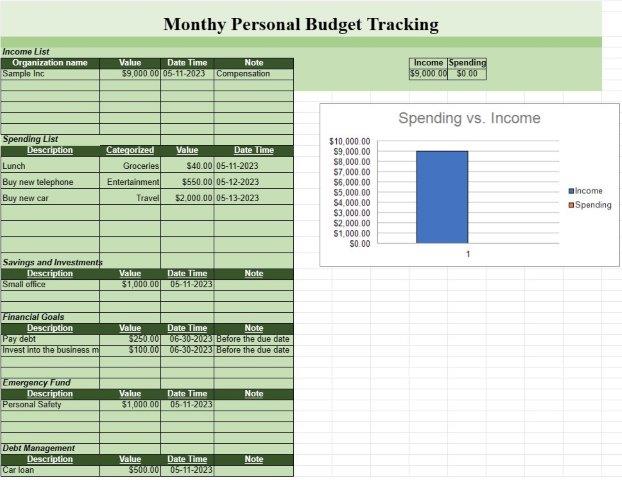
- Pajamos: Pajamų šaltiniai: nurodykite visus pajamų šaltinius, pvz., atlyginimus, nuomą. pajamos, investicijos ir kiti į namų ūkį gaunami pinigų šaltiniai.
- Suma: nurodykite sumą, gautą iš kiekvieno pajamų šaltinio.
- Bendros pajamos: automatiškai apskaičiuokite visas mėnesio pajamas.
- Pastovios išlaidos:
- hipotekos arba nuomos mokėjimai.
- Komunalinės paslaugos (pvz., elektra, dujos, vanduo).
- Draudimo įmokos (pvz., sveikatos, automobilio, būsto).
- Paskolų mokėjimai (pvz., paskolos automobiliui, studentų paskolos).
- Prenumeratos paslaugos (pvz., kabelis, internetas, srautinio perdavimo paslaugos).
- Nekilnojamojo turto mokesčiai.
- Kitos fiksuotos mėnesinės išlaidos.
- Kintamos išlaidos:
- bakalėjos ir namų apyvokos reikmenys.
- Transportas (pvz., kuras, viešasis transportas).
- Pietūs. ir pramogoms.
- Sveikata ir sveikata (pvz., medicinos sąskaitos, receptai).
- Vaiko priežiūros ir švietimo išlaidos.
- Asmens priežiūra ir priežiūra.
- Įvairios išlaidos.
- Taupymas ir investicijos: įnašai į taupomąsias sąskaitas (pvz., skubios pagalbos fondas, santaupos pensijai).
- Investicijos (pvz., akcijos, obligacijos, investiciniai fondai).
- Įnašai į koledžo taupomąsias sąskaitas.
- Kiti taupymo tikslai arba sąskaitos.
- Skolos ir kreditas Kortelės:
- Kredito kortelių likučiai ir minimalūs mokėjimai.
- Kitos neapmokėtos skolos ir paskolų likučiai.
- Skolų palūkanų normos.
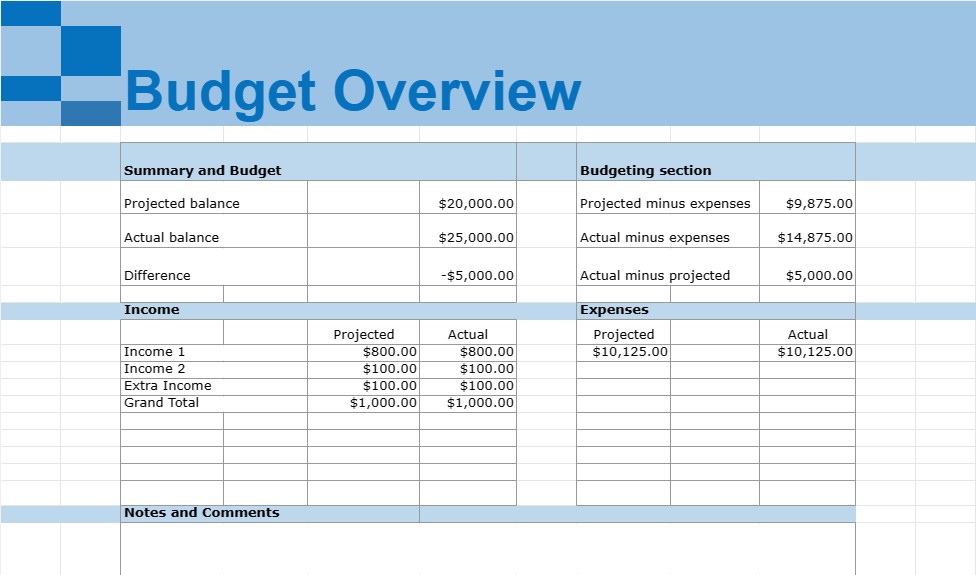
- Suvestinė ir biudžetas: suvestinės skyrius, kuriame apskaičiuojamos visos mėnesio pajamos, visos išlaidos ir grynosios pajamos (pajamos atėmus išlaidas).
- Biudžeto sudarymo skiltis: palyginkite faktines išlaidas su biudžetu arba išlaidų planu, jei taikoma.
- Papildomos kategorijos: atsižvelgiant į konkrečius namų ūkio ypatumus. finansinė padėtis, gali būti įtrauktos papildomos kategorijos, pvz., aukos labdarai, išlaidos naminiams gyvūnėliams, namų priežiūra ar sutaupytos lėšos švietimui.
- Pastabos ir komentarai: vieta komentarams, pastaboms arba pastaboms pridėti. priminimai, susiję su konkrečiomis išlaidomis ar finansinėmis operacijomis.
Namų ūkio mėnesinės skaičiuoklės šablonai yra vertingi įrankiai asmeniniams finansams tvarkyti, nes padeda asmenims ir šeimoms sekti savo pajamas ir išlaidas, nustatyti išlaidų modelius, nustatyti finansinius tikslus ir sukurti biudžetą. Jie suteikia aiškią namų ūkio finansinės būklės apžvalgą ir gali padėti priimti pagrįstus finansinius sprendimus, sumažinti skolas, didinti santaupas ir siekti ilgalaikių finansinių tikslų. Šiuos šablonus galima sukurti naudojant skaičiuoklių programinę įrangą, pvz., „Microsoft Excel“ arba „Google“ skaičiuokles, arba rasti kaip paruoštus šablonus internete.
Lengva peržiūrėti ir atsisiųsti skaičiuoklės šabloną
Peržiūrėkite visą skaičiuoklės šablono versiją be jokių apribojimų, kad sužinotumėte, ar jis jums patinka, tada galite atsisiųsti „Excel“ šabloną, išsaugoti jį savo įrenginyje ir naudoti jį nemokamai.
Pasiekite skaičiuoklės šabloną iš bet kur
Tai veikia visose populiariose operacinėse sistemose, tokiose kaip Windows, MacOS, Linux, iOS. Skaičiuoklių šablonus galite pamatyti ir atsisiųsti be papildomų programų.
Kaip naudoti šabloną
Išsiaiškinkite, kaip peržiūrėti, atsisiųsti ir naudoti skaičiuoklės šabloną, atlikdami veiksmus, kuriuos atlikti labai paprasta
Daugiau panašių šablonų
Peržiūrėkite daugiau skaičiuoklės šablonų, kurie yra toje pačioje kategorijoje su pasirinktu.