
Ticket Sales
범주 : 추적기
Use this to manage the margin and the sales operation, this can be used for movie ticket sales, music festival ticket sales, and more.
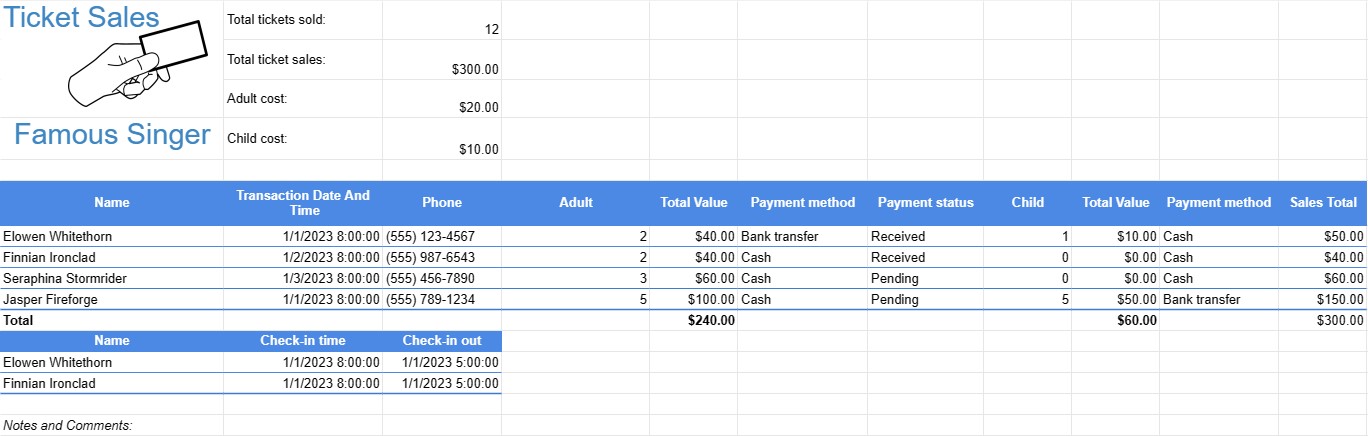
A Ticket Sales Template is a document or spreadsheet used by event organizers, businesses, or individuals to track the sale of tickets for various events, such as concerts, sports games, fundraisers, workshops, or performances. This template helps manage ticket inventory, sales revenue, and attendee information.
Key Components of a Ticket Sales Template:
- Event Information: At the top of the template, there is usually a section for recording essential event details, including the event name, date, venue, and contact information for the event organizer.
- Ticket Types: Lists the different types of tickets available for the event, such as VIP, general admission, student, or senior tickets. Each type may have a different price and availability.
- Ticket Inventory: Records the initial quantity of tickets available for each ticket type. As tickets are sold, this section is updated to reflect the remaining quantity.
- Ticket Sales: Tracks individual ticket sales, including:
- Buyer's name
- Contact information (email, phone)
- Ticket type
- Quantity of tickets purchased
- Total cost
- Payment method (e.g., cash, credit card, online payment)
- Transaction date and time
- Sales Total:Calculates the total revenue generated from ticket sales by summing the costs of all sold tickets.
- Payment Tracking: Keeps a record of payments received, outstanding balances, and any payment deadlines.
- Attendance Information: As the event date approaches, the template may be used to track attendee check-ins or verify tickets at the event entrance.
- Notes and Comments: Provides space for additional notes, special instructions, or comments related to ticket sales or event logistics.
Benefits of Using a Ticket Sales Template:
- Inventory Management: Helps organizers keep track of available tickets, preventing overselling or underestimating demand.
- Revenue Tracking: Provides a real-time view of ticket sales revenue and helps organizers forecast income.
- Attendee Information: Allows for the collection of attendee contact information for communication purposes and post-event follow-up.
- Payment Management: Aids in tracking payments received and managing any outstanding balances or refunds.
- Sales Reporting: Provides a comprehensive record of ticket sales for reporting and accounting purposes.
- Event Planning: Facilitates logistical planning, including staffing, seating arrangements, and event capacity.
- Transparency: Offers transparency and accountability in ticket sales and revenue management.
- Customer Service: Allows organizers to provide timely assistance to attendees with questions or issues related to their tickets.
In conclusion, a Ticket Sales Template is a valuable tool for event organizers and businesses to efficiently manage the sale of tickets for various events. It helps organizers keep track of ticket inventory, sales revenue, attendee information, and payment records, ultimately contributing to the success of the event.
간편한 미리보기 및 스프레드시트 템플릿 다운로드
제한 없이 스프레드시트 템플릿의 전체 버전을 보고 마음에 드는지 확인한 다음 Excel 템플릿을 다운로드하여 장치에 저장하고 무료로 사용할 수 있습니다.
어디서나 스프레드시트 템플릿에 액세스
이는 Windows, MacOS, Linux, iOS와 같은 널리 사용되는 모든 운영 체제에서 작동합니다. 별도의 프로그램 없이 스프레드시트 템플릿을 확인하고 다운로드할 수 있습니다.
템플릿을 사용하는 방법
따라하기 매우 쉬운 단계에 따라 스프레드시트 템플릿을 미리 보고, 다운로드하고, 사용하는 방법을 알아보세요.
더 유사한 템플릿
선택한 것과 동일한 카테고리에 있는 더 많은 스프레드시트 템플릿을 확인하세요.














