
✕︎
LANGUAGE ▼︎
Svenska
فارسی
Italiano
Tiếng Việt
Català
Türk
हिन्दी
Čeština
Lietuvis
Ελληνικά
Dansk
Magyar
Български
Deutsch
Bahasa Melayu
Nederlands
Русский
English
Український
Español
Polskie
ภาษาไทย
Português
ქართველი
Français
Română
한국어
Slovák
繁體中文
日本語
Indonesia
العربية
简体中文
English
▾︎
Svenska
فارسی
Italiano
Tiếng Việt
Català
Türk
हिन्दी
Čeština
Lietuvis
Ελληνικά
Dansk
Magyar
Български
Deutsch
Bahasa Melayu
Nederlands
Русский
English
Український
Español
Polskie
ภาษาไทย
Português
ქართველი
Français
Română
한국어
Slovák
繁體中文
日本語
Indonesia
العربية
简体中文
Fuel Cost Tracking

Fuel Cost Tracking

범주 : 추적기

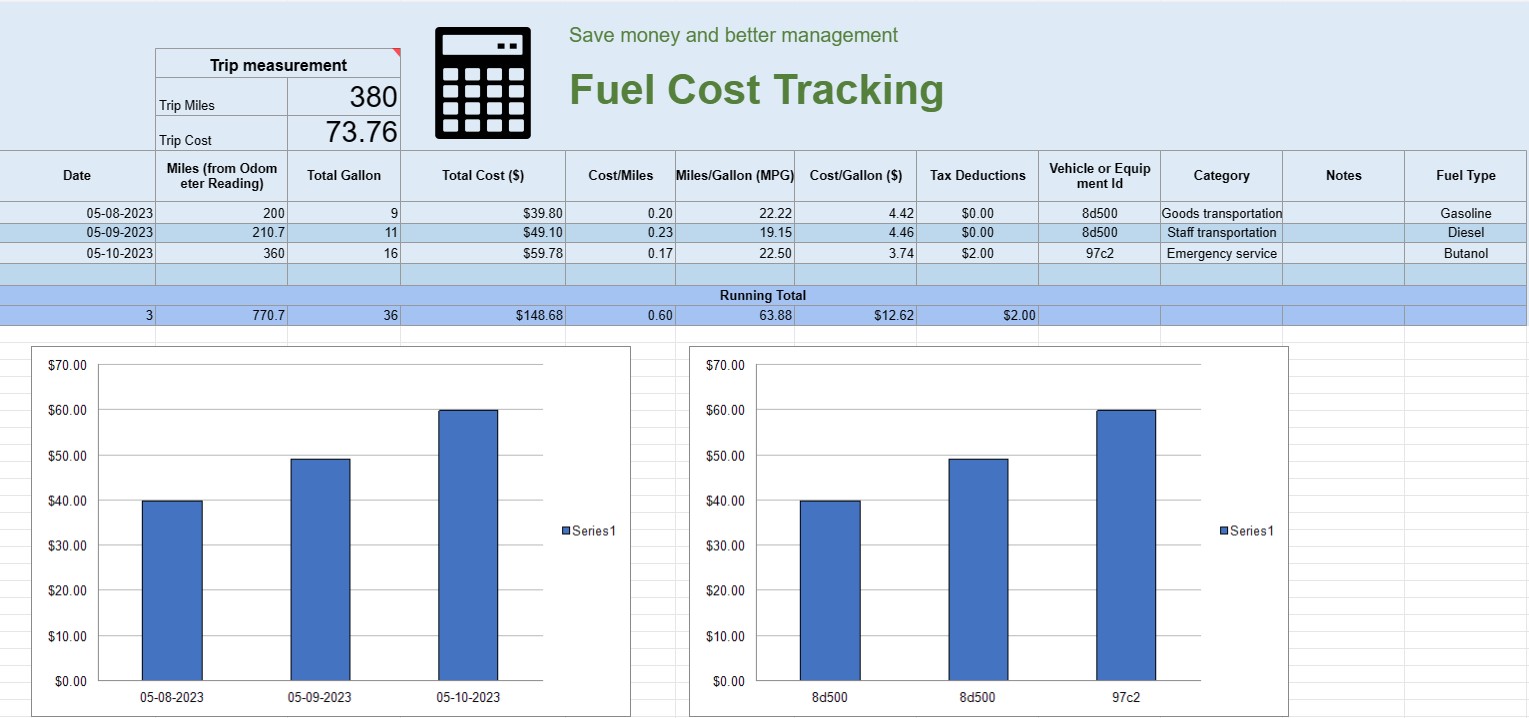
You can use this to track the operating cost of a vehicle, it offers the formulas for you to automate the calculation.

템플릿 보기
↓︎ 지금 다운로드
위의 버튼을 사용하여 다운로드 할 수 없습니까? 이 링크를 클릭하여 파일을 다운로드하십시오.
설명
0
⌨︎
코멘트
449
⤓︎
1
☆︎

A fuel cost tracking spreadsheet is a digital document or spreadsheet that individuals, businesses, or organizations use to record, analyze, and manage expenses related to fuel consumption for vehicles or equipment. It provides a structured format for documenting fuel purchases, calculating fuel efficiency, and tracking overall fuel costs over time.

Here are the key components typically found in a fuel cost tracking spreadsheet:

  • Date: Record the date when the fuel purchase was made. This helps establish a chronological record of transactions.
  • Vehicle or Equipment ID: Identify the specific vehicle or equipment for which the fuel is being purchased. This is especially useful for tracking expenses associated with multiple vehicles or pieces of machinery.
  • Odometer Reading: For vehicles, record the current odometer reading at the time of refueling. This allows you to track the distance traveled between refueling events.
  • Fuel Type: Specify the type of fuel being purchased (e.g., gasoline, diesel, natural gas, electric).
  • Gallons/Liters Purchased: Document the quantity of fuel purchased in gallons or liters.
  • Unit Price: Note the cost per unit of fuel, typically in dollars or the local currency.
  • Total Cost: Automatically calculate the total cost of the fuel purchase by multiplying the gallons/liters purchased by the unit price.
  • Mileage/Kilometerage: Calculate and record the distance traveled between the current and previous refueling events. This can be computed by subtracting the previous odometer reading from the current one.
  • Fuel Efficiency (MPG or L/100km): Calculate and record the fuel efficiency in miles per gallon (MPG) or liters per 100 kilometers (L/100km). To calculate MPG, divide the distance traveled by the fuel consumed. To calculate L/100km, divide the fuel consumed (in liters) by the distance traveled (in kilometers).
  • Notes: Include any relevant notes or comments about the fuel purchase, such as the location of the refueling station or any maintenance performed.
  • Running Total: Maintain a running total of fuel costs over time. This helps you track your cumulative expenses.
  • Charts and Graphs: Create visual representations of your fuel consumption and costs over time using charts or graphs to better visualize trends and patterns.
  • Category or Purpose: Categorize fuel expenses based on the purpose, such as personal use, business use, or specific projects. This can help you allocate costs accurately.
  • Tax Deductions: If applicable, document fuel expenses that are eligible for tax deductions or reimbursements.

You can create a fuel cost tracking spreadsheet using software like Microsoft Excel, Google Sheets, or specialized accounting software. Templates for fuel cost tracking are often available online and can be customized to meet your specific needs. Regularly updating and analyzing the data in your fuel cost tracking spreadsheet can help you make informed decisions about fuel consumption, budgeting, and optimizing efficiency for your vehicles or equipment.

간편한 미리보기 및 스프레드시트 템플릿 다운로드

제한 없이 스프레드시트 템플릿의 전체 버전을 보고 마음에 드는지 확인한 다음 Excel 템플릿을 다운로드하여 장치에 저장하고 무료로 사용할 수 있습니다.

어디서나 스프레드시트 템플릿에 액세스

이는 Windows, MacOS, Linux, iOS와 같은 널리 사용되는 모든 운영 체제에서 작동합니다. 별도의 프로그램 없이 스프레드시트 템플릿을 확인하고 다운로드할 수 있습니다.

템플릿을 사용하는 방법

따라하기 매우 쉬운 단계에 따라 스프레드시트 템플릿을 미리 보고, 다운로드하고, 사용하는 방법을 알아보세요.

👁
1
송장, 예산, 달력, 기타 플래너 및 기타 추적기와 같은 카테고리를 선택하고 스프레드시트 템플릿을 클릭하여 온라인으로 확인하세요.
2
스프레드시트 템플릿을 미리 본 후 귀하의 목적에 적합하다고 생각되는 템플릿을 다운로드할 수 있습니다
🗎
3
한 번 장치에 파일이 있으면 간단히 데이터를 입력하거나 사용 사례에 맞게 수정할 수 있습니다.
🗂
4
스프레드시트 템플릿 작업이 완료되면 원하는 방식으로 사용할 수 있습니다.

더 유사한 템플릿

선택한 것과 동일한 카테고리에 있는 더 많은 스프레드시트 템플릿을 확인하세요.












