საყოფაცხოვრებო თვიური ბიუჯეტი
범주 : 예산
დღესდღეობით სახლებში ცხოვრება ფულს უჯდება, გთხოვთ გამოიყენოთ ეს საფასურისა და ნაღდი ფულის ყველა მონაცემის უფრო მარტივად სამართავად.
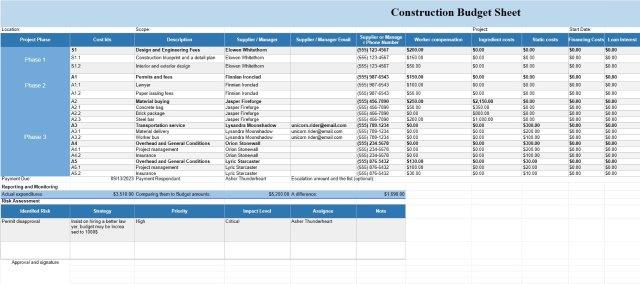
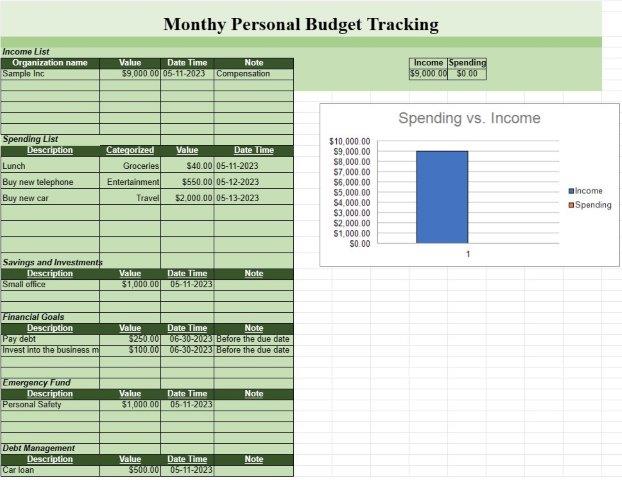
ოჯახის ყოველთვიური ცხრილების შაბლონი არის წინასწარ შემუშავებული დოკუმენტი ან ციფრული ფაილი, რომელსაც ინდივიდები ან ოჯახები იყენებენ თავიანთი ყოველთვიური საყოფაცხოვრებო ფინანსებისა და ხარჯების თვალყურის დევნებისთვის და მართვისთვის. ეს შაბლონები ხელმისაწვდომია და მათი მორგება შესაძლებელია ოჯახის სპეციფიკური ფინანსური საჭიროებებისა და მიზნების შესაბამისად. ისინი უზრუნველყოფენ სტრუქტურირებულ ფორმატს ყოველთვიურად შემოსავლების, ხარჯების, დანაზოგების და სხვა ფინანსური ოპერაციების აღრიცხვისთვის. აქ არის საერთო კომპონენტები და სექციები, რომლებიც შეიძლება იპოვოთ საოჯახო მეურნეობის ყოველთვიური ცხრილების შაბლონში:
- შემოსავლები: შემოსავლის წყაროები: ჩამოთვალეთ შემოსავლის ყველა წყარო, როგორიცაა ხელფასები, გაქირავება შემოსავალი, ინვესტიციები და ფულის ნებისმიერი სხვა წყარო, რომელიც შემოდის ოჯახში.
- თანხა: მიუთითეთ თითოეული შემოსავლის წყაროდან მიღებული თანხა.
- მთლიანი შემოსავალი: ავტომატურად გამოთვალეთ მთლიანი შემოსავალი თვისთვის.
- ფიქსირებული ხარჯები:
- იპოთეკის ან ქირავნობის გადასახადები.
- კომუნალური (მაგ., ელექტროენერგია, გაზი, წყალი).
- დაზღვევის პრემიები (მაგ. ჯანმრთელობა, ავტო, სახლი).
- სესხის გადახდა (მაგ. მანქანის სესხი, სტუდენტური სესხი).
- გამოწერის სერვისები (მაგ., საკაბელო, ინტერნეტი, სტრიმინგის სერვისები).
- ქონების გადასახადები.
- სხვა ფიქსირებული ყოველთვიური ხარჯები.
- ცვლადი ხარჯები:
- სასურსათო და საყოფაცხოვრებო ნივთები.
- ტრანსპორტი (მაგ., საწვავი, საზოგადოებრივი ტრანსპორტი).
- სადილზე. და გართობა.
- ჯანმრთელობა და კეთილდღეობა (მაგ., სამედიცინო გადასახადები, რეცეპტები).
- ბავშვის მოვლისა და განათლების ხარჯები.
- პერსონალური მოვლა და მოვლა.
- სხვადასხვა ხარჯები.
- შენახვები და ინვესტიციები: შენატანები შემნახველ ანგარიშებში (მაგ., სასწრაფო დახმარების ფონდი, საპენსიო დანაზოგი).
- ინვესტიციები (მაგ. აქციები, ობლიგაციები, ერთობლივი ფონდები).
- წვლილი კოლეჯის შემნახველ ანგარიშებში.
- სხვა შემნახველი მიზნები ან ანგარიშები.
- ვალებები და კრედიტები. ბარათები:
- საკრედიტო ბარათების ნაშთები და მინიმალური გადახდები.
- სხვა დავალიანება და სესხის ნაშთები.
- ვალებზე საპროცენტო განაკვეთები.
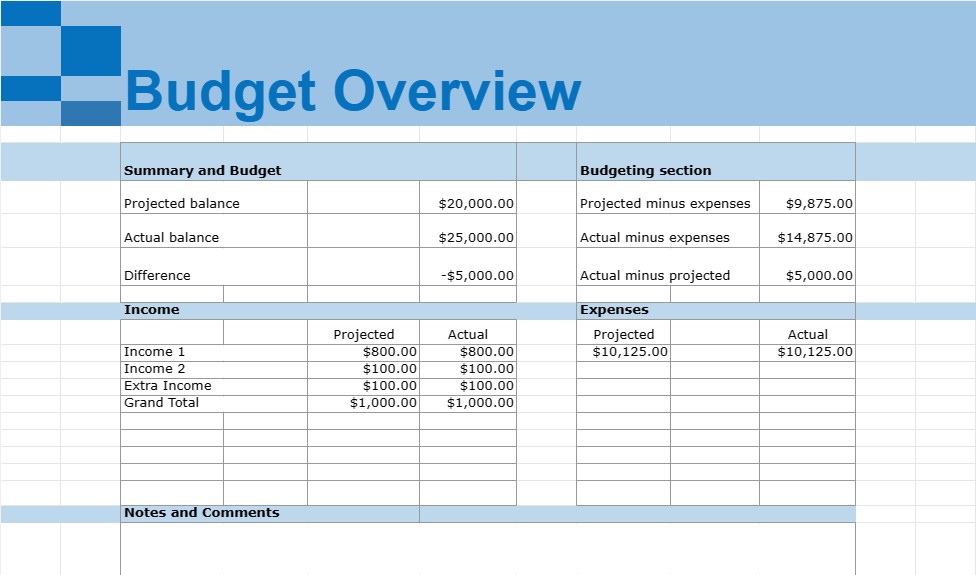
- შეჯამება და ბიუჯეტი: შემაჯამებელი განყოფილება, რომელიც ითვლის მთლიან შემოსავალს, მთლიან ხარჯებს და წმინდა შემოსავალს (შემოსავალი მინუს ხარჯები) თვისთვის.
- ბიუჯეტის განყოფილება: შეადარეთ ფაქტობრივი ხარჯები ბიუჯეტს ან ხარჯვის გეგმას, თუ ეს შესაძლებელია.
- დამატებითი კატეგორიები: დამოკიდებულია ოჯახის სპეციფიკაზე. ფინანსური მდგომარეობა, შეიძლება შეიცავდეს დამატებით კატეგორიებს, როგორიცაა საქველმოქმედო შემოწირულობები, შინაური ცხოველების ხარჯები, სახლის მოვლა ან განათლების დაზოგვა.
- შენიშვნები და კომენტარები: სივრცე კომენტარების, შენიშვნების ან დასამატებლად. შეხსენებები, რომლებიც დაკავშირებულია კონკრეტულ ხარჯებთან ან ფინანსურ ტრანზაქციებთან.
საყოფაცხოვრებო თვიური ცხრილების შაბლონები არის ღირებული ინსტრუმენტები პირადი ფინანსების მართვისთვის, რადგან ისინი ეხმარება ინდივიდებსა და ოჯახებს თვალყური ადევნონ თავიანთ შემოსავალს და ხარჯებს, განსაზღვრონ ხარჯვის სქემა, დაადგინონ ფინანსური. მიზნები და შექმენით ბიუჯეტი. ისინი უზრუნველყოფენ ოჯახის ფინანსური ჯანმრთელობის მკაფიო მიმოხილვას და დაგეხმარებათ ინფორმირებული ფინანსური გადაწყვეტილებების მიღებაში, ვალების შემცირებაში, დანაზოგების გაზრდაში და გრძელვადიანი ფინანსური მიზნების მიღწევაში. ეს შაბლონები შეიძლება შეიქმნას ცხრილების პროგრამული უზრუნველყოფის გამოყენებით, როგორიცაა Microsoft Excel ან Google Sheets, ან მზა შაბლონების ნახვა ინტერნეტში.
간편한 미리보기 및 스프레드시트 템플릿 다운로드
제한 없이 스프레드시트 템플릿의 전체 버전을 보고 마음에 드는지 확인한 다음 Excel 템플릿을 다운로드하여 장치에 저장하고 무료로 사용할 수 있습니다.
어디서나 스프레드시트 템플릿에 액세스
이는 Windows, MacOS, Linux, iOS와 같은 널리 사용되는 모든 운영 체제에서 작동합니다. 별도의 프로그램 없이 스프레드시트 템플릿을 확인하고 다운로드할 수 있습니다.
템플릿을 사용하는 방법
따라하기 매우 쉬운 단계에 따라 스프레드시트 템플릿을 미리 보고, 다운로드하고, 사용하는 방법을 알아보세요.