
Ticket Sales
カテゴリー : トラッカー
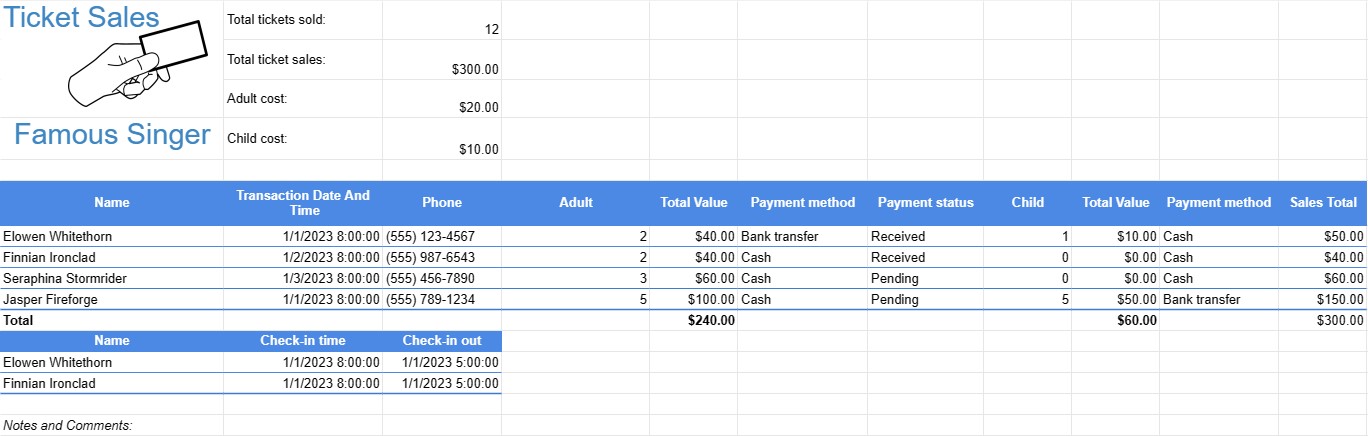
Use this to manage the margin and the sales operation, this can be used for movie ticket sales, music festival ticket sales, and more.
A Ticket Sales Template is a document or spreadsheet used by event organizers, businesses, or individuals to track the sale of tickets for various events, such as concerts, sports games, fundraisers, workshops, or performances. This template helps manage ticket inventory, sales revenue, and attendee information.
Key Components of a Ticket Sales Template:
- Event Information: At the top of the template, there is usually a section for recording essential event details, including the event name, date, venue, and contact information for the event organizer.
- Ticket Types: Lists the different types of tickets available for the event, such as VIP, general admission, student, or senior tickets. Each type may have a different price and availability.
- Ticket Inventory: Records the initial quantity of tickets available for each ticket type. As tickets are sold, this section is updated to reflect the remaining quantity.
- Ticket Sales: Tracks individual ticket sales, including:
- Buyer's name
- Contact information (email, phone)
- Ticket type
- Quantity of tickets purchased
- Total cost
- Payment method (e.g., cash, credit card, online payment)
- Transaction date and time
- Sales Total:Calculates the total revenue generated from ticket sales by summing the costs of all sold tickets.
- Payment Tracking: Keeps a record of payments received, outstanding balances, and any payment deadlines.
- Attendance Information: As the event date approaches, the template may be used to track attendee check-ins or verify tickets at the event entrance.
- Notes and Comments: Provides space for additional notes, special instructions, or comments related to ticket sales or event logistics.
Benefits of Using a Ticket Sales Template:
- Inventory Management: Helps organizers keep track of available tickets, preventing overselling or underestimating demand.
- Revenue Tracking: Provides a real-time view of ticket sales revenue and helps organizers forecast income.
- Attendee Information: Allows for the collection of attendee contact information for communication purposes and post-event follow-up.
- Payment Management: Aids in tracking payments received and managing any outstanding balances or refunds.
- Sales Reporting: Provides a comprehensive record of ticket sales for reporting and accounting purposes.
- Event Planning: Facilitates logistical planning, including staffing, seating arrangements, and event capacity.
- Transparency: Offers transparency and accountability in ticket sales and revenue management.
- Customer Service: Allows organizers to provide timely assistance to attendees with questions or issues related to their tickets.
In conclusion, a Ticket Sales Template is a valuable tool for event organizers and businesses to efficiently manage the sale of tickets for various events. It helps organizers keep track of ticket inventory, sales revenue, attendee information, and payment records, ultimately contributing to the success of the event.
スプレッドシートのテンプレートを簡単にプレビューしてダウンロード
制限なしでスプレッドシート テンプレートのフル バージョンを表示して気に入るかどうかを確認し、Excel テンプレートをダウンロードしてデバイスに保存し、無料で使用できます。
どこからでもスプレッドシート テンプレートにアクセス
これは、Windows、MacOS、Linux、iOS などのすべての一般的なオペレーティング システムで動作します。スプレッドシート テンプレートを表示し、追加のプログラムを必要とせずにダウンロードできます。
テンプレートの使用方法
非常に簡単な手順に従って、スプレッドシート テンプレートをプレビュー、ダウンロード、使用する方法を理解します。
さらに類似したテンプレート
選択したものと同じカテゴリにあるスプレッドシート テンプレートをさらに表示します。














