
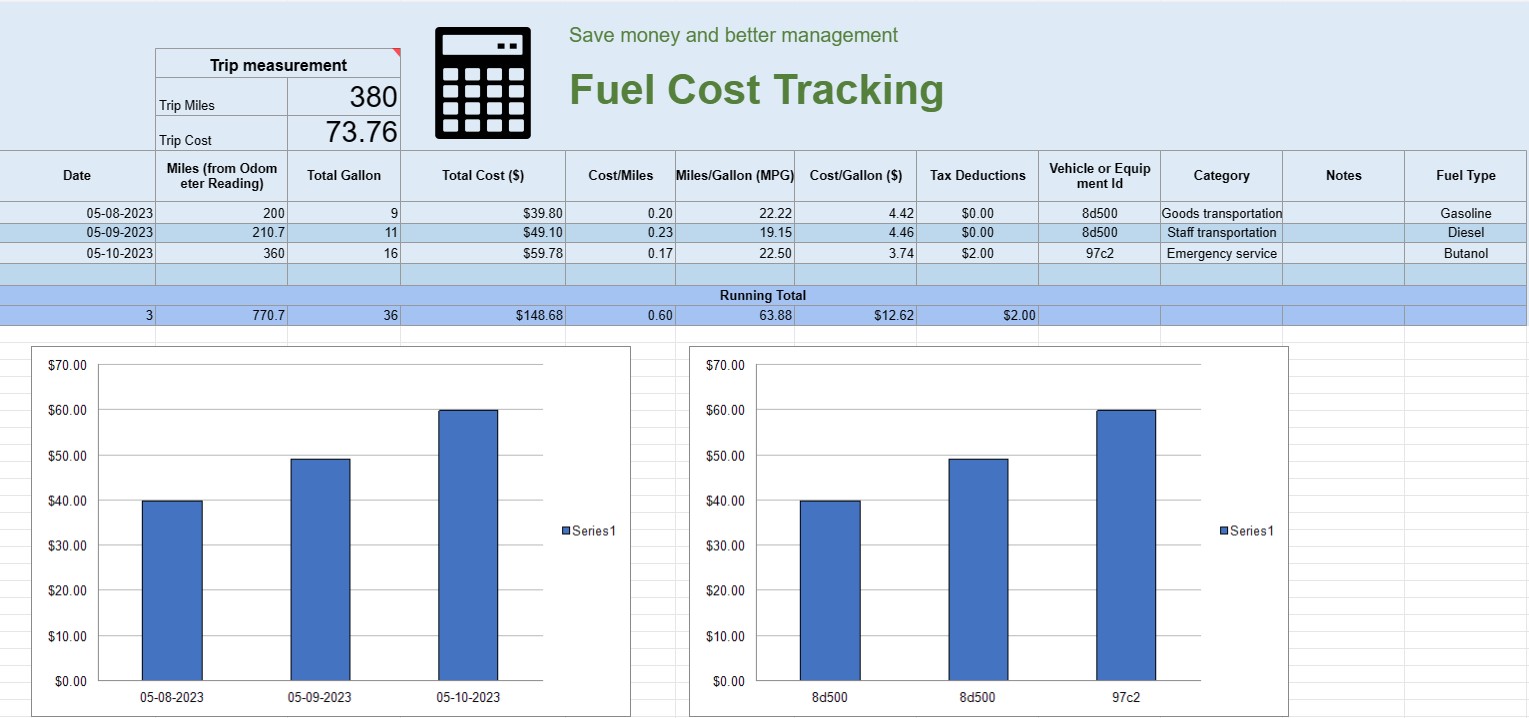
Üzemanyagköltség nyomon követése
Kategória : Nyomkövetők
Ezzel nyomon követheti egy jármű üzemeltetési költségét, felkínálja a képleteket a számítás automatizálásához.
Az üzemanyagköltség-követő táblázat egy digitális dokumentum vagy táblázat, amelyet magánszemélyek, vállalkozások vagy szervezetek használnak a járművek vagy berendezések üzemanyag-fogyasztásával kapcsolatos kiadások rögzítésére, elemzésére és kezelésére. Strukturált formátumot biztosít az üzemanyag-vásárlások dokumentálásához, az üzemanyag-hatékonyság kiszámításához és az általános üzemanyagköltségek időbeli nyomon követéséhez.
Íme, az üzemanyagköltség-követő táblázatban jellemzően megtalálható legfontosabb összetevők:
- Dátum: Jegyezze fel az üzemanyagvásárlás dátumát. Ez segít a tranzakciók időrendi nyilvántartásában.
- Jármű vagy berendezés azonosítója: Azonosítsa azt a járművet vagy berendezést, amelyhez az üzemanyagot vásárolja. Ez különösen hasznos a több járművel vagy géppel kapcsolatos kiadások nyomon követéséhez.
- Kilométer-számláló állása: Gépjárművek esetén rögzítse az aktuális kilométer-számláló állását a tankoláskor. Ezzel nyomon követheti a tankolási események között megtett távolságot.
- Üzemanyag típusa: Adja meg a vásárolt üzemanyag típusát (pl. benzin, dízel, földgáz, elektromos).
- Vásárolt gallon/liter: dokumentálja a vásárolt üzemanyag mennyiségét gallonban vagy literben.
- Egységár: Jegyezze fel a perenkénti költséget egységnyi üzemanyag, jellemzően dollárban vagy helyi pénznemben.
- Teljes költség: Az üzemanyag-vásárlás teljes költségének automatikus kiszámítása a megvásárolt gallon/liter és az egységár szorzatával.
- Kifutás/Kilométer: Számítsa ki és rögzítse a megtett távolságot az aktuális és az előző tankolási események között. Ez úgy számítható ki, hogy levonja az előző kilométer-számláló állását az aktuális értékből.
- Üzemanyag-hatékonyság (MPG vagy L/100 km): Számítsa ki és jegyezze fel az üzemanyag-hatékonyságot mérföld per gallonban ( MPG) vagy liter/100 kilométer (L/100km). Az MPG kiszámításához ossza el a megtett utat az elfogyasztott üzemanyaggal. Az L/100 km kiszámításához ossza el az elfogyasztott üzemanyagot (literben) a megtett távolsággal (kilométerben).
- Megjegyzések: Az üzemanyag-vásárlással kapcsolatos minden vonatkozó megjegyzést vagy megjegyzést mellékelje, például az üzemanyagtöltő állomás helye vagy az elvégzett karbantartás.
- Running Total: Fenntartja a teljes üzemanyagköltséget az idő múlásával. Ez segít nyomon követni halmozott kiadásait.
- Diagramok és grafikonok: Készítsen vizuális ábrázolásokat üzemanyag-fogyasztásáról és költségeiről az idő múlásával diagramok vagy grafikonok segítségével a trendek és minták jobb megjelenítéséhez.
- Kategória vagy cél: Az üzemanyag-kiadások kategorizálása a cél, például személyes használat, üzleti felhasználás vagy konkrét projektek alapján. Ez segíthet a költségek pontos felosztásában.
- Adólevonások: Adott esetben dokumentálja azokat az üzemanyagköltségeket, amelyek adókedvezményre vagy -visszatérítésre jogosultak.
Létrehozhat üzemanyagköltség-követő táblázatot olyan szoftverek segítségével, mint a Microsoft Excel, a Google Sheets vagy a speciális könyvelő szoftver. Az üzemanyagköltség nyomon követésére szolgáló sablonok gyakran elérhetők online, és testreszabhatók az Ön egyedi igényei szerint. Az üzemanyagköltség-követő táblázat adatainak rendszeres frissítése és elemzése segíthet megalapozott döntéseket hozni az üzemanyag-fogyasztással, a költségvetés-tervezéssel és a járművei vagy berendezései hatékonyságának optimalizálásával kapcsolatban.
Táblázatsablon egyszerű előnézete és letöltése
Tekintse meg egy táblázatsablon teljes verzióját korlátozások nélkül, és ellenőrizze, hogy tetszik-e, majd letöltheti az Excel-sablont, hogy tárolja az eszközén, és ingyenesen felhasználhassa.
Bárhonnan elérheti a táblázatsablont
Ez minden népszerű operációs rendszeren működik, például Windows, MacOS, Linux, iOS. Megtekintheti a táblázatsablonokat, és további programok nélkül letöltheti őket.
Hogyan használjunk sablont
Találja ki, hogyan tekintheti meg, töltheti le, majd használhatja a táblázatsablont a rendkívül egyszerűen követhető lépések végrehajtásával.
További hasonló sablonok
Tekintse meg azokat a táblázatsablonokat, amelyek a kiválasztottal azonos kategóriába tartoznak.













