
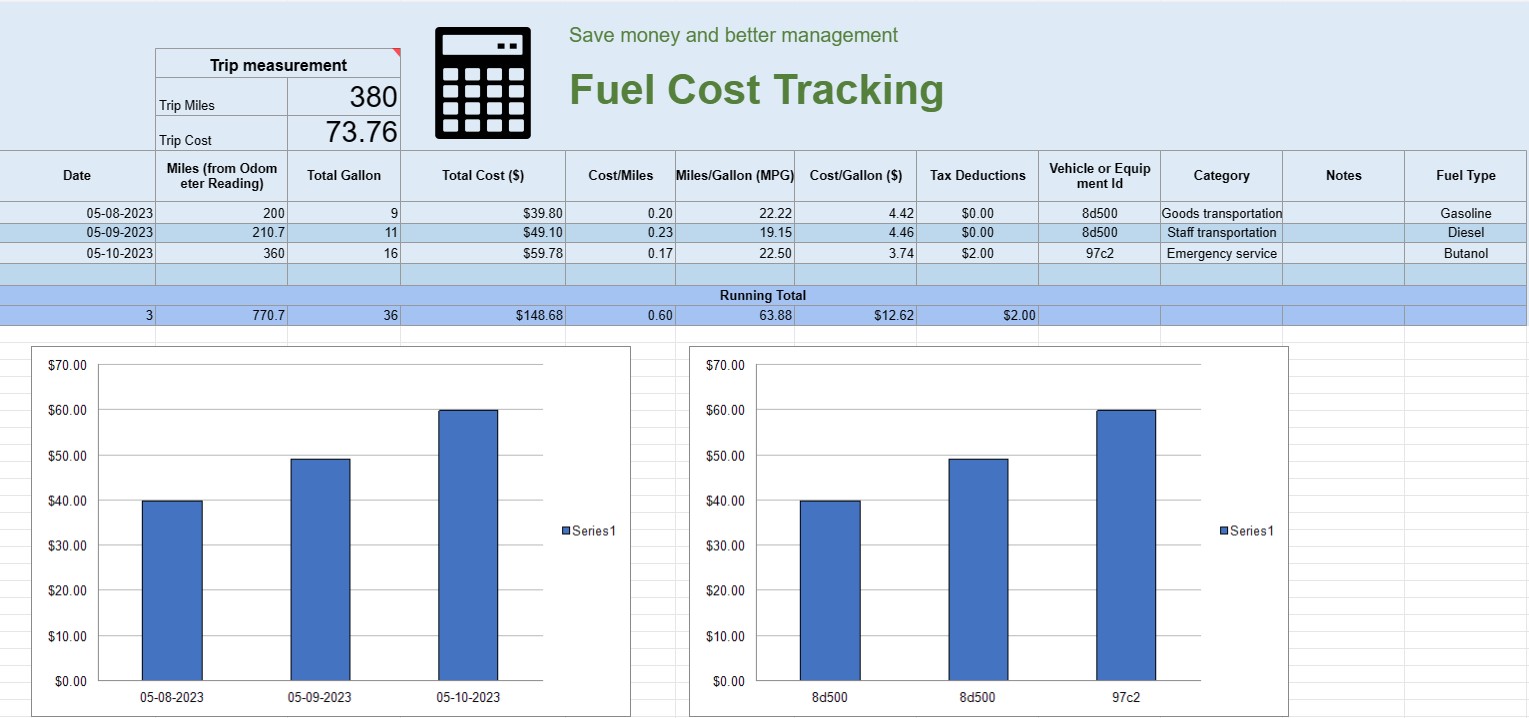
Suivi des coûts de carburant
Catégorie : Traqueurs
Vous pouvez l'utiliser pour suivre le coût d'exploitation d'un véhicule, il vous propose les formules pour automatiser le calcul.


Une feuille de calcul de suivi des coûts de carburant est un document ou une feuille de calcul numérique que les particuliers, les entreprises ou les organisations utilisent pour enregistrer, analyser et gérer les dépenses liées à la consommation de carburant des véhicules ou des équipements. Il fournit un format structuré pour documenter les achats de carburant, calculer l'efficacité énergétique et suivre les coûts globaux de carburant au fil du temps.
Voici les éléments clés généralement trouvés dans une feuille de calcul de suivi des coûts de carburant :
- Date : Enregistrez la date à laquelle l'achat de carburant a été effectué. Cela permet d'établir un enregistrement chronologique des transactions.
- ID du véhicule ou de l'équipement : Identifiez le véhicule ou l'équipement spécifique pour lequel le carburant est acheté. Ceci est particulièrement utile pour suivre les dépenses associées à plusieurs véhicules ou pièces de machines.
- Relevé du compteur kilométrique : Pour les véhicules, enregistrez le relevé actuel du compteur kilométrique au moment du ravitaillement. Cela vous permet de suivre la distance parcourue entre les ravitaillements.
- Type de carburant : Spécifiez le type de carburant acheté (par exemple, essence, diesel, gaz naturel, électrique).
- Gallons/Litres achetés : Documentez la quantité de carburant achetée en gallons ou en litres.
- Prix unitaire : Notez le coût par unité de carburant, généralement en dollars ou dans la devise locale.
- Coût total : Calculez automatiquement le coût total de l'achat de carburant en multipliant les gallons/litres achetés par le prix unitaire.
- Kilométrage : Calculez et enregistrez la distance parcourue entre les événements de ravitaillement en cours et les précédents. Ceci peut être calculé en soustrayant le relevé précédent du compteur kilométrique de celui actuel.
- Efficacité énergétique (MPG ou L/100 km) : Calculez et enregistrez l'efficacité énergétique en miles par gallon ( MPG) ou litres aux 100 kilomètres (L/100km). Pour calculer MPG, divisez la distance parcourue par le carburant consommé. Pour calculer les L/100 km, divisez le carburant consommé (en litres) par la distance parcourue (en kilomètres).
- Remarques : Incluez toutes les notes ou commentaires pertinents concernant l'achat de carburant, tels que l'emplacement de la station de ravitaillement ou tout entretien effectué.
- Total cumulé : Maintenez un total cumulé des coûts de carburant au fil du temps. Cela vous aide à suivre vos dépenses cumulées.
- Tableaux et graphiques : créez des représentations visuelles de votre consommation de carburant et de vos coûts au fil du temps à l'aide de tableaux ou de graphiques pour mieux visualiser les tendances et les modèles.
- Tableaux et graphiques
- Catégorie ou objectif : catégorisez les dépenses de carburant en fonction de l'objectif, tel qu'un usage personnel, un usage professionnel ou des projets spécifiques. Cela peut vous aider à répartir les coûts avec précision.
- Déductions fiscales : Le cas échéant, documentez les dépenses de carburant éligibles aux déductions fiscales ou aux remboursements.
Vous pouvez créer une feuille de calcul de suivi des coûts de carburant à l'aide d'un logiciel comme Microsoft Excel, Google Sheets ou un logiciel de comptabilité spécialisé. Des modèles de suivi des coûts de carburant sont souvent disponibles en ligne et peuvent être personnalisés pour répondre à vos besoins spécifiques. La mise à jour et l'analyse régulières des données de votre feuille de calcul de suivi des coûts de carburant peuvent vous aider à prendre des décisions éclairées concernant la consommation de carburant, la budgétisation et l'optimisation de l'efficacité de vos véhicules ou équipements.
Modèle de feuille de calcul facile à prévisualiser et à télécharger
Affichez la version complète d'un modèle de feuille de calcul sans limitation pour voir si vous l'aimez, vous pouvez alors télécharger le modèle Excel pour le stocker sur votre appareil et l'utiliser gratuitement.
Accédez au modèle de feuille de calcul depuis n'importe où
Cela fonctionne sur tous les systèmes d'exploitation populaires tels que Windows, MacOS, Linux, iOS. Vous pouvez voir les modèles de feuilles de calcul et les télécharger sans programmes supplémentaires.
Comment utiliser un modèle
Découvrez comment prévisualiser, télécharger puis utiliser le modèle de feuille de calcul en suivant les étapes extrêmement faciles à suivre.
Plus de modèles similaires
Découvrez plus de modèles de feuilles de calcul qui appartiennent à la même catégorie que celui choisi.













