
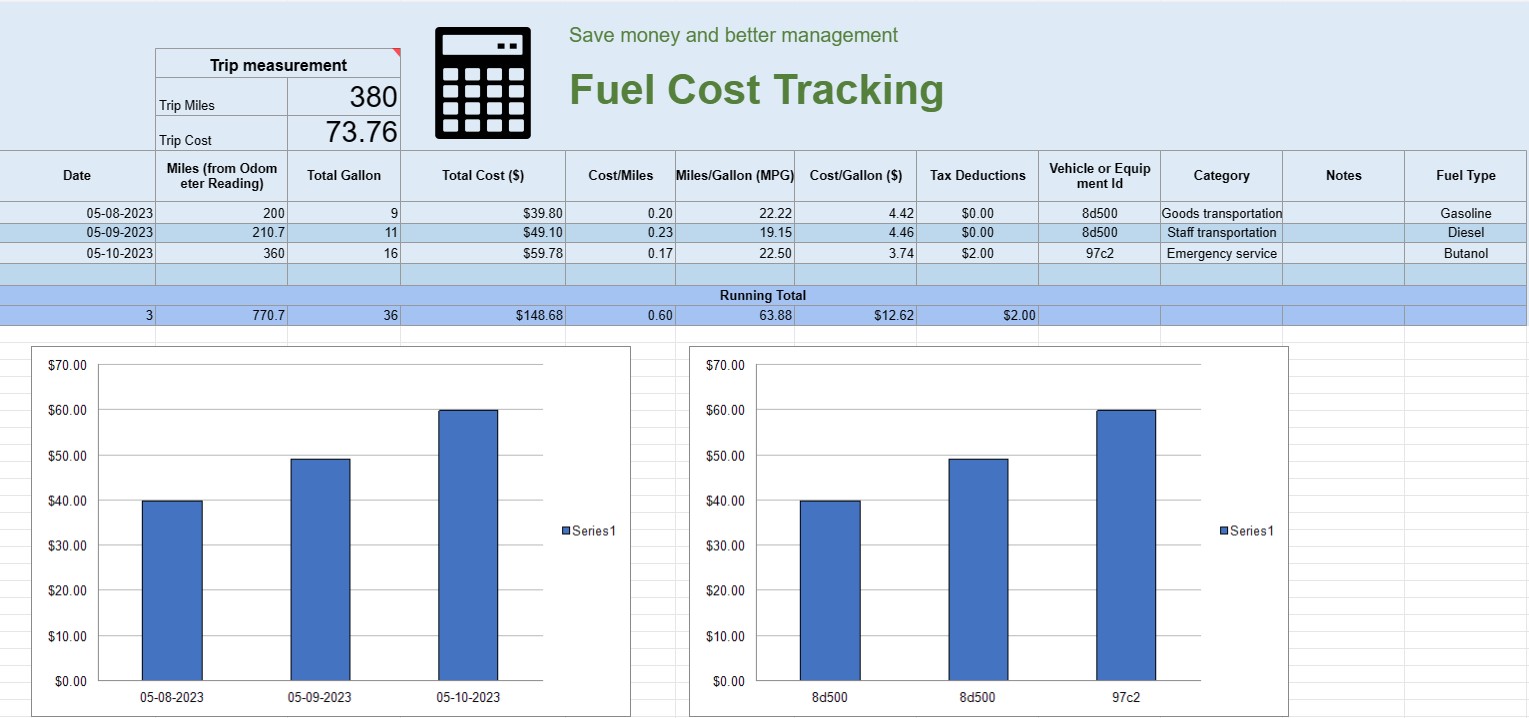
Seguimiento de costos de combustible
Categoría : Rastreadores
Puede usar esto para rastrear el costo operativo de un vehículo, ofrece las fórmulas para que automatice el cálculo.


Una hoja de cálculo de seguimiento de costos de combustible es un documento u hoja de cálculo digital que las personas, empresas u organizaciones utilizan para registrar, analizar y gestionar los gastos relacionados con el consumo de combustible de vehículos o equipos. Proporciona un formato estructurado para documentar las compras de combustible, calcular la eficiencia del combustible y realizar un seguimiento de los costos generales del combustible a lo largo del tiempo.
Estos son los componentes clave que normalmente se encuentran en una hoja de cálculo de seguimiento de costos de combustible:
- Fecha: Registre la fecha en que se realizó la compra de combustible. Esto ayuda a establecer un registro cronológico de las transacciones.
- ID del vehículo o equipo: Identifique el vehículo o equipo específico para el cual se compra el combustible. Esto es especialmente útil para realizar un seguimiento de los gastos asociados con varios vehículos o piezas de maquinaria.
- Lectura del odómetro: Para vehículos, registre la lectura actual del odómetro en el momento de repostar combustible. Esto le permite realizar un seguimiento de la distancia recorrida entre eventos de reabastecimiento de combustible.
- Tipo de combustible: Especifique el tipo de combustible que se compra (p. ej., gasolina, diésel, gas natural, eléctrico).
- Galones/Litros comprados: Documente la cantidad de combustible comprado en galones o litros.
- Precio unitario: Anote el costo por unidad de combustible, generalmente en dólares o la moneda local.
- Costo total: Calcule automáticamente el costo total de la compra de combustible multiplicando los galones/litros comprados por el precio unitario.
- Millaje/Kilómetro: Calcule y registre la distancia recorrida entre los eventos de reabastecimiento de combustible actuales y anteriores. Esto se puede calcular restando la lectura del odómetro anterior de la actual.
- Eficiencia de combustible (MPG o L/100 km): Calcule y registre la eficiencia de combustible en millas por galón ( MPG) o litros cada 100 kilómetros (L/100km). Para calcular MPG, divida la distancia recorrida por el combustible consumido. Para calcular L/100km, divida el combustible consumido (en litros) por la distancia recorrida (en kilómetros).
- Notas: Incluya cualquier nota o comentario relevante sobre la compra de combustible. como la ubicación de la estación de servicio o cualquier mantenimiento realizado.
- Total acumulado: mantenga un total acumulado de los costos de combustible a lo largo del tiempo. Esto le ayuda a realizar un seguimiento de sus gastos acumulados.
- Cuadros y gráficos: cree representaciones visuales de su consumo de combustible y costos a lo largo del tiempo utilizando cuadros o gráficos para visualizar mejor tendencias y patrones.
- Categoría o Propósito: Clasifique los gastos de combustible según el propósito, como uso personal, uso comercial o proyectos específicos. Esto puede ayudarle a asignar los costos con precisión.
- Deducciones fiscales: Si corresponde, documente los gastos de combustible que son elegibles para deducciones o reembolsos fiscales.
Puede crear una hoja de cálculo de seguimiento del costo del combustible utilizando software como Microsoft Excel, Google Sheets o software de contabilidad especializado. Las plantillas para el seguimiento del costo del combustible suelen estar disponibles en línea y pueden personalizarse para satisfacer sus necesidades específicas. Actualizar y analizar periódicamente los datos de su hoja de cálculo de seguimiento de costos de combustible puede ayudarlo a tomar decisiones informadas sobre el consumo de combustible, la elaboración de presupuestos y la optimización de la eficiencia de sus vehículos o equipos.
Vista previa y descarga sencilla de la plantilla de hoja de cálculo
Vea la versión completa de una plantilla de hoja de cálculo sin limitaciones para ver si le gusta, luego puede descargar la plantilla de Excel para almacenarla en su dispositivo y usarla de forma gratuita.
Acceda a la plantilla de hoja de cálculo desde cualquier lugar
Esto funciona en todos los sistemas operativos populares, como Windows, MacOS, Linux, iOS. Puedes ver las plantillas de hojas de cálculo y descargarlas sin programas adicionales.
Cómo utilizar una plantilla
Descubra cómo obtener una vista previa, descargar y luego usar la plantilla de hoja de cálculo siguiendo los pasos que son extremadamente fáciles de seguir.
Más plantillas similares
Vea más plantillas de hojas de cálculo que se encuentran en la misma categoría que la elegida.













