
Ticketverkauf
Kategorie : Tracker
Verwenden Sie dies, um die Marge und den Verkaufsvorgang zu verwalten. Dies kann für den Verkauf von Kinokarten, den Verkauf von Eintrittskarten für Musikfestivals und mehr verwendet werden.


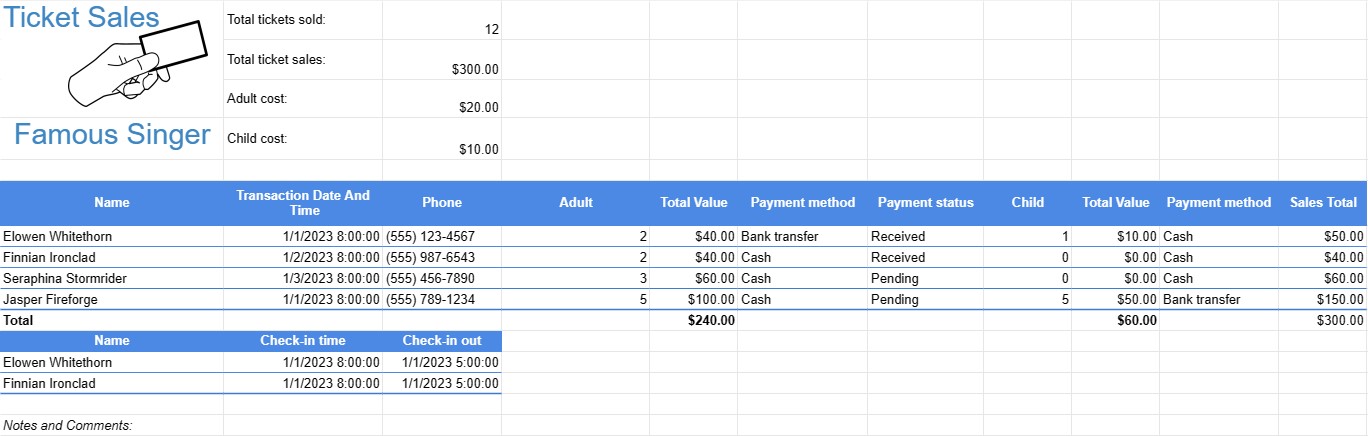
Eine Ticketverkaufsvorlage ist ein Dokument oder eine Tabelle, die von Veranstaltern, Unternehmen oder Einzelpersonen verwendet wird, um den Verkauf von Tickets für verschiedene Veranstaltungen wie Konzerte, Sportspiele, Spendenaktionen, Workshops oder Aufführungen zu verfolgen. Diese Vorlage hilft bei der Verwaltung des Ticketbestands, der Verkaufserlöse und der Teilnehmerinformationen.
Hauptbestandteile einer Ticketverkaufsvorlage:
- Veranstaltungsinformationen: Unter Oben in der Vorlage gibt es normalerweise einen Abschnitt zum Aufzeichnen wichtiger Veranstaltungsdetails, einschließlich Veranstaltungsname, Datum, Veranstaltungsort und Kontaktinformationen für den Veranstalter.
- Ticketarten: Listet die verschiedenen Arten von Tickets auf, die für die Veranstaltung verfügbar sind, z. B. VIP-Tickets, allgemeine Eintrittskarten, Studenten- oder Seniorentickets. Jeder Typ kann einen anderen Preis und eine andere Verfügbarkeit haben.
- Ticketbestand: Zeichnet die anfängliche Anzahl der für jeden Tickettyp verfügbaren Tickets auf. Wenn Tickets verkauft werden, wird dieser Abschnitt aktualisiert, um die verbleibende Menge anzuzeigen.
- Ticketverkäufe: Verfolgt einzelne Ticketverkäufe, einschließlich:
- Käufer Name
- Kontaktinformationen (E-Mail, Telefon)
- Ticketart
- Anzahl der gekauften Tickets
- Gesamtkosten
- Zahlungsmethode (z. B. Bargeld, Kreditkarte, Online-Zahlung)
- Datum und Uhrzeit der Transaktion
- Gesamtumsatz:Berechnet den Gesamtumsatz aus Ticketverkäufen durch Summieren Kosten aller verkauften Tickets.
- Zahlungsverfolgung: Erfasst eingegangene Zahlungen, ausstehende Beträge und etwaige Zahlungsfristen.
- Anwesenheitsinformationen: Wenn das Veranstaltungsdatum näher rückt, kann die Vorlage verwendet werden, um den Check-in der Teilnehmer zu verfolgen oder Tickets am Eingang der Veranstaltung zu überprüfen.
- Notizen und Kommentare: Bietet Platz für zusätzliche Notizen, spezielle Anweisungen oder Kommentare im Zusammenhang mit dem Ticketverkauf oder der Veranstaltungslogistik.
Vorteile der Verwendung einer Ticketverkaufsvorlage:
- Bestandsverwaltung: Hilft Veranstaltern, den Überblick über verfügbare Tickets zu behalten und so einen Überverkauf oder eine Unterschätzung der Nachfrage zu verhindern.
- Umsatzverfolgung: Bietet eine Echtzeitansicht der Ticketverkäufe Einnahmen und hilft Organisatoren, Einnahmen zu prognostizieren.
- Teilnehmerinformationen: Ermöglicht die Erfassung von Teilnehmerkontaktinformationen für Kommunikationszwecke und Nachverfolgung nach der Veranstaltung.
- Zahlungsverwaltung: Hilft bei der Verfolgung eingegangener Zahlungen und der Verwaltung ausstehender Beträge oder Rückerstattungen.
- Verkaufsberichte: Bietet eine umfassende Aufzeichnung der Ticketverkäufe für die Berichterstattung und Buchhaltungszwecke.
- Veranstaltungsplanung: Erleichtert die logistische Planung, einschließlich Personalbesetzung, Sitzordnung und Veranstaltungskapazität.
- Transparenz: Bietet Transparenz und Verantwortlichkeit beim Ticketverkauf und der Umsatzverwaltung.
- Kundenservice: Ermöglicht Organisatoren, Teilnehmern bei Fragen oder Problemen im Zusammenhang mit ihren Tickets zeitnah zu helfen.
Zusammenfassend lässt sich sagen, dass eine Ticketverkaufsvorlage ein wertvolles Tool für Veranstalter und Unternehmen ist, um den Verkauf von Tickets für verschiedene Veranstaltungen effizient zu verwalten. Es hilft Organisatoren dabei, den Überblick über den Ticketbestand, die Verkaufserlöse, die Teilnehmerinformationen und die Zahlungsaufzeichnungen zu behalten, was letztendlich zum Erfolg der Veranstaltung beiträgt.
Einfache Vorschau und Download der Tabellenvorlage
Sehen Sie sich die Vollversion einer Tabellenkalkulationsvorlage ohne Einschränkungen an, um zu sehen, ob sie Ihnen gefällt. Anschließend können Sie die Excel-Vorlage herunterladen, sie auf Ihrem Gerät speichern und kostenlos verwenden.
Greifen Sie von überall auf die Tabellenvorlage zu
Dies funktioniert auf allen gängigen Betriebssystemen wie Windows, MacOS, Linux, iOS. Sie können die Tabellenvorlagen ansehen und ohne zusätzliche Programme herunterladen.
So verwenden Sie eine Vorlage
Finden Sie heraus, wie Sie die Tabellenvorlage in der Vorschau anzeigen, herunterladen und dann verwenden können, indem Sie die Schritte befolgen, die äußerst einfach zu befolgen sind
Weitere ähnliche Vorlagen
Sehen Sie sich weitere Tabellenvorlagen an, die zur gleichen Kategorie gehören wie die ausgewählte.














