Anggaran bulanan rumah tangga
Kategori : Budgetter
Tinggal di rumah saat ini membutuhkan biaya, silakan gunakan ini untuk mengelola semua data biaya dan uang tunai dengan lebih mudah.
Template Spreadsheet Bulanan Rumah Tangga adalah dokumen atau file digital yang telah dirancang sebelumnya yang digunakan individu atau keluarga untuk melacak dan mengelola keuangan dan pengeluaran rumah tangga bulanan mereka. Templat ini sudah tersedia dan dapat disesuaikan dengan kebutuhan dan tujuan keuangan spesifik rumah tangga. Mereka menyediakan format terstruktur untuk mencatat pendapatan, pengeluaran, tabungan, dan transaksi keuangan lainnya setiap bulan. Berikut adalah komponen dan bagian umum yang mungkin Anda temukan di Templat Spreadsheet Bulanan Rumah Tangga:
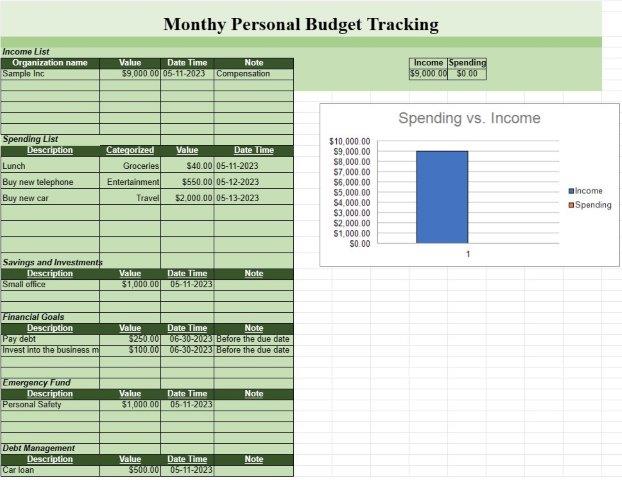
- Pendapatan: Sumber pendapatan: Cantumkan semua sumber pendapatan, seperti gaji, sewa pendapatan, investasi, dan sumber uang lain yang masuk ke rumah tangga.
- Jumlah: Tentukan jumlah yang diterima dari setiap sumber pendapatan.
- Total pendapatan: Secara otomatis menghitung total pendapatan pada bulan tersebut.
- Beban Tetap:
- Pembayaran hipotek atau sewa.
- Utilitas (misalnya listrik, gas, air).
- Premi asuransi (misalnya kesehatan, otomotif, rumah).
- Pembayaran pinjaman (misalnya kredit mobil, pinjaman pelajar).
- Layanan berlangganan (misalnya, TV kabel, internet, layanan streaming).
- Pajak properti.
- Pengeluaran tetap bulanan lainnya.
- Pengeluaran Variabel:
- Bahan makanan dan perlengkapan rumah tangga.
- Transportasi (misalnya bahan bakar, transportasi umum).
- Makan di luar dan hiburan.
- Kesehatan dan kebugaran (misalnya, tagihan medis, resep).
- Biaya penitipan anak dan pendidikan.
- Perawatan dan perawatan pribadi.
- Pengeluaran lain-lain.
- Tabungan dan Investasi: Kontribusi ke rekening tabungan (misalnya dana darurat, tabungan pensiun).
- Investasi (misalnya saham, obligasi, reksa dana).
- Kontribusi ke rekening tabungan perguruan tinggi.
- Tujuan atau rekening tabungan lainnya.
- Hutang dan Kredit Kartu:
- Saldo kartu kredit dan pembayaran minimum.
- Utang dan saldo pinjaman lainnya.
- Suku bunga utang.
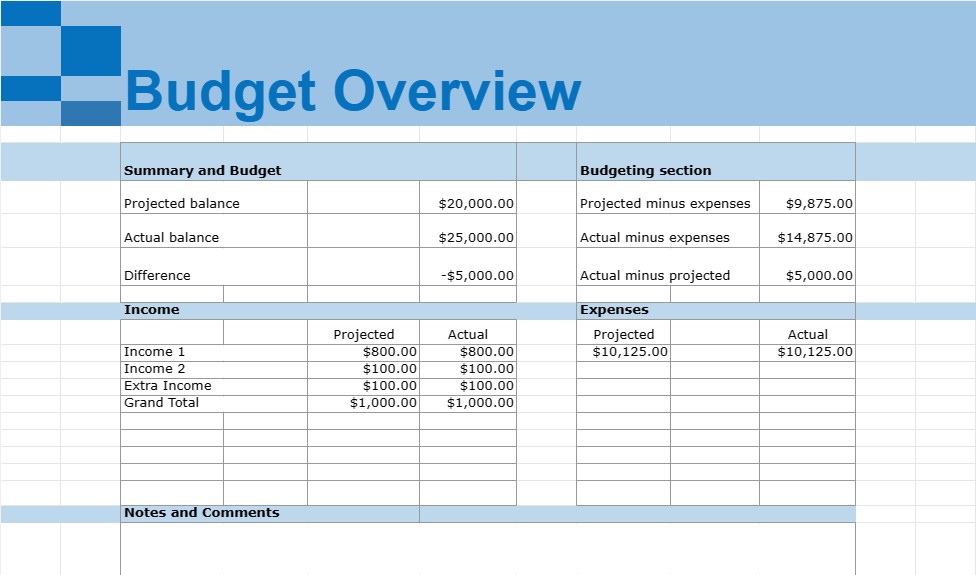
- Ringkasan dan Anggaran: Bagian ringkasan yang menghitung total pendapatan, total pengeluaran, dan pendapatan bersih (pendapatan dikurangi pengeluaran) pada bulan tersebut.
- Bagian penganggaran: Bandingkan pengeluaran sebenarnya dengan anggaran atau rencana pengeluaran, jika berlaku.
- Kategori Tambahan: Tergantung pada kebutuhan spesifik rumah tangga situasi keuangan, kategori tambahan dapat dimasukkan, seperti sumbangan amal, pengeluaran hewan peliharaan, pemeliharaan rumah, atau tabungan pendidikan.
- Catatan dan Komentar: Ruang untuk menambahkan komentar, catatan, atau pengingat terkait pengeluaran atau transaksi keuangan tertentu.
Template Spreadsheet Bulanan Rumah Tangga adalah alat yang berharga untuk mengelola keuangan pribadi, karena membantu individu dan keluarga melacak pendapatan dan pengeluaran mereka, mengidentifikasi pola pengeluaran, mengatur keuangan tujuan, dan membuat anggaran. Mereka memberikan gambaran yang jelas tentang kesehatan keuangan rumah tangga dan dapat membantu dalam membuat keputusan keuangan yang tepat, mengurangi utang, meningkatkan tabungan, dan mencapai tujuan keuangan jangka panjang. Templat ini dapat dibuat menggunakan perangkat lunak spreadsheet seperti Microsoft Excel atau Google Spreadsheet atau ditemukan sebagai templat siap pakai secara online.
Nem forhåndsvisning og download regnearkskabelon
Se den fulde version af en regnearksskabelon uden begrænsninger for at se, om du kan lide den, så kan du downloade excel-skabelonen for at gemme den på din enhed og bruge den gratis.
Få adgang til regnearksskabelon fra hvor som helst
Dette fungerer på alle populære operativsystemer såsom Windows, MacOS, Linux, iOS. Du kan se regnearksskabelonerne og downloade dem uden yderligere programmer.
Sådan bruger du en skabelon
Find ud af, hvordan du kan forhåndsvise, downloade og derefter bruge regnearksskabelonen ved at følge trinene, som er ekstremt nemme at følge
Flere lignende skabeloner
Se flere af regnearksskabelonerne, som er under samme kategori med den valgte.