
✕︎
LANGUAGE ▼︎
Svenska
فارسی
Italiano
Tiếng Việt
Català
Türk
हिन्दी
Čeština
Lietuvis
Ελληνικά
Dansk
Magyar
Български
Deutsch
Bahasa Melayu
Nederlands
Русский
English
Український
Español
Polskie
ภาษาไทย
Português
ქართველი
Français
Română
한국어
Slovák
繁體中文
日本語
Indonesia
العربية
简体中文
Svenska
فارسی
Italiano
Tiếng Việt
Català
Türk
हिन्दी
Čeština
Lietuvis
Ελληνικά
Dansk
Magyar
Български
Deutsch
Bahasa Melayu
Nederlands
Русский
English
Український
Español
Polskie
ภาษาไทย
Português
ქართველი
Français
Română
한국어
Slovák
繁體中文
日本語
Indonesia
العربية
简体中文
Simple Inventory List

Simple Inventory List

类别 : 追踪器

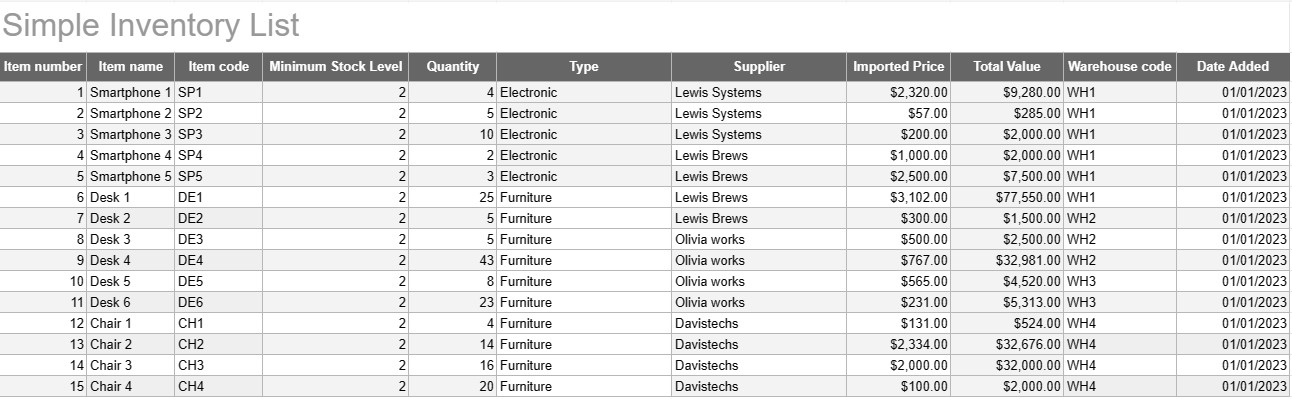
Write down all of your inventory names and descriptions so you can see on all them in one place.

查看模板
↓︎ 现在下载
无法使用上面的按钮下载?单击此链接下载文件。
描述
0
⌨︎
评论
283
⤓︎
1
☆︎

A Simple Inventory List Template is a basic yet effective tool used by individuals and businesses to track and manage their inventory of goods, products, or assets. This template provides a structured format for recording item details, quantities, locations, and other relevant information, making it easier to monitor inventory levels and facilitate efficient management.

Key Components of a Simple Inventory List Template:

  • Item Details: The template includes columns or sections for item-specific information, such as the item name, description, unique identifier (e.g., SKU or serial number), and any additional notes.
  • Quantity: Users can record the quantity or units of each item in stock. This column is essential for tracking inventory levels accurately.
  • Location: For businesses with multiple storage locations or warehouses, the template may include a column to specify the physical location of each item. This helps streamline retrieval and restocking.
  • Unit Price: Users can enter the unit price or cost of each item. This information is valuable for calculating the total value of the inventory.
  • Total Value: Some templates automatically calculate the total value of each item based on the quantity and unit price. This provides a quick overview of the total worth of the inventory.
  • Date Added/Updated: To track changes and updates to the inventory, users can record the date each item was added or modified.
  • Category/Type: Items can be categorized into different groups or types (e.g., electronics, office supplies, clothing) for better organization and reporting.
  • Minimum Stock Level: Users can set a minimum stock level for each item. When the quantity falls below this level, it serves as a trigger to reorder or restock the item.
  • Supplier Information: In a business setting, users may include supplier details, such as the supplier's name, contact information, and reorder information.

Benefits of Using a Simple Inventory List Template:

  • Inventory Tracking: Provides a clear, up-to-date snapshot of inventory levels, helping prevent stockouts and overstocking.
  • Cost Control: Enables businesses to monitor the value of their inventory and make informed decisions about restocking and purchasing.
  • Efficiency: Streamlines inventory management by centralizing information and making it easily accessible.
  • Data Accuracy: Reduces the risk of errors in tracking inventory, as all information is recorded systematically.
  • Order Management: Helps in identifying when to reorder items and from which suppliers, improving supply chain management.
  • Compliance: In some industries, maintaining accurate inventory records is essential for regulatory compliance and financial reporting.
  • Resource Optimization: Enables businesses to allocate resources more effectively and reduce carrying costs.

In conclusion, a Simple Inventory List Template is a practical tool for individuals and businesses looking to maintain organized and accurate records of their inventory. Whether used for a small home inventory or as part of a larger business operation, this template simplifies inventory management, reduces the risk of shortages or overstocking, and contributes to better financial control and decision-making.

轻松预览和下载电子表格模板

查看电子表格模板的完整版本,没有任何限制,看看您是否喜欢它,然后您可以下载 Excel 模板将其存储在您的设备上并免费使用。

从任何地方访问电子表格模板

这适用于所有流行的操作系统,例如 Windows、MacOS、Linux、iOS。您可以查看电子表格模板并下载它们,而无需其他程序。

如何使用模板

按照非常容易遵循的步骤了解如何预览、下载和使用电子表格模板

👁
1
选择发票、预算、日历、其他计划者和其他跟踪器等类别,然后单击电子表格模板以在线查看
2
预览电子表格模板后,您可以下载您认为适合您目的的模板
🗎
3
一次您的设备上有该文件,您只需将数据填充到其中或修改它以匹配用例
🗂
4
完成电子表格模板后,您可以按照您选择的方式使用它

更多类似模板

查看更多与所选模板属于同一类别的电子表格模板。












