✕︎
LANGUAGE ▼︎
Svenska
فارسی
Italiano
Tiếng Việt
Català
Türk
हिन्दी
Čeština
Lietuvis
Ελληνικά
Dansk
Magyar
Български
Deutsch
Bahasa Melayu
Nederlands
Русский
English
Український
Español
Polskie
ภาษาไทย
Português
ქართველი
Français
Română
한국어
Slovák
繁體中文
日本語
Indonesia
العربية
简体中文
Svenska
فارسی
Italiano
Tiếng Việt
Català
Türk
हिन्दी
Čeština
Lietuvis
Ελληνικά
Dansk
Magyar
Български
Deutsch
Bahasa Melayu
Nederlands
Русский
English
Український
Español
Polskie
ภาษาไทย
Português
ქართველი
Français
Română
한국어
Slovák
繁體中文
日本語
Indonesia
العربية
简体中文
Class Calendar

Class Calendar

类别 : 日历

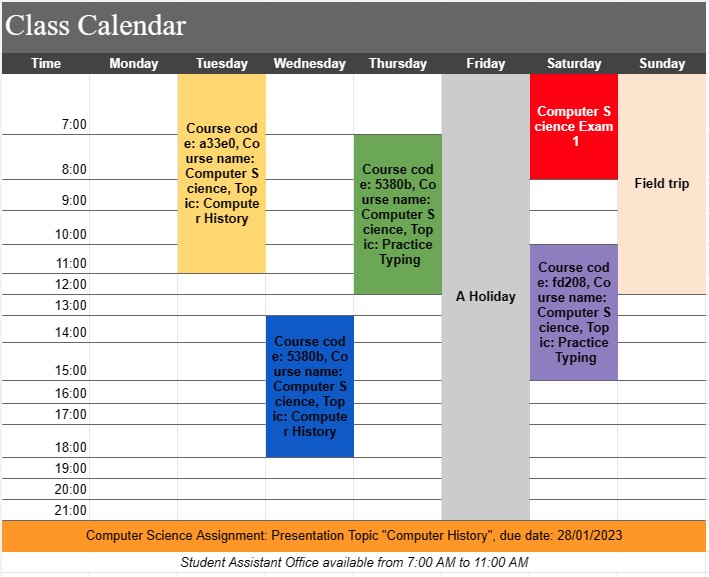
This calendar is for you to use to see the upcoming classes to learn and to do work much more well-organized.

查看模板
↓︎ 现在下载
无法使用上面的按钮下载?单击此链接下载文件。
描述
0
⌨︎
评论
205
⤓︎
0
☆︎

A Class Calendar Template is a versatile tool commonly used in educational settings, such as schools, colleges, and universities. It serves as a visual representation of a class schedule, enabling educators and students to plan and organize their academic activities effectively. This template helps ensure that classes, assignments, exams, and other important events are scheduled and managed efficiently.

Key Components of a Class Calendar Template:

  • Course Details: The template typically includes information about the course, such as the course name, course code, instructor's name, and location of the class.
  • Days and Times: A Class Calendar displays the days of the week and the times when classes occur. This schedule may vary from day to day, depending on the course structure.
  • Class Sessions: Each class session is listed within the corresponding day and time slot. This includes details like the topic to be covered, any required reading or assignments, and special notes or instructions.
  • Assignments and Due Dates: Important assignment due dates and deadlines are often included on the calendar. This helps students plan their study time and ensures that assignments are submitted on time.
  • Exams and Tests: The calendar may indicate exam dates and times. It's crucial for students to be aware of these dates to adequately prepare for assessments.
  • Holidays and Breaks: Non-class days, such as holidays and semester breaks, are typically marked on the calendar to avoid scheduling conflicts.
  • Special Events: Any special events related to the course, such as guest lectures, field trips, or lab sessions, may be noted on the calendar.
  • Office Hours: For instructors, office hours—times when students can seek assistance or clarification—are often included on the calendar.

Benefits of Using a Class Calendar Template:

  • Organization: Provides a structured and organized overview of the entire academic term, making it easier for both educators and students to plan their schedules.
  • Time Management: Helps students allocate time for studying, attending classes, and completing assignments, leading to better time management skills.
  • Communication: Enhances communication between instructors and students by providing a central location for sharing important course-related information.
  • Preparation: Allows students to prepare in advance for upcoming assignments, exams, and class discussions.
  • Avoiding Conflicts: Reduces scheduling conflicts by clearly indicating when classes, exams, and other commitments occur.
  • Resource Allocation: Facilitates the allocation of resources such as textbooks, study materials, and study group meetings based on the class schedule.
  • Transparency: Provides transparency regarding course expectations and due dates, reducing misunderstandings and missed deadlines.

In conclusion, a Class Calendar Template is an invaluable tool for educators and students alike. It simplifies class scheduling, aids in time management, and fosters effective communication within an educational environment. Whether used in traditional classroom settings or for online courses, this template helps ensure that all academic activities are organized, accessible, and well-coordinated throughout the academic term.

轻松预览和下载电子表格模板

查看电子表格模板的完整版本,没有任何限制,看看您是否喜欢它,然后您可以下载 Excel 模板将其存储在您的设备上并免费使用。

从任何地方访问电子表格模板

这适用于所有流行的操作系统,例如 Windows、MacOS、Linux、iOS。您可以查看电子表格模板并下载它们,而无需其他程序。

如何使用模板

按照非常容易遵循的步骤了解如何预览、下载和使用电子表格模板

👁
1
选择发票、预算、日历、其他计划者和其他跟踪器等类别,然后单击电子表格模板以在线查看
2
预览电子表格模板后,您可以下载您认为适合您目的的模板
🗎
3
一次您的设备上有该文件,您只需将数据填充到其中或修改它以匹配用例
🗂
4
完成电子表格模板后,您可以按照您选择的方式使用它

更多类似模板

查看更多与所选模板属于同一类别的电子表格模板。