
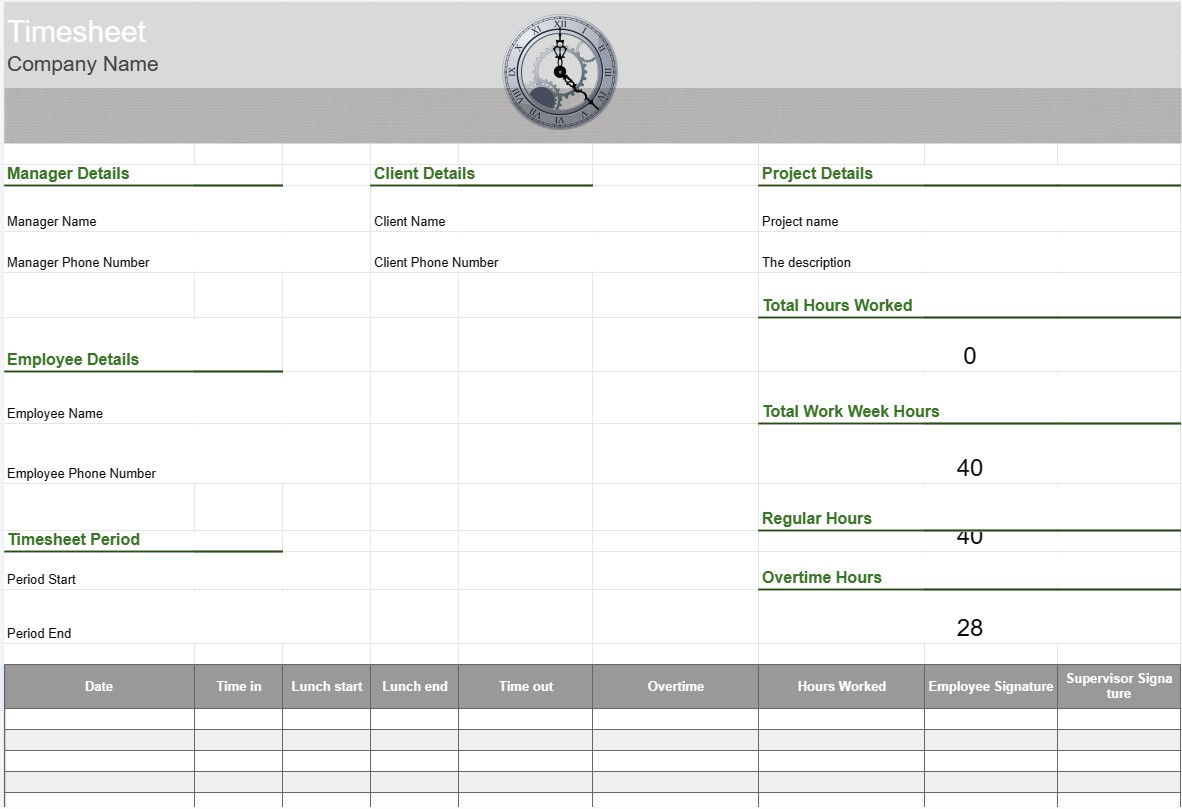
Thời gian biểu
Loại : Trình theo dõi
Bảng chấm công làm việc để theo dõi nhân viên nhằm đạt được cái nhìn tổng quan về những gì bộ phận đang làm trong giờ làm việc.
Mẫu bảng chấm công là một công cụ được nhân viên và tổ chức sử dụng để theo dõi và ghi lại thời gian dành cho các nhiệm vụ, dự án hoặc nhiệm vụ khác nhau. Bảng chấm công thường được sử dụng để theo dõi giờ làm việc, cho dù vì mục đích tính lương, quản lý dự án hay theo dõi số giờ phải trả cho khách hàng. Mẫu bảng chấm công giúp đảm bảo theo dõi và báo cáo thời gian chính xác.
Các thành phần chính của Mẫu bảng chấm công:
- Thông tin nhân viên: Mẫu bao gồm thông tin chi tiết về nhân viên, chẳng hạn như tên, ID nhân viên, bộ phận và thông tin liên hệ.
- Ngày và giờ: Định dạng lịch hoặc bảng hiển thị ngày và giờ mà nhân viên ghi lại giờ làm việc của họ . Việc này có thể được sắp xếp theo ngày, tuần hoặc tháng.
- Chi tiết nhiệm vụ/dự án: Nhân viên nhập thông tin chi tiết về nhiệm vụ hoặc dự án họ đang thực hiện. Điều này có thể bao gồm tên dự án, mô tả nhiệm vụ hoặc mã dự án.
- Thời gian vào và ra: Đối với mỗi ngày, nhân viên ghi lại thời gian họ bắt đầu và kết thúc công việc, cũng như thời gian họ bắt đầu và kết thúc công việc. mọi thời gian nghỉ giải lao trong ngày làm việc.
- Tổng số giờ: Mẫu tính tổng số giờ làm việc mỗi ngày, tuần hoặc tháng dựa trên các mục nhập thời gian.
- Theo dõi làm thêm giờ: Nếu có thể, mẫu có thể bao gồm các phần để theo dõi số giờ làm thêm, bao gồm làm thêm giờ thông thường, làm thêm giờ gấp đôi và bất kỳ mức giá hiện hành nào.
- Khách hàng hoặc Khách hàng: Nếu công việc liên quan đến dự án của khách hàng, mẫu có thể bao gồm một trường để chỉ định khách hàng hoặc tên khách hàng.
- Phê duyệt và Chữ ký: Một số bảng chấm công bao gồm các khoảng trống để nhân viên ký tên và người giám sát hoặc người quản lý phê duyệt số giờ đã ghi.
- Ghi chú hoặc Nhận xét: Nhân viên có thể thêm ghi chú hoặc nhận xét liên quan đến nhiệm vụ hoặc mục thời gian cụ thể, chẳng hạn như giải thích về thời gian làm thêm hoặc bối cảnh bổ sung.
- Kết thúc tuần: Bảng chấm công thường cho biết ngày kết thúc của tuần làm việc hoặc kỳ báo cáo.
Lợi ích về việc sử dụng Mẫu bảng chấm công:
- Theo dõi thời gian chính xác: Đảm bảo rằng giờ làm việc của nhân viên được ghi lại chính xác, điều này cần thiết cho việc xử lý bảng lương, thanh toán dự án và tuân thủ quy định lao động luật.
- Quản lý dự án: Giúp các nhóm và người quản lý dự án theo dõi thời gian dành cho các nhiệm vụ khác nhau của dự án, cho phép lập kế hoạch dự án và phân bổ nguồn lực tốt hơn.
- Xử lý bảng lương: Đơn giản hóa quy trình trả lương bằng cách cung cấp bản ghi chi tiết về số giờ làm việc của nhân viên, bao gồm cả thời gian làm thêm giờ và thời gian nghỉ.
- Thanh toán cho khách hàng: Tạo điều kiện thanh toán cho khách hàng về số giờ làm việc có thể lập hóa đơn, giúp việc lập hóa đơn chính xác dễ dàng hơn.
- Tuân thủ: Hỗ trợ các tổ chức tuân thủ các quy định lao động và luật lao động liên quan đến giờ làm việc và làm thêm giờ.
- Phân tích hiệu suất: Cung cấp dữ liệu để phân tích năng suất và hiệu quả công việc của nhân viên.
- Tài liệu: Dùng dưới dạng bản ghi về số giờ làm việc, có thể hữu ích cho việc kiểm tra , tranh chấp hoặc tham chiếu trong tương lai.
- Tính minh bạch: Thúc đẩy tính minh bạch trong theo dõi thời gian và báo cáo công việc, giúp nhân viên và người sử dụng lao động duy trì niềm tin.
Tóm lại, Mẫu bảng chấm công là một công cụ có giá trị để theo dõi và ghi lại chính xác giờ làm việc và nhiệm vụ của nhân viên. Nó cần thiết cho nhiều mục đích khác nhau, bao gồm xử lý bảng lương, quản lý dự án, thanh toán cho khách hàng và tuân thủ luật và quy định lao động.
Dễ dàng xem trước và tải xuống mẫu bảng tính
Xem phiên bản đầy đủ của mẫu bảng tính không có giới hạn để xem nếu bạn thích nó thì bạn có thể tải xuống mẫu excel để lưu trữ trên thiết bị của mình và sử dụng miễn phí.
Truy cập mẫu bảng tính từ mọi nơi
Tính năng này hoạt động trên tất cả các hệ điều hành phổ biến như Windows, MacOS, Linux, iOS. Bạn có thể xem các mẫu bảng tính và tải chúng xuống mà không cần chương trình bổ sung.
Cách sử dụng mẫu
Tìm hiểu cách xem trước, tải xuống và sau đó sử dụng mẫu bảng tính bằng cách làm theo các bước cực kỳ dễ thực hiện
Nhiều mẫu tương tự hơn
Xem thêm các mẫu bảng tính cùng danh mục với mẫu đã chọn.













