
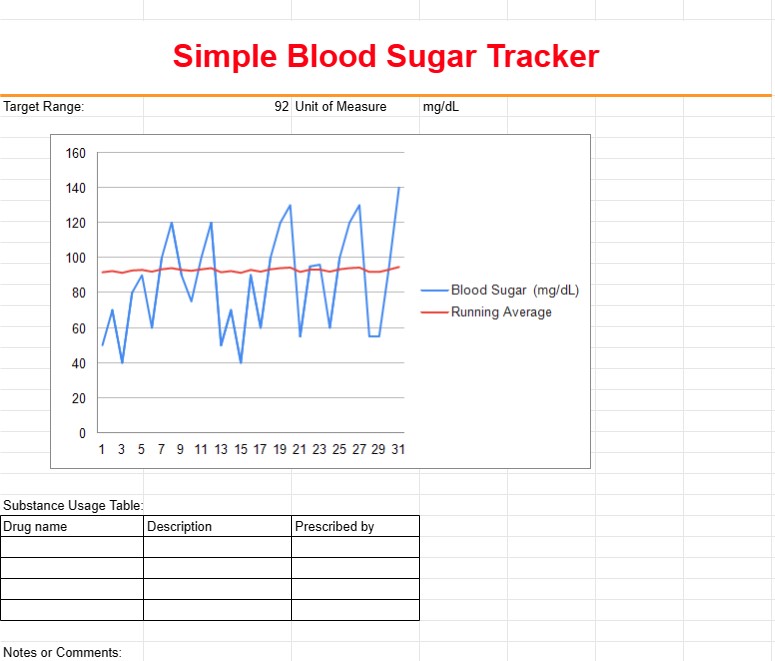
Simple Blood Sugar Tracker
Loại : Trình theo dõi
Integrate this with your device or give information to it manually, this will give you an idea on how to visualize the health data.
A Simple Blood Sugar Tracker Template is a tool used by individuals, particularly those with diabetes or other health conditions, to monitor and record their blood sugar levels over time. This template helps users track fluctuations in blood sugar, identify patterns, and share essential information with healthcare providers to manage their health effectively.
Key Components of a Simple Blood Sugar Tracker Template:
- Date and Time: The template includes columns for recording the date and time of each blood sugar reading. Users can enter multiple readings throughout the day.
- Blood Sugar Level: Users input their blood sugar levels in the corresponding columns, typically measured in milligrams per deciliter (mg/dL) or millimoles per liter (mmol/L).
- Before/After Meals: Users indicate whether each reading was taken before or after meals, helping to track how blood sugar responds to food intake.
- Notes or Comments: A section for users to add notes or comments about factors that may have influenced blood sugar levels, such as exercise, medication, or illness.
- Target Range: In some templates, users can set and track their target blood sugar range to see if their readings are within the desired range.
- Medication: If applicable, users can record the names and dosages of any medications or insulin they are taking.
Benefits of Using a Simple Blood Sugar Tracker Template:
- Monitoring: Provides a comprehensive overview of blood sugar levels over time, allowing individuals to monitor their health and identify trends.
- Pattern Recognition: Helps users recognize patterns in blood sugar fluctuations, such as spikes or drops, in response to different factors.
- Treatment Adjustment: Enables individuals and healthcare providers to make informed decisions about medication dosages, dietary adjustments, or lifestyle changes.
- Improved Communication: Facilitates communication between individuals and healthcare providers, as the recorded data can be shared during medical appointments.
- Medication Management: Helps individuals track the effectiveness of medications and insulin doses in maintaining stable blood sugar levels.
- Self-Management: Empowers individuals to take an active role in managing their health and making informed decisions about their diabetes care.
- Early Detection: Allows for early detection of potential issues or trends that may require medical attention.
In summary, a Simple Blood Sugar Tracker Template is a valuable tool for individuals managing diabetes or other health conditions that require monitoring of blood sugar levels. It assists in tracking, analyzing, and managing blood sugar data, ultimately contributing to better health outcomes and informed decision-making regarding treatment and lifestyle choices.
Dễ dàng xem trước và tải xuống mẫu bảng tính
Xem phiên bản đầy đủ của mẫu bảng tính không có giới hạn để xem nếu bạn thích nó thì bạn có thể tải xuống mẫu excel để lưu trữ trên thiết bị của mình và sử dụng miễn phí.
Truy cập mẫu bảng tính từ mọi nơi
Tính năng này hoạt động trên tất cả các hệ điều hành phổ biến như Windows, MacOS, Linux, iOS. Bạn có thể xem các mẫu bảng tính và tải chúng xuống mà không cần chương trình bổ sung.
Cách sử dụng mẫu
Tìm hiểu cách xem trước, tải xuống và sau đó sử dụng mẫu bảng tính bằng cách làm theo các bước cực kỳ dễ thực hiện
Nhiều mẫu tương tự hơn
Xem thêm các mẫu bảng tính cùng danh mục với mẫu đã chọn.













