
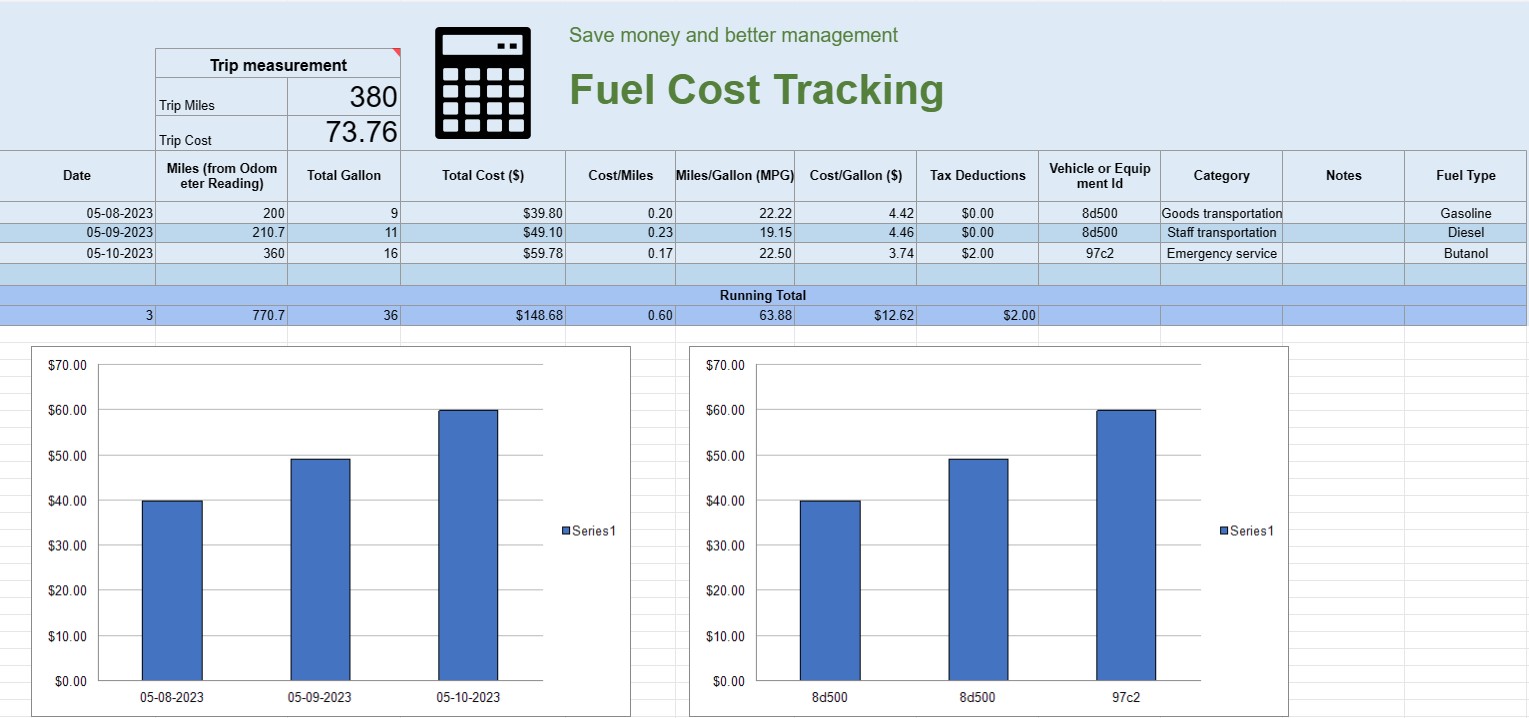
Theo dõi chi phí nhiên liệu
Loại : Trình theo dõi
Bạn có thể sử dụng điều này để theo dõi chi phí vận hành của một chiếc xe, nó cung cấp các công thức để bạn tự động tính toán.


Bảng tính theo dõi chi phí nhiên liệu là tài liệu hoặc bảng tính kỹ thuật số mà các cá nhân, doanh nghiệp hoặc tổ chức sử dụng để ghi lại, phân tích và quản lý các chi phí liên quan đến mức tiêu thụ nhiên liệu cho phương tiện hoặc thiết bị. Nó cung cấp một định dạng có cấu trúc để ghi lại việc mua nhiên liệu, tính toán hiệu quả sử dụng nhiên liệu và theo dõi chi phí nhiên liệu tổng thể theo thời gian.
Dưới đây là các thành phần chính thường thấy trong bảng tính theo dõi chi phí nhiên liệu:
- Ngày: Ghi lại ngày thực hiện mua nhiên liệu. Điều này giúp thiết lập hồ sơ giao dịch theo trình tự thời gian.
- ID phương tiện hoặc thiết bị: Xác định phương tiện hoặc thiết bị cụ thể mà nhiên liệu được mua. Điều này đặc biệt hữu ích để theo dõi các chi phí liên quan đến nhiều phương tiện hoặc bộ phận máy móc.
- Đọc đồng hồ đo đường: Đối với các phương tiện, hãy ghi lại chỉ số đồng hồ đo đường hiện tại tại thời điểm tiếp nhiên liệu. Điều này cho phép bạn theo dõi khoảng cách di chuyển giữa các lần tiếp nhiên liệu.
- Loại nhiên liệu: Chỉ định loại nhiên liệu được mua (ví dụ: xăng, dầu diesel, khí tự nhiên, điện).
- Gallon/Lít đã mua: Ghi lại số lượng nhiên liệu đã mua tính bằng gallon hoặc lít.
- Đơn giá: Lưu ý chi phí cho mỗi gallon đơn vị nhiên liệu, thường bằng đô la hoặc nội tệ.
- Tổng chi phí: Tự động tính toán tổng chi phí mua nhiên liệu bằng cách nhân số gallon/lít mua với đơn giá.
- Số dặm/km: Tính toán và ghi lại quãng đường đã đi giữa lần tiếp nhiên liệu hiện tại và lần tiếp nhiên liệu trước đó. Điều này có thể được tính bằng cách lấy số hiện tại trừ đi số chỉ trên đồng hồ đo đường trước đó.
- Hiệu suất nhiên liệu (MPG hoặc L/100km): Tính toán và ghi lại mức tiết kiệm nhiên liệu theo đơn vị dặm trên mỗi gallon ( MPG) hoặc lít trên 100 km (L/100km). Để tính MPG, hãy chia quãng đường đã đi cho lượng nhiên liệu tiêu thụ. Để tính L/100 km, hãy chia lượng nhiên liệu tiêu thụ (tính bằng lít) cho quãng đường đã đi (tính bằng km).
- Lưu ý: Bao gồm mọi ghi chú hoặc nhận xét có liên quan về việc mua nhiên liệu, chẳng hạn như vị trí của trạm tiếp nhiên liệu hoặc bất kỳ hoạt động bảo trì nào được thực hiện.
- Tổng hoạt động: Duy trì tổng chi phí nhiên liệu đang hoạt động theo thời gian. Điều này giúp bạn theo dõi chi phí tích lũy của mình.
- Biểu đồ và đồ thị: Tạo trình bày trực quan về mức tiêu thụ nhiên liệu và chi phí của bạn theo thời gian bằng cách sử dụng biểu đồ hoặc đồ thị để hình dung rõ hơn các xu hướng và mô hình.
- Danh mục hoặc Mục đích: Phân loại chi phí nhiên liệu dựa trên mục đích, chẳng hạn như mục đích sử dụng cá nhân, mục đích kinh doanh hoặc các dự án cụ thể. Điều này có thể giúp bạn phân bổ chi phí một cách chính xác.
- Khấu trừ thuế: Nếu có thể, hãy ghi lại chi phí nhiên liệu đủ điều kiện để được khấu trừ hoặc hoàn thuế.
Bạn có thể tạo bảng tính theo dõi chi phí nhiên liệu bằng phần mềm như Microsoft Excel, Google Trang tính hoặc phần mềm kế toán chuyên dụng. Các mẫu theo dõi chi phí nhiên liệu thường có sẵn trực tuyến và có thể được tùy chỉnh để đáp ứng nhu cầu cụ thể của bạn. Việc thường xuyên cập nhật và phân tích dữ liệu trong bảng tính theo dõi chi phí nhiên liệu có thể giúp bạn đưa ra quyết định sáng suốt về mức tiêu thụ nhiên liệu, lập ngân sách và tối ưu hóa hiệu suất cho phương tiện hoặc thiết bị của mình.
Dễ dàng xem trước và tải xuống mẫu bảng tính
Xem phiên bản đầy đủ của mẫu bảng tính không có giới hạn để xem nếu bạn thích nó thì bạn có thể tải xuống mẫu excel để lưu trữ trên thiết bị của mình và sử dụng miễn phí.
Truy cập mẫu bảng tính từ mọi nơi
Tính năng này hoạt động trên tất cả các hệ điều hành phổ biến như Windows, MacOS, Linux, iOS. Bạn có thể xem các mẫu bảng tính và tải chúng xuống mà không cần chương trình bổ sung.
Cách sử dụng mẫu
Tìm hiểu cách xem trước, tải xuống và sau đó sử dụng mẫu bảng tính bằng cách làm theo các bước cực kỳ dễ thực hiện
Nhiều mẫu tương tự hơn
Xem thêm các mẫu bảng tính cùng danh mục với mẫu đã chọn.













