
Lập kế hoạch sự kiện nhóm
Loại : Người lập kế hoạch
Bảng tính này đang giúp người lãnh đạo lập kế hoạch sự kiện kỹ lưỡng hơn.


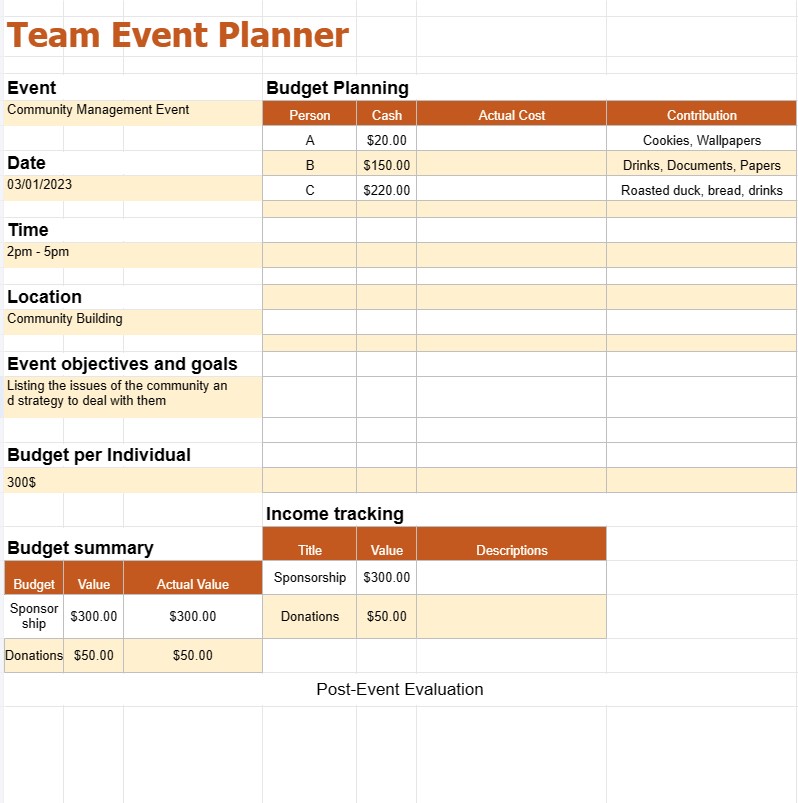
Mẫu lập kế hoạch sự kiện nhóm là một tài liệu hoặc tệp kỹ thuật số được thiết kế sẵn, đóng vai trò là điểm khởi đầu để các nhóm hoặc người lập kế hoạch sự kiện tạo kế hoạch có cấu trúc để tổ chức và quản lý sự kiện. Các mẫu này có sẵn và có thể được tùy chỉnh để đáp ứng nhu cầu cụ thể của một sự kiện, cho dù đó là cuộc họp công ty, hội nghị, đám cưới, bữa tiệc hay bất kỳ hình thức tụ tập nào khác.
Các mẫu lập kế hoạch sự kiện được thiết kế để đơn giản hóa quy trình lập kế hoạch, cung cấp khuôn khổ cho các nhiệm vụ và trách nhiệm, đồng thời giúp các nhóm luôn có tổ chức và đi đúng hướng. Dưới đây là các thành phần và phần phổ biến mà bạn có thể tìm thấy trong Mẫu lập kế hoạch sự kiện nhóm:
- Chi tiết sự kiện:
- Tên sự kiện, ngày, giờ, và địa điểm.
- Loại hoặc chủ đề sự kiện.
- Mục đích và mục đích của sự kiện.
- Danh sách kiểm tra nhiệm vụ:
- Danh sách các nhiệm vụ cần hoàn thành trước, trong và sau sự kiện.
- Giao nhiệm vụ:Giao nhiệm vụ cụ thể cho các thành viên trong nhóm hoặc các bên chịu trách nhiệm.
- Ngày đến hạn: Đặt thời hạn hoàn thành nhiệm vụ.
- Cập nhật trạng thái: Theo dõi tiến độ của nhiệm vụ.
- Lập ngân sách:
- Phân bổ ngân sách: Xác định ngân sách sự kiện tổng thể và phân bổ kinh phí cho các tổ chức khác nhau danh mục (ví dụ: địa điểm, phục vụ ăn uống, trang trí).
- Theo dõi chi phí: Ghi lại và theo dõi tất cả các chi phí liên quan đến sự kiện, bao gồm cả ước tính và chi phí thực tế.
- Theo dõi thu nhập: Ghi lại các nguồn thu nhập, chẳng hạn như bán vé, tài trợ hoặc quyên góp.
- Tóm tắt ngân sách: Tính toán và hiển thị số dư ngân sách cũng như chênh lệch giữa ước tính và thực tế.
- Danh sách khách mời:
- Danh sách khách mời hoặc người tham dự, bao gồm tên, thông tin liên hệ và hồi đáp trạng thái.
- Các yêu cầu hoặc lưu ý đặc biệt dành cho những khách hàng cụ thể.
- Đánh giá sau sự kiện:
- Tiêu chí đánh giá và khảo sát để thu thập phản hồi từ người tham dự.
- Phân tích thành công của sự kiện và các lĩnh vực cần cải thiện.
Mẫu lập kế hoạch sự kiện nhóm có thể có thể được tìm thấy ở nhiều định dạng khác nhau, bao gồm tài liệu Word, bảng tính Excel, Google Docs và phần mềm quản lý sự kiện chuyên dụng. Việc sử dụng mẫu giúp tiết kiệm thời gian, đảm bảo tính nhất quán và cung cấp khuôn khổ có cấu trúc để lập kế hoạch và thực hiện sự kiện thành công. Các nhóm có thể tùy chỉnh các mẫu này để phù hợp với yêu cầu sự kiện cụ thể của mình và cộng tác hiệu quả trong suốt quá trình lập kế hoạch.
Dễ dàng xem trước và tải xuống mẫu bảng tính
Xem phiên bản đầy đủ của mẫu bảng tính không có giới hạn để xem nếu bạn thích nó thì bạn có thể tải xuống mẫu excel để lưu trữ trên thiết bị của mình và sử dụng miễn phí.
Truy cập mẫu bảng tính từ mọi nơi
Tính năng này hoạt động trên tất cả các hệ điều hành phổ biến như Windows, MacOS, Linux, iOS. Bạn có thể xem các mẫu bảng tính và tải chúng xuống mà không cần chương trình bổ sung.
Cách sử dụng mẫu
Tìm hiểu cách xem trước, tải xuống và sau đó sử dụng mẫu bảng tính bằng cách làm theo các bước cực kỳ dễ thực hiện
Nhiều mẫu tương tự hơn
Xem thêm các mẫu bảng tính cùng danh mục với mẫu đã chọn.













