Lịch hẹn hàng ngày
Loại : lịch
Lịch trình hàng ngày của bạn sẽ rõ ràng hơn nếu bạn sử dụng điều này để chỉ ra tất cả các cuộc hẹn trong ngày.
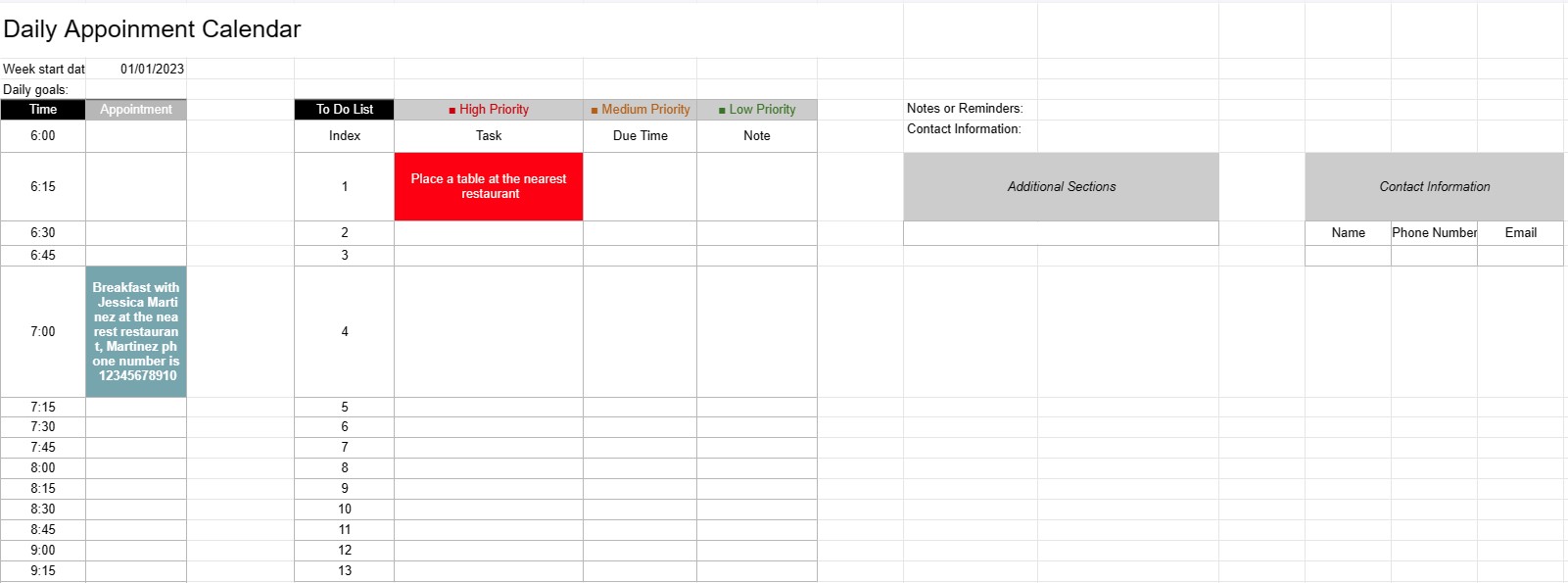
Mẫu lịch hẹn hàng ngày là một công cụ lập kế hoạch được các cá nhân, chuyên gia và doanh nghiệp sử dụng để lên lịch và quản lý các cuộc hẹn, cuộc họp và nhiệm vụ hàng ngày của họ. Nó cung cấp bố cục có cấu trúc để tổ chức các hoạt động hàng ngày, đặt mức độ ưu tiên và đảm bảo thời gian được phân bổ hiệu quả.
Các thành phần chính của Mẫu lịch hẹn hàng ngày:
- Ngày: Mẫu thường hiển thị ngày ở đầu mỗi trang hàng ngày, cho phép người dùng điều hướng qua các ngày khác nhau.
- Khoảng thời gian: Ngày được chia thành các khe thời gian hoặc giờ, thường bắt đầu vào buổi sáng và kết thúc vào buổi tối. Mỗi khoảng thời gian đại diện cho một khoảng thời gian cụ thể trong ngày.
- Chi tiết cuộc hẹn: Người dùng có thể nhập chi tiết cuộc hẹn trong từng khoảng thời gian, bao gồm:
- Thời gian hẹn
- Tiêu đề hoặc mô tả về cuộc hẹn
- Địa điểm hoặc phòng họp
- Thông tin liên hệ của các cá nhân liên quan
- Danh sách việc cần làm: Một số mẫu bao gồm một phần để liệt kê các nhiệm vụ hoặc mục việc cần làm cần hoàn thành trong ngày. Những nội dung này có thể được phân loại theo mức độ ưu tiên hoặc thời gian đến hạn.
- Ghi chú hoặc Lời nhắc: Bạn có thể cung cấp khoảng trống cho các ghi chú hoặc lời nhắc chung ở cuối trang.
- Ưu tiên hoặc mục tiêu: Một số mẫu có thể bao gồm một phần để đặt các ưu tiên hoặc mục tiêu hàng ngày, giúp người dùng tập trung vào các nhiệm vụ thiết yếu.
- Thông tin liên hệ: Chi tiết liên hệ của các cá nhân hoặc khách hàng quan trọng có thể được đưa vào để tham khảo nhanh.
- Các phần bổ sung: Tùy thuộc vào mẫu, các phần bổ sung để theo dõi chi phí, quãng đường hoặc thông tin cụ thể khác có thể
Lợi ích của việc sử dụng Mẫu lịch hẹn hàng ngày:
- Quản lý thời gian: Giúp người dùng phân bổ thời gian hiệu quả bằng cách lên lịch các cuộc hẹn và nhiệm vụ.
- Tổ chức: Cung cấp một cách có cấu trúc để theo dõi các cam kết hàng ngày, giảm nguy cơ đặt trước quá nhiều hoặc bỏ lỡ cuộc hẹn.
- Ưu tiên: Cho phép người dùng ưu tiên các nhiệm vụ và cuộc hẹn, đảm bảo rằng những mục quan trọng nhất được giải quyết trước.
- Năng suất: Tạo điều kiện quản lý thời gian tốt hơn và tăng năng suất bằng cách cung cấp cái nhìn tổng quan trực quan về các hoạt động trong ngày.
- Giao tiếp: Đảm bảo rằng người dùng được chuẩn bị tốt cho các cuộc họp và cuộc hẹn bằng cách có tất cả thông tin liên quan trong tầm tay.
- Theo dõi thời gian: Có thể được sử dụng để theo dõi số giờ có thể tính phí cho các chuyên gia tính phí theo giờ.
- Tham khảo: Dùng làm điểm tham chiếu để xem lại quá khứ các cuộc hẹn và nhiệm vụ.
- Hiệu quả: Nâng cao hiệu quả bằng cách giảm thời gian lãng phí do lập lịch và lập kế hoạch vô tổ chức.
Tóm lại, Lịch hẹn hàng ngày Mẫu là một công cụ có giá trị để quản lý lịch trình, cuộc hẹn và nhiệm vụ hàng ngày một cách hiệu quả. Nó giúp các cá nhân và chuyên gia luôn ngăn nắp, sắp xếp thứ tự ưu tiên cho các hoạt động của họ và tận dụng tối đa thời gian của họ.
Dễ dàng xem trước và tải xuống mẫu bảng tính
Xem phiên bản đầy đủ của mẫu bảng tính không có giới hạn để xem nếu bạn thích nó thì bạn có thể tải xuống mẫu excel để lưu trữ trên thiết bị của mình và sử dụng miễn phí.
Truy cập mẫu bảng tính từ mọi nơi
Tính năng này hoạt động trên tất cả các hệ điều hành phổ biến như Windows, MacOS, Linux, iOS. Bạn có thể xem các mẫu bảng tính và tải chúng xuống mà không cần chương trình bổ sung.
Cách sử dụng mẫu
Tìm hiểu cách xem trước, tải xuống và sau đó sử dụng mẫu bảng tính bằng cách làm theo các bước cực kỳ dễ thực hiện
Nhiều mẫu tương tự hơn
Xem thêm các mẫu bảng tính cùng danh mục với mẫu đã chọn.