
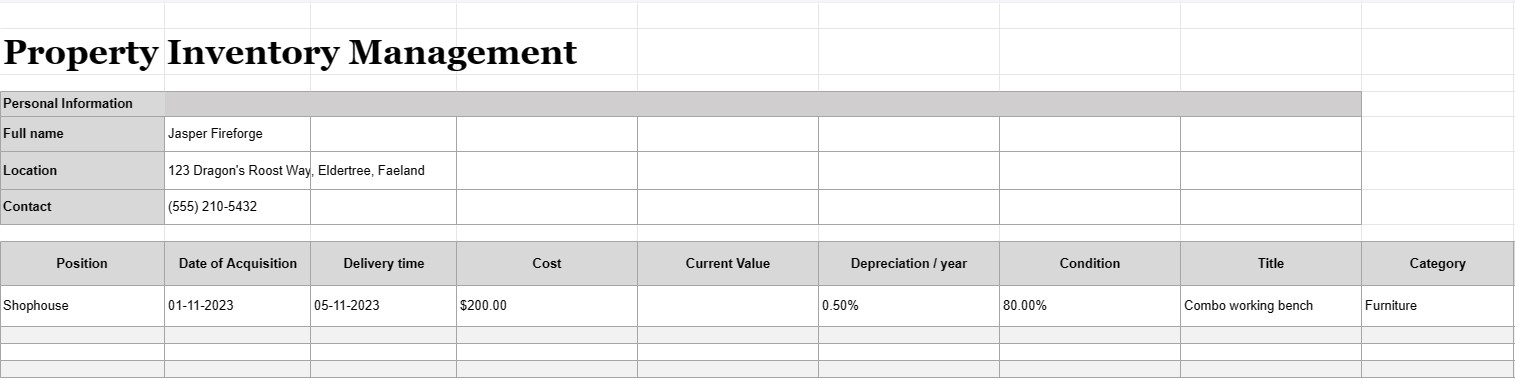
Управління інвентаризацією майна
Категорія : Трекери
Мати власність і керувати нею, а запаси всередині — це непросте завдання, ми вважаємо, що це набагато легше організувати ваші об’єкти за допомогою цього шаблону Excel.


Управление запасами имущества – это процесс ведения подробного и систематизированного учета всех активов, оборудования или предметов, принадлежащих, используемых или управляемых отдельным лицом, предприятием или организацией. Документ управления инвентаризацией имущества, часто называемый инвентарным списком или реестром активов, представляет собой документ или базу данных, используемые для записи и отслеживания информации об этих активах. Этот документ имеет решающее значение для различных целей, включая управление активами, финансовый учет, планирование технического обслуживания и оценку рисков.
Вот ключевые компоненты, которые обычно включаются в документ по управлению инвентаризацией имущества:
- Описание объекта. Подробное описание каждого актива, включая его имя, модель, серийный номер, производителя и любые другие соответствующие сведения, которые однозначно идентифицируют элемент.
- Категория актива: Активы классифицируются по типу, например офисное оборудование, машины, транспортные средства, мебель, электроника или недвижимость.
- Расположение актива: Конкретное физическое местоположение или отдел, в котором находится актив, что особенно важно для крупных организаций с несколькими объектами.
- Дата приобретения: Дата, когда актив был приобретен или приобретен. Это помогает определить его возраст и амортизацию.
- Стоимость: первоначальная стоимость покупки или приобретения актива, включая налоги, стоимость доставки и установки.
- Текущая стоимость. Текущая расчетная стоимость актива, которая может меняться со временем из-за обесценивания или повышения стоимости.
- Состояние: Текущее состояние актива. актив, включая любые необходимые потребности в техническом обслуживании или ремонте.
- Амортизация: Информация об амортизации актива, включая метод амортизации (например, линейный или уменьшающийся остаток) и ежегодные расходы на амортизацию. .
- Информация о гарантии: Подробная информация о любых гарантиях или соглашениях об обслуживании, связанных с активом, включая даты истечения срока действия гарантии.
- История использования: Информация о том, как часто и интенсивно используется актив, что может помочь в составлении графика технического обслуживания и планировании замены.
- Записи о техническом обслуживании: Записи всех работ по техническому обслуживанию и ремонту, выполненных на объекте. актив, включая даты, затраты и описания проделанной работы.
- Информация о ликвидации: Подробная информация о том, как и когда актив был продан или выведен из эксплуатации, включая цену продажи, ликвидационную стоимость. или затраты на утилизацию.
- Штрих-код или QR-код: Если применимо, активы могут быть помечены штрих-кодами или QR-кодами, которые связаны с соответствующими записями в системе управления запасами, что делает их легче отслеживать и находить предметы.
- Ответственная сторона: Лицо или отдел, ответственный за уход, обслуживание и управление активом.
- Страхование Информация: Информация о страховом покрытии актива, включая номера полисов и сведения о покрытии.
- Оценка рисков: Примечания о любых потенциальных рисках, связанных с активом, таких как проблемы безопасности или проблемы соответствия.
- Фотографии: Визуальная документация объекта, включая фотографии или сканы серийных номеров, меток объекта и самого объекта.
- История пользователей и местоположений. Записи об изменениях местоположения объектов и пользователей с течением времени, что особенно актуально для общих или мобильных ресурсов.
- Аудитовый журнал: A история изменений, внесенных в записи об активах, включая имена пользователей, даты и описания изменений.
Документы по управлению инвентаризацией имущества необходимы для предприятий и организаций любого размера, поскольку они помогают гарантировать, что активы должным образом учитываются, обслуживаются и эффективно используются. Эти документы облегчают принятие обоснованных решений, повышают безопасность активов и поддерживают финансовую отчетность и отчетность о соответствии требованиям. Кроме того, они имеют решающее значение в сценариях аварийного восстановления и страховых возмещениях в случае потери или повреждения активов.
Легкий попередній перегляд і завантаження шаблону електронної таблиці
Перегляньте повну версію шаблону електронної таблиці без обмежень, щоб дізнатися, чи він вам подобається, а потім ви можете завантажити шаблон excel, щоб зберегти його на своєму пристрої та використовувати безкоштовно.
Отримуйте доступ до шаблону електронної таблиці будь-де
Це працює на всіх популярних операційних системах, таких як Windows, MacOS, Linux, iOS. Ви можете переглянути шаблони таблиць і завантажити їх без додаткових програм.
Як користуватися шаблоном
Дізнайтесь, як попередньо переглянути, завантажити та використати шаблон електронної таблиці, дотримуючись надзвичайно простих кроків
Більше схожих шаблонів
Перегляньте більше шаблонів електронних таблиць, які належать до тієї ж категорії, що й вибраний.













