
Basit Kan Şekeri Takibi
Kategori : İzleyiciler
Bunu cihazınızla entegre edin veya manuel olarak bilgi verin, bu size sağlık verilerini nasıl görselleştireceğiniz konusunda fikir verecektir.


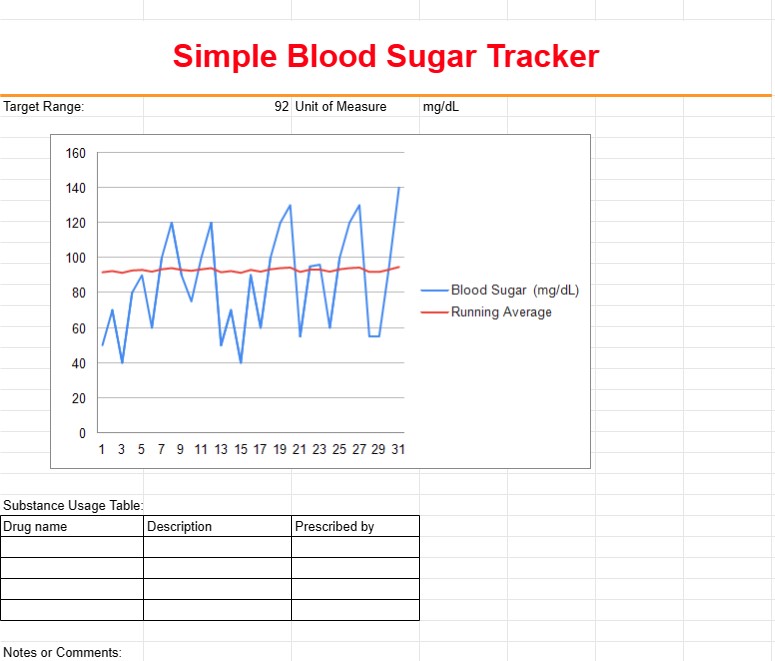
Basit Kan Şekeri Takip Şablonu, özellikle diyabet veya diğer sağlık sorunları olan kişiler tarafından zaman içinde kan şekeri seviyelerini izlemek ve kaydetmek için kullanılan bir araçtır. Bu şablon, kullanıcıların kan şekerindeki dalgalanmaları izlemesine, kalıpları belirlemesine ve sağlıklarını etkili bir şekilde yönetmek için temel bilgileri sağlık hizmeti sağlayıcılarıyla paylaşmalarına yardımcı olur.
Basit Kan Şekeri Takip Şablonunun Temel Bileşenleri:
- Tarih ve Saat: Şablon, her kan şekeri ölçümünün tarihini ve saatini kaydetmek için sütunlar içerir. Kullanıcılar gün boyunca birden fazla okuma girebilir.
- Kan Şekeri Düzeyi: Kullanıcılar, genellikle dekilitre başına miligram (mg/dL) veya litre başına milimol (mmol/L) cinsinden ölçülen kan şekeri düzeylerini ilgili sütunlara girerler.
- Yemeklerden Önce/Sonra: Kullanıcılar, her ölçümün yemeklerden önce mi yoksa sonra mı yapıldığını belirtir; bu, kan şekerinin yiyecek alımına nasıl tepki verdiğini izlemeye yardımcı olur.
- Notlar veya Yorumlar: Kullanıcıların egzersiz, ilaç tedavisi veya hastalık gibi kan şekeri düzeylerini etkilemiş olabilecek faktörler hakkında not veya yorum ekleyebileceği bir bölüm.
- Hedef Aralık: Bazı şablonlarda kullanıcılar, okumalarının istenen aralıkta olup olmadığını görmek için hedef kan şekeri aralığını ayarlayabilir ve izleyebilir.
- İlaçlar: Mümkünse, kullanıcılar aldıkları ilaçların veya insülinin adlarını ve dozajlarını kaydedebilirler.
İlaç Kullanmanın Yararları Basit Kan Şekeri Takip Şablonu:
- İzleme: Zaman içindeki kan şekeri düzeylerine ilişkin kapsamlı bir genel bakış sunarak bireylerin sağlıklarını izlemelerine ve eğilimleri belirlemelerine olanak tanır.
- Desen Tanıma: Kullanıcıların, farklı faktörlere yanıt olarak kan şekeri dalgalanmalarındaki ani yükseliş veya düşüşler gibi kalıpları tanımasına yardımcı olur.
- Tedavi Ayarlaması: Bireylerin ve sağlık hizmeti sağlayıcılarının ilaç dozajları, diyet ayarlamaları veya yaşam tarzı değişiklikleri hakkında bilinçli kararlar almasına olanak tanır.
- Gelişmiş İletişim: Kaydedilen veriler tıbbi randevular sırasında paylaşılabildiği için bireyler ile sağlık hizmeti sağlayıcıları arasındaki iletişimi kolaylaştırır.
- İlaç Yönetimi: Bireylerin kan şekeri düzeylerini sabit tutmada ilaçların ve insülin dozlarının etkinliğini takip etmelerine yardımcı olur.
- Kendi Kendini Yönetme: Bireylere, sağlıklarını yönetmede aktif rol alma ve diyabet bakımıyla ilgili bilinçli kararlar alma gücü verir.
- Erken Teşhis : Tıbbi müdahale gerektirebilecek potansiyel sorunların veya eğilimlerin erken tespitine olanak tanır.
Özet olarak, Basit Kan Şekeri Takip Şablonu, diyabet veya diğer sorunları yöneten kişiler için değerli bir araçtır. Kan şekeri seviyelerinin izlenmesini gerektiren sağlık koşulları. Kan şekeri verilerinin izlenmesine, analiz edilmesine ve yönetilmesine yardımcı olarak sonuçta daha iyi sağlık sonuçlarına ve tedavi ve yaşam tarzı seçimleriyle ilgili bilinçli karar alınmasına katkıda bulunur.
Kolay Önizleme ve İndirme E-Tablo Şablonu
Beğenip beğenmediğinizi görmek için bir e-tablo şablonunun tam sürümünü hiçbir sınırlama olmadan görüntüleyin, ardından excel şablonunu indirip cihazınızda saklayabilir ve ücretsiz olarak kullanabilirsiniz.
Elektronik Tablo Şablonuna Her Yerden Erişin
Bu, Windows, MacOS, Linux, iOS gibi tüm popüler işletim sistemlerinde çalışmaktadır. Elektronik tablo şablonlarını görebilir ve ek programlara gerek kalmadan indirebilirsiniz.
Şablon nasıl kullanılır?
Takip edilmesi son derece kolay adımları izleyerek e-tablo şablonunu nasıl önizleyeceğinizi, indireceğinizi ve ardından kullanacağınızı öğrenin
Daha benzer şablonlar
Seçilenle aynı kategori altındaki e-tablo şablonlarının daha fazlasını görün.













