
Emlak Envanter Yönetimi
Kategori : İzleyiciler
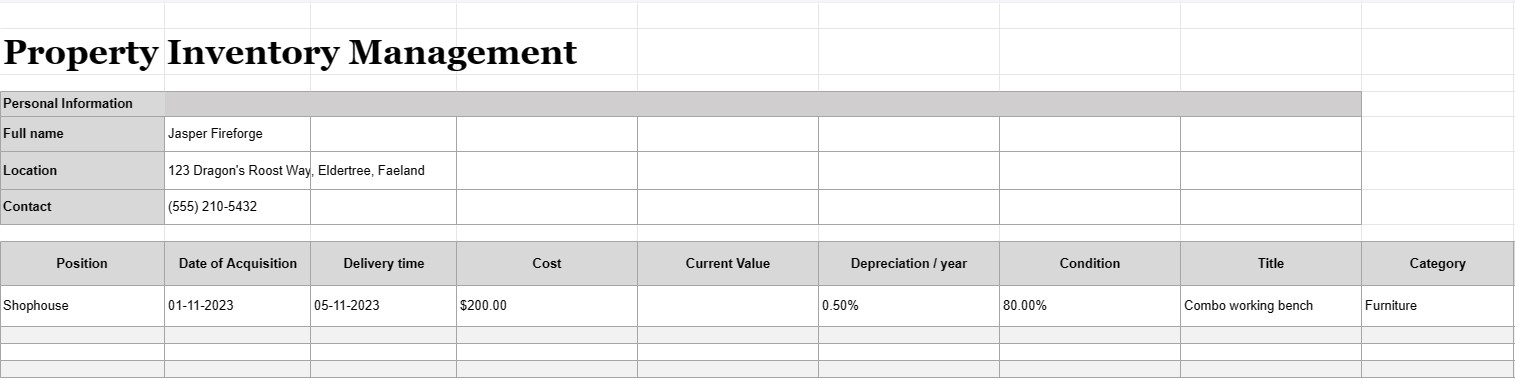
Bir mülk sahibi olun ve onu yönetin ve içindeki envanterlerle başa çıkmak kolay bir iş değildir, bu excel şablonunu kullanarak nesnelerinizi düzenlemenin çok daha kolay olduğuna inanıyoruz.


Mülk envanter yönetimi, bir kişi, işletme veya kuruluşun sahip olduğu, kullandığı veya yönettiği tüm varlıkların, ekipmanların veya öğelerin ayrıntılı ve düzenli bir kaydını tutma sürecidir. Genellikle envanter listesi veya varlık kaydı olarak adlandırılan mülk envanter yönetimi belgesi, bu varlıklar hakkındaki bilgileri kaydetmek ve izlemek için kullanılan bir belge veya veritabanıdır. Bu belge, varlık yönetimi, finansal takip, bakım planlaması ve risk değerlendirmesi de dahil olmak üzere çeşitli amaçlar açısından çok önemlidir.
Genellikle bir mülk envanter yönetimi belgesinde yer alan temel bileşenler şunlardır:
- Varlık Açıklaması: Adı, modeli, seri numarası, üreticisi ve öğeyi benzersiz şekilde tanımlayan diğer ilgili ayrıntılar da dahil olmak üzere her varlığın ayrıntılı açıklaması.
- Varlık Kategorisi: Varlıklar, ofis ekipmanı, makine, araç, mobilya, elektronik veya gayrimenkul gibi türlerine göre kategorize edilir.
- Varlık Konumu: Varlığın bulunduğu belirli fiziksel konum veya departman; özellikle birden fazla tesise sahip daha büyük kuruluşlar için önemlidir.
- Satın Alma Tarihi: Varlığın satın alındığı veya satın alındığı tarih. Bu, yaşının ve amortismanının belirlenmesine yardımcı olur.
- Maliyet: Varlığın orijinal satın alma maliyeti veya edinim maliyeti; vergiler, nakliye ve kurulum ücretleri dahil.
- Mevcut Değer: Varlığın, amortisman veya değer artışı nedeniyle zaman içinde değişebilecek mevcut tahmini değeri.
- Durum: Varlığın mevcut durumu gerekli bakım veya onarım ihtiyaçları da dahil olmak üzere varlık.
- Amortisman: Amortisman yöntemi (örneğin, sabit amortisman veya azalan bakiye) ve yıllık amortisman gideri de dahil olmak üzere varlığın amortismanına ilişkin bilgiler .
- Garanti Bilgileri: Garantinin sona erme tarihleri de dahil olmak üzere, varlıkla ilişkili tüm garantiler veya hizmet sözleşmeleriyle ilgili ayrıntılar.
- Kullanım Geçmişi: Varlığın ne sıklıkta ve yoğun şekilde kullanıldığına ilişkin, bakım planlamasına ve değiştirme planlamasına yardımcı olabilecek bilgiler.
- Bakım Kayıtları: Cihaz üzerinde gerçekleştirilen tüm bakım ve onarım faaliyetlerinin kayıtları. tarihler, maliyetler ve yapılan işin açıklamaları da dahil olmak üzere varlık.
- Elden Çıkarma Bilgileri: Satış fiyatı, hurda değeri de dahil olmak üzere varlığın nasıl ve ne zaman elden çıkarıldığı veya kullanımdan kaldırıldığıyla ilgili ayrıntılar veya elden çıkarma maliyetleri.
- Barkod veya QR Kodu: Varsa varlıklar, envanter yönetimi sistemindeki ilgili kayıtlara bağlanan barkodlar veya QR kodları ile etiketlenebilir. öğeleri takip etmek ve bulmak daha kolaydır.
- Sorumlu Taraf: Varlığın bakımı, bakımı ve yönetiminden sorumlu kişi veya departman.
- Sigorta Bilgi: Poliçe numaraları ve teminat ayrıntıları da dahil olmak üzere varlığın sigorta kapsamına ilişkin bilgiler.
- Risk Değerlendirmesi: Aşağıdakiler gibi varlıkla ilişkili olası risklere ilişkin notlar: güvenlik endişeleri veya uyumluluk sorunları.
- Fotoğraflar: Seri numaralarının, varlık etiketlerinin ve varlığın fotoğrafları veya taranmış görüntüleri de dahil olmak üzere varlığın görsel dokümantasyonu.
- Kullanıcı ve Konum Geçmişi: Özellikle paylaşılan veya mobil varlıklarla ilgili olmak üzere, öğe konumu ve kullanıcılarda zaman içinde meydana gelen değişikliklerin kayıtları.
- Denetim Geçmişi: A Kullanıcı adları, tarihler ve değişiklik açıklamaları da dahil olmak üzere varlık kayıtlarında yapılan değişikliklerin geçmişi.
Gayrimenkul envanter yönetimi belgeleri, her büyüklükteki işletme ve kuruluş için önemlidir; Varlıkların uygun şekilde muhasebeleştirilmesi, muhafaza edilmesi ve verimli bir şekilde kullanılması. Bu belgeler bilinçli karar almayı kolaylaştırır, varlık güvenliğini artırır ve mali ve uyumluluk raporlamasını destekler. Ayrıca olağanüstü durum kurtarma senaryolarında ve varlıkların kaybolması veya hasar görmesi durumunda sigorta talepleri açısından da çok önemlidirler.
Kolay Önizleme ve İndirme E-Tablo Şablonu
Beğenip beğenmediğinizi görmek için bir e-tablo şablonunun tam sürümünü hiçbir sınırlama olmadan görüntüleyin, ardından excel şablonunu indirip cihazınızda saklayabilir ve ücretsiz olarak kullanabilirsiniz.
Elektronik Tablo Şablonuna Her Yerden Erişin
Bu, Windows, MacOS, Linux, iOS gibi tüm popüler işletim sistemlerinde çalışmaktadır. Elektronik tablo şablonlarını görebilir ve ek programlara gerek kalmadan indirebilirsiniz.
Şablon nasıl kullanılır?
Takip edilmesi son derece kolay adımları izleyerek e-tablo şablonunu nasıl önizleyeceğinizi, indireceğinizi ve ardından kullanacağınızı öğrenin
Daha benzer şablonlar
Seçilenle aynı kategori altındaki e-tablo şablonlarının daha fazlasını görün.













