
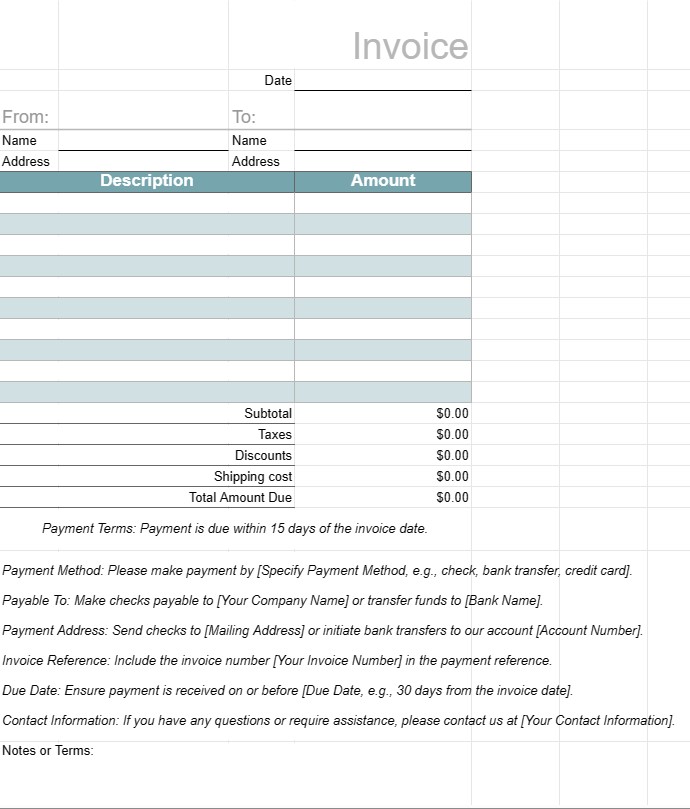
fatura 1
Kategori : Planlamacılar
Bir iş yapıldıktan sonra müşterilere gönderilecek bir fatura şablonu
Fatura Şablonu, işletmelerin müşterilerine veya müşterilerine sağlanan mal veya hizmetler için fatura kesmek için kullandıkları standart bir belgedir. Resmi bir ödeme talebi olarak hizmet eder ve hem işletme hem de müşteri için ürünler veya hizmetler, bunların maliyetleri, ödeme koşulları ve iletişim bilgileri hakkında ayrıntıları içerir. Faturalar; işlemleri takip etmek, nakit akışını yönetmek ve mali kayıtları tutmak için gereklidir.
Fatura Şablonunun Temel Bileşenleri:
- Başlık: Faturanın üst kısmında genellikle işletmenin adı, logosu ve iletişim bilgilerinin yanı sıra fatura numarası ve düzenlenme tarihi de bulunur.
- Müşteri Bilgileri: Bu bölüm müşterinin bilgilerini içerir. ad, şirket (varsa), fatura adresi ve iletişim bilgileri.
- Fatura Ayrıntıları: Sağlanan ürün veya hizmetlerin dökümü bu bölümde yer almaktadır. Her satır öğesi bir açıklama, miktar, birim fiyat ve toplam tutar içerir.
- Alt toplam: Alt toplam, tüm satır öğelerinin vergiler veya ek masraflar hariç toplamıdır.
- Vergiler: Varsa, tüm satış vergisi, KDV veya diğer vergiler ayrı ayrı maddeler halinde belirtilir.
- İndirimler: Geçerli tüm indirimler, kuponlar veya promosyon teklifleri bu bölümde listelenir.
- Gönderim ve Taşıma: Faturada nakliye veya taşıma ücretleri yer alıyorsa bunlar ayrıca belirtilir.
- Ödenmesi Gereken Toplam Tutar: Bu, tüm masraflar, vergiler, indirimler ve ücretler dahil olmak üzere faturanın genel toplamıdır.
- Ödeme Koşulları: Ödeme şartlarda son tarih, kabul edilen ödeme yöntemleri (ör. banka havalesi, çek, kredi kartı) ve geç ödeme cezaları belirtilir.
- Ödeme Talimatları: Banka hesabı ayrıntıları veya ödeme talimatları ödeme sürecini kolaylaştırmak için sağlanmıştır.
- Notlar veya Şartlar: Fatura veya işlemle ilgili her türlü ek şart, talimat veya özel not dahil edilebilir.
- Fatura Alt Bilgisi: Bazı faturalar, ek iletişim bilgilerini veya teşekkür mesajını içeren bir alt bilgi içerir.
Fatura Şablonu Kullanmanın Yararları:
- Profesyonellik: Müşterilere, işletmenin verimli ve sistematik bir şekilde çalıştığını gösteren profesyonel bir imaj sunar.
- Açıklık: Sağlanan ürün veya hizmetlerin ana hatları net bir şekilde belirtilir , maliyetleri ve ödeme ayrıntıları, anlaşmazlık veya yanlış anlama riskini azaltır.
- Kayıt Tutma: İşletmelerin muhasebe, vergi ve denetim amacıyla mali işlemlerin doğru kayıtlarını tutmasına yardımcı olur.
- Verimlilik: Her müşteri veya işlem için özelleştirilebilecek standartlaştırılmış bir biçim sağlayarak zamandan tasarruf sağlar.
- Yasal Koruma: Anlaşmazlık durumunda faydalı olabilecek, işletme ile müşteri arasındaki anlaşmanın resmi bir kaydını sağlar.
- Hızlı Ödeme: Müşterileri, vade tarihlerini ve ödeme tarihlerini belirterek derhal ödeme yapmaya teşvik eder. ödeme talimatları.
- Tutarlılık: Faturaların biçim ve içerik açısından tutarlı olmasını sağlar; bu, birden fazla müşteriyle çalışan işletmeler için önemlidir.
Sonuç olarak, Fatura Şablonu, işletmelerin müşterilere ve müşterilere yapılandırılmış ve profesyonel bir şekilde fatura kesmesi için önemli bir araçtır. Ödeme sürecini kolaylaştırmaya, mali kayıtların korunmasına ve ödemeler ve şartlarla ilgili net beklentilerin oluşturulmasına yardımcı olur.
Kolay Önizleme ve İndirme E-Tablo Şablonu
Beğenip beğenmediğinizi görmek için bir e-tablo şablonunun tam sürümünü hiçbir sınırlama olmadan görüntüleyin, ardından excel şablonunu indirip cihazınızda saklayabilir ve ücretsiz olarak kullanabilirsiniz.
Elektronik Tablo Şablonuna Her Yerden Erişin
Bu, Windows, MacOS, Linux, iOS gibi tüm popüler işletim sistemlerinde çalışmaktadır. Elektronik tablo şablonlarını görebilir ve ek programlara gerek kalmadan indirebilirsiniz.
Şablon nasıl kullanılır?
Takip edilmesi son derece kolay adımları izleyerek e-tablo şablonunu nasıl önizleyeceğinizi, indireceğinizi ve ardından kullanacağınızı öğrenin
Daha benzer şablonlar
Seçilenle aynı kategori altındaki e-tablo şablonlarının daha fazlasını görün.













