
Eisenhower Kutusu
Kategori : Planlamacılar
Bu, projeniz veya kişisel amacınız için kullanabileceğiniz ünlü bir bilimsel modeli simüle eden elektronik tablo şablonudur.
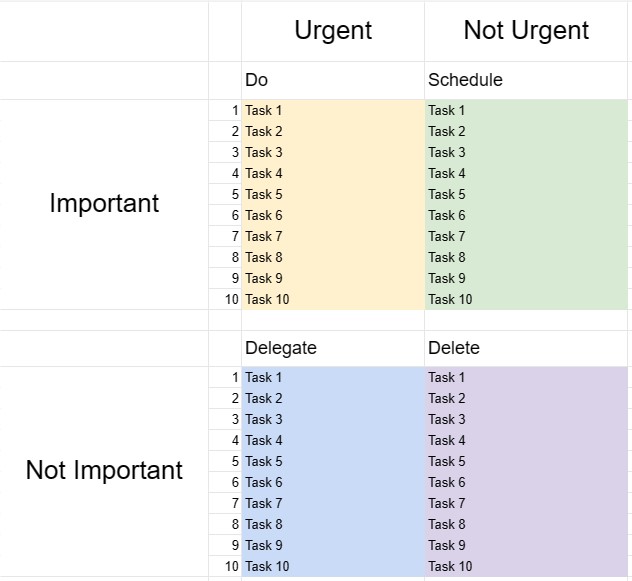
Eisenhower Matrisi veya Acil-Önemli Matrisi olarak da bilinen Eisenhower Kutusu, Başkan Dwight D. Eisenhower'a atfedilen bir alıntıdan ilham alan bir karar verme ve zaman yönetimi aracıdır: Önemli olan nadiren acildir ve neyin acil olduğu acil nadiren önemlidir. Bu şablon, bireylerin görevlere öncelik vermelerine ve zamanlarını ve kaynaklarını etkili bir şekilde nasıl tahsis edecekleri konusunda kararlar almalarına yardımcı olmak için tasarlanmıştır.
Eisenhower Kutusu Şablonunun Temel Bileşenleri:
- Dört Çeyrek: Şablon, her biri aciliyetine ve önemine göre farklı bir görev kategorisini temsil eden dört çeyreğe bölünmüştür.
- I. Çeyrek - Acil ve Önemli: Bu çeyrekteki görevler hem acil hem de önemlidir. Bunlara anında müdahale edilmesi gerekir ve en yüksek öncelik olarak ele alınmalıdır.
- II. Çeyrek - Acil Değil Ama Önemli: Bu çeyrekteki görevler önemlidir ancak acil değildir. Kişisel ve profesyonel gelişime ve başarıya katkıda bulunan proaktif ve uzun vadeli faaliyetleri temsil ederler. Bu görevleri planlamak ve programlamak çok önemlidir.
- III. Çeyrek - Acil Ama Önemli Değil: Bu çeyrekteki görevler acildir ancak özellikle önemli değildir. Bunlar, kesintileri, dikkat dağıtıcı unsurları veya daha önemli konulara zaman kazandırmak amacıyla devredilebilecek veya en aza indirilebilecek görevleri içerebilir.
- IV. Çeyrek - Acil Değil ve Önemli Değil: Bu bölümdeki görevler Çeyrek ne acil ne de önemli. Bunlar genellikle zaman kaybettiren faaliyetlerdir ve en aza indirilmeleri veya ortadan kaldırılmaları gerekir.
- Görev Listesi: Kullanıcılar görevlerini, durumlarına göre uygun çeyrekte listelerler. her görevin aciliyetinin ve öneminin değerlendirilmesi.
- Eylem Planı: I. ve II. Karelerdeki görevler için kullanıcılar eylem planları oluşturabilir, son teslim tarihlerini belirleyebilir ve bunları tamamlamak için gerekli adımları belirleyebilir. .
- İnceleme ve Güncelleme: Eisenhower Kutusu'nu düzenli olarak incelemek ve güncellemek, bireylerin gerçekten önemli olan şeylere odaklanmalarına ve önceliklerini gerektiği gibi uyarlamalarına yardımcı olur.
Eisenhower Kutusu Şablonu Kullanmanın Yararları:
- Öncelik Ayarı: Görevlerin önceliklendirilmesi ve zaman ve emeğin nereye tahsis edileceğine ilişkin kararlar alınması için yapılandırılmış bir çerçeve sağlar.
- Zaman Yönetimi: Kullanıcıların uzun vadeli hedeflere katkıda bulunan görevlere odaklanmasına ve önemsiz veya tepkisel faaliyetlere harcanan zamanı azaltmasına yardımcı olur.
- Verimlilik: Önemli görevleri vurgulayarak ve daha az önemli olanlara harcanan zamanı azaltarak verimliliği artırır.
- Stres Azaltma: Kullanıcıların acil meseleleri hemen ele almasına ve aynı zamanda önemli ancak önemsiz işlere zaman ayırmasına olanak tanır. -acil görevler, stresi ve krizlere sürekli tepki verme hissini azaltır.
- Hedefe Başarı: Önemli görevleri vurgulayarak uzun vadeli hedeflere doğru ilerlemeyi ve kişisel gelişimi destekler.
- Verimlilik: Devredilebilecek, ortadan kaldırılabilecek veya en aza indirilebilecek görevleri belirleyerek bireylerin daha akıllı çalışmasına yardımcı olur.
- Zaman Farkındalığı: Zaman farkındalığını artırır zamanın nasıl harcandığını ve zamanın daha bilinçli kullanılmasını teşvik eder.
Sonuç olarak, Eisenhower Kutu Şablonu, zamanlarını etkili bir şekilde yönetmek, görevleri önceliklendirmek ve bilinçli kararlar vermek isteyen bireyler için değerli bir araçtır. çabalarını nereye yatıracakları hakkında. Kullanıcılar, görevleri aciliyet ve önemlerine göre kategorilere ayırarak üretkenliği artırabilir, stresi azaltabilir ve hedeflerine daha verimli bir şekilde ulaşmaya çalışabilir.
Kolay Önizleme ve İndirme E-Tablo Şablonu
Beğenip beğenmediğinizi görmek için bir e-tablo şablonunun tam sürümünü hiçbir sınırlama olmadan görüntüleyin, ardından excel şablonunu indirip cihazınızda saklayabilir ve ücretsiz olarak kullanabilirsiniz.
Elektronik Tablo Şablonuna Her Yerden Erişin
Bu, Windows, MacOS, Linux, iOS gibi tüm popüler işletim sistemlerinde çalışmaktadır. Elektronik tablo şablonlarını görebilir ve ek programlara gerek kalmadan indirebilirsiniz.
Şablon nasıl kullanılır?
Takip edilmesi son derece kolay adımları izleyerek e-tablo şablonunu nasıl önizleyeceğinizi, indireceğinizi ve ardından kullanacağınızı öğrenin
Daha benzer şablonlar
Seçilenle aynı kategori altındaki e-tablo şablonlarının daha fazlasını görün.













