
Fastighetslagerhantering
Kategori : Spårare
Ha en fastighet och hantera den och inventarierna inuti är inte en lätt uppgift att hantera, vi tror att det är mycket lättare att organisera dina objekt med hjälp av denna excel-mall.


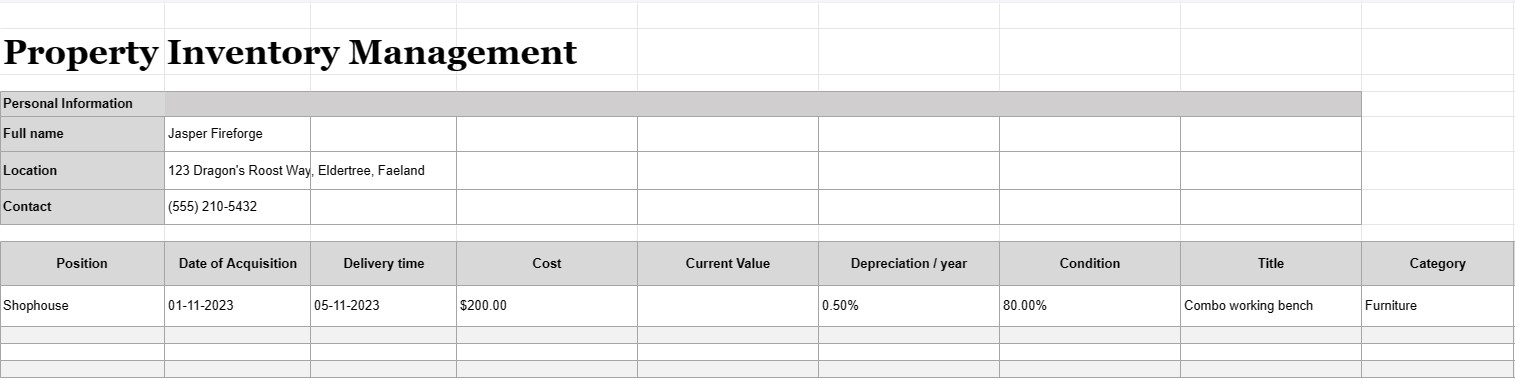
Fastighetslagerhantering är processen att föra en detaljerad och organiserad förteckning över alla tillgångar, utrustning eller föremål som ägs, används eller hanteras av en individ, företag eller organisation. Ett dokument för fastighetsinventering, ofta kallat en inventarielista eller tillgångsregister, är ett dokument eller en databas som används för att registrera och spåra information om dessa tillgångar. Det här dokumentet är avgörande för olika ändamål, inklusive tillgångsförvaltning, ekonomisk spårning, underhållsplanering och riskbedömning.
Här är de viktigaste komponenterna som vanligtvis ingår i ett dokument för hantering av fastighetsinventering:
- Tillgångsbeskrivning: En detaljerad beskrivning av varje tillgång, inklusive dess namn, modell, serienummer, tillverkare och alla andra relevanta detaljer som unikt identifierar föremålet.
- Tillgångskategori: Tillgångar kategoriseras utifrån deras typ, såsom kontorsutrustning, maskiner, fordon, möbler, elektronik eller fastigheter.
- Tillgångsplats: Den specifika fysiska platsen eller avdelningen där tillgången är belägen, särskilt viktig för större organisationer med flera faciliteter.
- Förvärvsdatum: Datumet då tillgången förvärvades eller köptes. Detta hjälper till att fastställa dess ålder och avskrivning.
- Kostnad: Den ursprungliga inköpskostnaden eller anskaffningskostnaden för tillgången, inklusive skatter, frakt och installationsavgifter.
- Aktuellt värde: Det aktuella uppskattade värdet av tillgången, som kan förändras över tiden på grund av värdeminskning eller appreciering.
- Tillstånd: Det nuvarande tillståndet för tillgången, inklusive eventuella nödvändiga underhålls- eller reparationsbehov.
- Avskrivning: Information om tillgångens avskrivning, inklusive avskrivningsmetod (t.ex. linjärt eller fallande saldo) och årliga avskrivningskostnader .
- Garantiinformation: Information om eventuella garantier eller serviceavtal som är kopplade till tillgången, inklusive garantins utgångsdatum.
- Användningshistorik: Information om hur ofta och intensivt tillgången används, vilket kan hjälpa till med underhållsschemaläggning och utbytesplanering.
- Underhållsregister: Register över alla underhålls- och reparationsaktiviteter som utförs på tillgång, inklusive datum, kostnader och beskrivningar av det utförda arbetet.
- Information om avfallshantering: Detaljer om hur och när tillgången avyttrades eller avvecklades, inklusive försäljningspris, bärgningsvärde , eller kasseringskostnader.
- Streckkod eller QR-kod: Om tillämpligt kan tillgångar märkas med streckkoder eller QR-koder som länkar till deras respektive register i lagerhanteringssystemet, vilket gör det lättare att spåra och lokalisera föremål.
- Ansvarig part: Den person eller avdelning som ansvarar för tillgångens skötsel, underhåll och förvaltning.
- Försäkring Information: Information om försäkringsskydd för tillgången, inklusive försäkringsnummer och täckningsdetaljer.
- Riskbedömning: Anteckningar om eventuella risker förknippade med tillgången, t.ex. säkerhetsproblem eller efterlevnadsproblem.
- Fotografier: Visuell dokumentation av tillgången, inklusive foton eller skanningar av serienummer, tillgångstaggar och själva tillgången.
- Användar- och platshistorik: Register över ändringar i tillgångens plats och användare över tid, särskilt relevant för delade eller mobila tillgångar.
- Revisionsspår: A historik över ändringar som gjorts i tillgångsposterna, inklusive användarnamn, datum och beskrivningar av ändringar.
Fastighetslagerhanteringsdokument är viktiga för företag och organisationer av alla storlekar, eftersom de hjälper till att säkerställa att tillgångar redovisas korrekt, underhålls och används effektivt. Dessa dokument underlättar välgrundat beslutsfattande, förbättrar tillgångssäkerheten och stödjer finansiell rapportering och efterlevnadsrapportering. Dessutom är de avgörande i scenarier för katastrofåterställning och för försäkringskrav vid förlust eller skada på tillgångar.
Enkel förhandsgranska och ladda ner kalkylbladsmall
Se den fullständiga versionen av en kalkylarksmall utan begränsningar för att se om du gillar den, sedan kan du ladda ner excelmallen för att lagra den på din enhet och använda den gratis.
Få åtkomst till kalkylbladsmall var som helst
Detta fungerar på alla populära operativsystem som Windows, MacOS, Linux, iOS. Du kan se kalkylbladsmallarna och ladda ner dem utan ytterligare program.
Hur man använder en mall
Ta reda på hur du förhandsgranskar, laddar ner och sedan använder kalkylarksmallen genom att följa stegen som är extremt enkla att följa
Fler liknande mallar
Se fler av kalkylbladsmallarna som är under samma kategori som den valda.













