
Faktura 1
Kategori : Planerare
En fakturamall att skicka till kunderna efter att ett jobb är klart
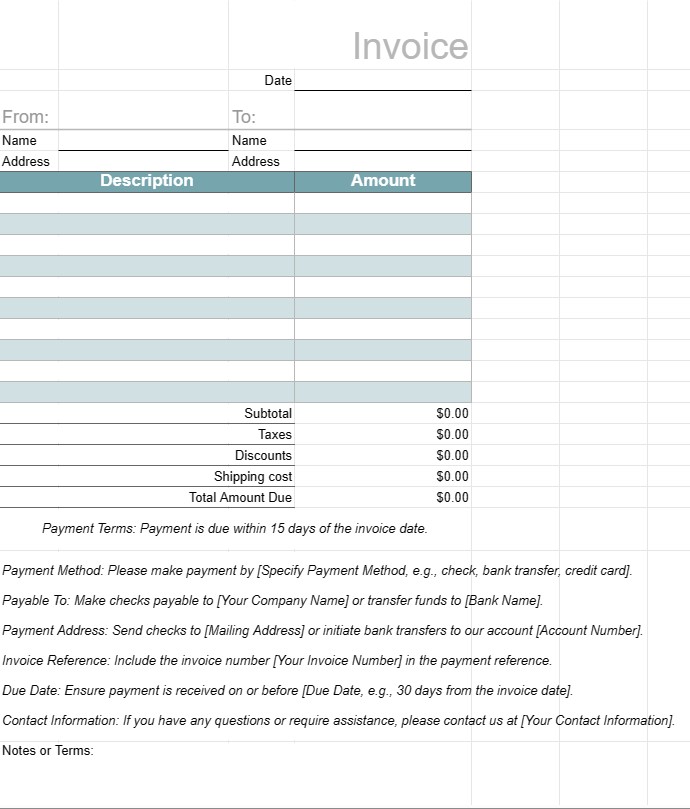
En fakturamall är ett standardiserat dokument som används av företag för att fakturera sina kunder eller kunder för tillhandahållna varor eller tjänster. Den fungerar som en formell begäran om betalning och innehåller information om produkterna eller tjänsterna, deras kostnader, betalningsvillkor och kontaktinformation för både företaget och kunden. Fakturor är viktiga för att spåra transaktioner, hantera kassaflöden och upprätthålla finansiella register.
Nyckelkomponenter i en fakturamall:
- Rubrik: översta delen av fakturan innehåller vanligtvis företagets namn, logotyp och kontaktinformation, såväl som fakturanummer och utfärdandedatum.
- Kundinformation: Det här avsnittet inkluderar kundens namn, företag (om tillämpligt), faktureringsadress och kontaktuppgifter.
- Fakturainformation: En uppdelning av de tillhandahållna produkterna eller tjänsterna ingår i detta avsnitt. Varje rad innehåller en beskrivning, kvantitet, enhetspris och totalt belopp.
- Selsumma: Delsumman är summan av alla rader före skatter eller extra avgifter.
- Skatter: Om tillämpligt anges eventuell försäljningsskatt, moms eller andra skatter separat.
- Rabatter: Alla tillämpliga rabatter, kuponger , eller kampanjerbjudanden listas i det här avsnittet.
- Frakt och hantering: Om fakturan inkluderar avgifter för frakt eller hantering anges de separat.
- Totalt belopp som ska betalas: Detta är summan av fakturan, inklusive alla avgifter, skatter, rabatter och avgifter.
- Betalningsvillkor: Betalningen villkoren anger förfallodatum, accepterade betalningsmetoder (t.ex. banköverföring, check, kreditkort) och eventuella påföljder för sen betalning.
- Betalningsinstruktioner: Bankkontouppgifter eller betalningsinstruktioner tillhandahålls för att underlätta betalningsprocessen.
- Anmärkningar eller villkor: Eventuella ytterligare villkor, instruktioner eller särskilda anmärkningar som är relevanta för fakturan eller transaktionen kan inkluderas.
- Fakturasidfot: Vissa fakturor innehåller en sidfot med ytterligare kontaktinformation eller ett tackmeddelande.
Fördelar med att använda en fakturamall:
- Professionalism: Presenterar en professionell bild för kunderna och visar att verksamheten fungerar effektivt och systematiskt.
- Tydlighet: Skisserar tydligt de produkter eller tjänster som tillhandahålls , deras kostnader och betalningsinformation, vilket minskar risken för tvister eller missförstånd.
- Registerföring: Hjälper företag att upprätthålla korrekta register över finansiella transaktioner för redovisnings-, skatte- och revisionsändamål.
- Effektivitet: Sparar tid genom att tillhandahålla ett standardiserat format som kan anpassas för varje kund eller transaktion.
- Rättsligt skydd: Ger en formell dokumentation av avtalet mellan företaget och kunden, vilket kan vara användbart vid tvister.
- Snabb betalning: Uppmuntrar kunder att betala snabbt genom att ange förfallodatum och betalningsinstruktioner.
- Konsistens: Säkerställer att fakturor är konsekventa i format och innehåll, vilket är viktigt för företag som har att göra med flera kunder.
Sammanfattningsvis är en fakturamall ett viktigt verktyg för företag att fakturera kunder och kunder på ett strukturerat och professionellt sätt. Det hjälper till att effektivisera betalningsprocessen, upprätthålla finansiella register och skapa tydliga förväntningar på betalningar och villkor.
Enkel förhandsgranska och ladda ner kalkylbladsmall
Se den fullständiga versionen av en kalkylarksmall utan begränsningar för att se om du gillar den, sedan kan du ladda ner excelmallen för att lagra den på din enhet och använda den gratis.
Få åtkomst till kalkylbladsmall var som helst
Detta fungerar på alla populära operativsystem som Windows, MacOS, Linux, iOS. Du kan se kalkylbladsmallarna och ladda ner dem utan ytterligare program.
Hur man använder en mall
Ta reda på hur du förhandsgranskar, laddar ner och sedan använder kalkylarksmallen genom att följa stegen som är extremt enkla att följa
Fler liknande mallar
Se fler av kalkylbladsmallarna som är under samma kategori som den valda.













