
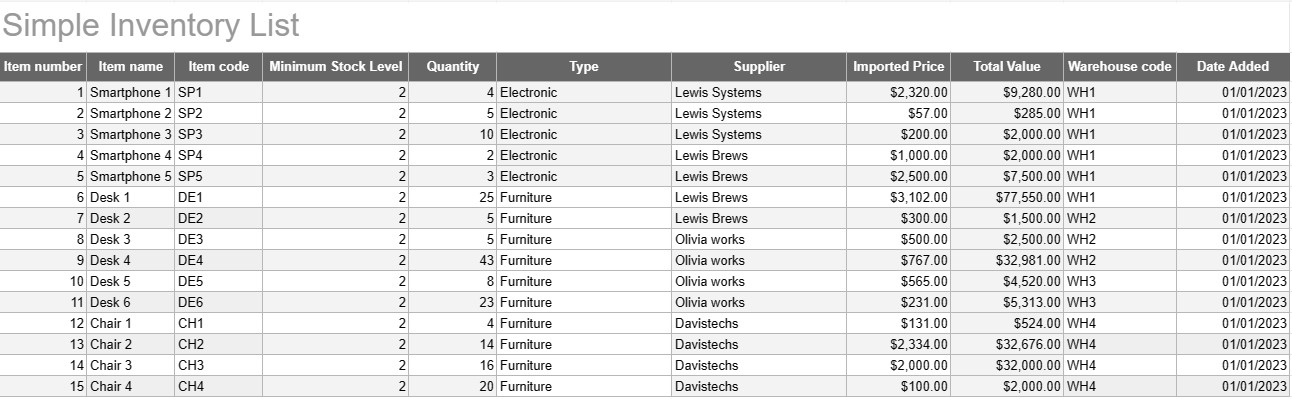
Jednoduchý zoznam zásob
Kategória : Sledovače
Zapíšte si všetky názvy a popisy inventára, aby ste ich mohli vidieť na jednom mieste.
Jednoduchá šablóna zoznamu zásob je základný, ale účinný nástroj, ktorý používajú jednotlivci a firmy na sledovanie a správu svojich zásob tovaru, produktov alebo majetku. Táto šablóna poskytuje štruktúrovaný formát na zaznamenávanie podrobností o položke, množstvách, umiestnení a iných relevantných informácií, čím uľahčuje monitorovanie úrovní zásob a uľahčuje efektívnu správu.
Kľúčové súčasti šablóny jednoduchého zoznamu zásob:
- Podrobnosti položky: Šablóna obsahuje stĺpce alebo sekcie pre informácie špecifické pre položku, ako je názov položky, popis, jedinečný identifikátor (napr. SKU alebo sériové číslo) a akékoľvek dodatočné poznámky.
- Množstvo: Používatelia môžu zaznamenávať množstvo alebo jednotky každej položky na sklade. Tento stĺpec je nevyhnutný na presné sledovanie úrovní zásob.
- Umiestnenie: V prípade firiem s viacerými miestami skladovania alebo skladov môže šablóna obsahovať stĺpec na určenie fyzického umiestnenia každej položky. To pomáha zefektívniť vyhľadávanie a dopĺňanie zásob.
- Jednotková cena: Používatelia môžu zadať jednotkovú cenu alebo cenu každej položky. Tieto informácie sú cenné pre výpočet celkovej hodnoty zásob.
- Celková hodnota: Niektoré šablóny automaticky vypočítavajú celkovú hodnotu každej položky na základe množstva a jednotkovej ceny. To poskytuje rýchly prehľad o celkovej hodnote inventára.
- Dátum pridania/aktualizácie: Ak chcete sledovať zmeny a aktualizácie inventára, používatelia môžu zaznamenať dátum pridania alebo úpravy každej položky.
- Kategória/Typ: Položky je možné kategorizovať do rôznych skupín alebo typov (napr. elektronika, kancelárske potreby, oblečenie) pre lepšiu organizáciu a podávanie správ.
- Minimálna úroveň zásob: Používatelia môžu nastaviť minimálnu úroveň zásob pre každú položku. Keď množstvo klesne pod túto úroveň, slúži ako spúšťač na doobjednanie alebo opätovné naskladnenie položky.
- Informácie o dodávateľovi: V obchodnom prostredí môžu používatelia zahrnúť podrobnosti o dodávateľovi, ako je meno dodávateľa, kontaktné informácie a informácie o objednávke.
Výhody používania jednoduchej šablóny zoznamu inventára:
- Sledovanie inventára: Poskytuje jasný a aktuálny prehľad stavu úrovne zásob, čo pomáha predchádzať vypredaniu a nadmernému zásobovaniu.
- Kontrola nákladov: umožňuje firmám monitorovať hodnotu svojich zásob a prijímať informované rozhodnutia o opätovnom zásobovaní a nákupe.
- Efektívnosť: Zjednodušuje správu zásob centralizáciou informácií a ich jednoduchým prístupom.
- Presnosť údajov: Znižuje riziko chýb pri sledovaní inventára, pretože všetky informácie sa zaznamenávajú systematicky.
- Správa objednávok: Pomáha pri identifikácii, kedy je potrebné znovu objednať položky a od ktorých dodávateľov, čím zlepšuje riadenie dodávateľského reťazca.
- Súlad: V niektorých odvetviach je udržiavanie presných záznamov o zásobách nevyhnutné pre súlad s predpismi a finančné výkazníctvo.
- Optimalizácia zdrojov: umožňuje podnikom efektívnejšie prideľovať zdroje a znižovať prevádzkové náklady.
Na záver možno povedať, že šablóna jednoduchého zoznamu zásob je praktický nástroj pre jednotlivcov a firmy, ktorí chcú viesť organizované a presné záznamy o svojich zásobách. Či už sa používa na malý domáci inventár alebo ako súčasť väčšej obchodnej operácie, táto šablóna zjednodušuje správu zásob, znižuje riziko nedostatku alebo nadmerného zásobovania a prispieva k lepšej finančnej kontrole a rozhodovaniu.
Jednoduchý náhľad a stiahnutie šablóny tabuľky
Prezrite si plnú verziu šablóny tabuľky bez obmedzení a zistite, či sa vám páči, potom si môžete stiahnuť excelovú šablónu, uložiť ju do svojho zariadenia a používať ju zadarmo.
Získajte prístup k šablóne tabuľky odkiaľkoľvek
Toto funguje na všetkých populárnych operačných systémoch, ako sú Windows, MacOS, Linux, iOS. Šablóny tabuliek si môžete pozrieť a stiahnuť bez ďalších programov.
Ako používať šablónu
Zistite, ako zobraziť ukážku, stiahnuť a potom použiť šablónu tabuľky podľa krokov, ktoré sú veľmi jednoduché
Viac podobných šablón
Pozrite si ďalšie šablóny tabuliek, ktoré sú v rovnakej kategórii ako vybratá.













