
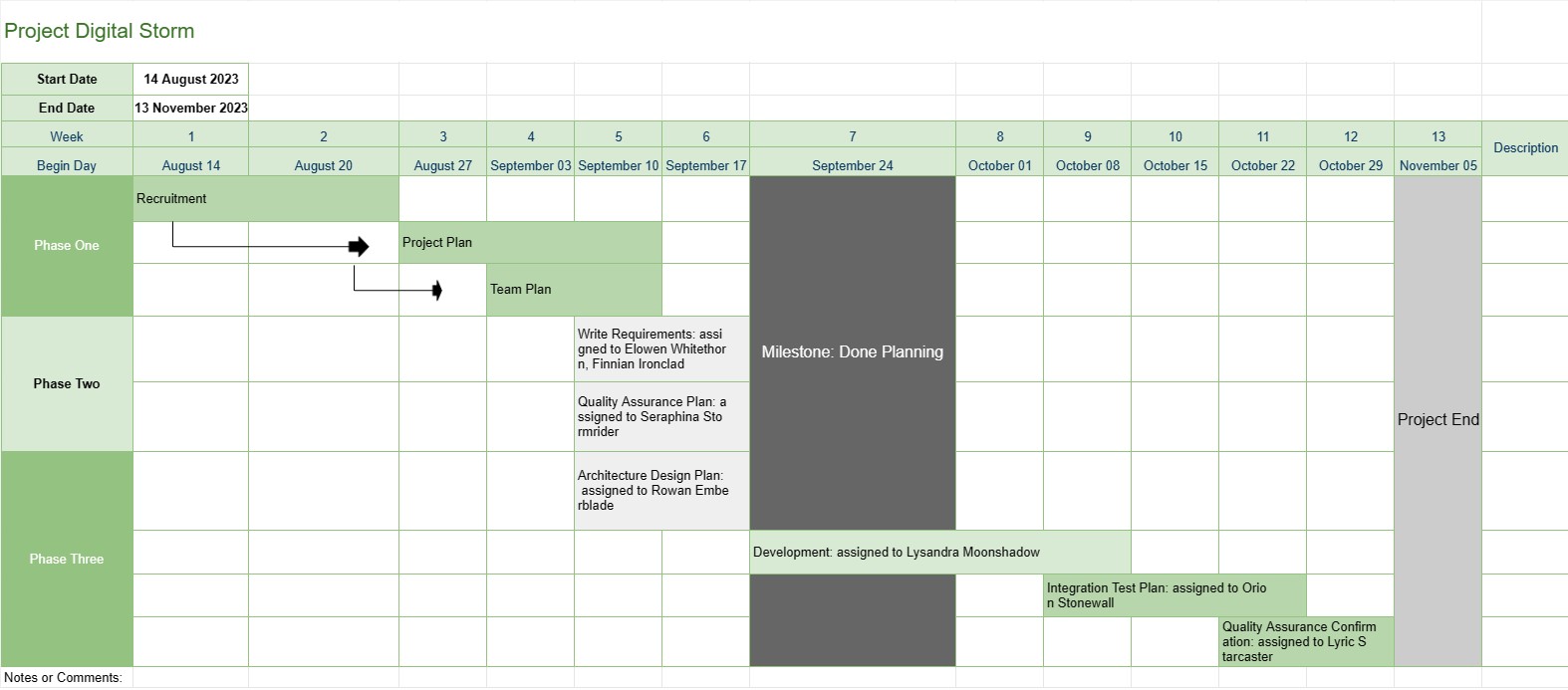
Časová os projektu
Kategória : Sledovače
Projektovému manažérovi to poskytuje lepší prehľad o projekte, obsahuje fázy úloh a termíny celého postupu vývoja, navyše všetky údaje boli vizualizované pútavým spôsobom.
Šablóna časovej osi projektu je základným nástrojom na riadenie projektu, ktorý poskytuje vizuálnu reprezentáciu kľúčových míľnikov, úloh a termínov projektu počas určitého obdobia. Slúži ako plán pre projektové tímy a zainteresované strany a ponúka jasný a stručný prehľad o priebehu a harmonograme projektu.
Tu sú kľúčové komponenty a funkcie, ktoré sú zvyčajne zahrnuté v šablóne časovej osi projektu:
- Názov projektu: Šablóna začína názvom alebo názvom projektu pre ľahkú identifikáciu.
- Trvanie projektu: Špecifikuje začiatok dátum a dátum ukončenia projektu, definujúci časový rámec, v ktorom bude projekt dokončený.
- Míľniky: Míľniky sú významné udalosti alebo úspechy v rámci projektu, ktoré označujú dôležité body pokroku. Zvyčajne sú reprezentované ako konkrétne dátumy na časovej osi a slúžia ako referenčné body na sledovanie pokroku v projekte.
- Úlohy alebo aktivity: Šablóna načrtáva rôzne úlohy, aktivity alebo fázy. v projekte. Každá úloha je spojená s dátumom spustenia a odhadovaným trvaním.
- Závislosti: Niektoré šablóny časovej osi projektu obsahujú šípky alebo čiary spájajúce úlohy na znázornenie závislostí úloh. Projektovým tímom to pomáha pochopiť poradie, v ktorom musia byť úlohy dokončené.
- Priradené zdroje: Projektoví manažéri môžu určiť, ktorí členovia tímu alebo zdroje sú zodpovední za jednotlivé úlohy. To uľahčuje prideľovanie zdrojov a priraďovanie úloh.
- Trvanie úloh: Odhadované trvanie každej úlohy sa často zobrazuje, čo tímom umožňuje odhadnúť, ako dlho bude každá aktivita trvať.
- Sledovanie pokroku: Šablóna môže obsahovať vizuálne indikátory na sledovanie dokončenia úlohy a celkového pokroku projektu.
- Kritická cesta: V pokročilejšej časovej osi projektu šablóny, možno identifikovať kritickú cestu, ktorá predstavuje postupnosť úloh, ktoré určujú minimálne trvanie projektu.
- Poznámky alebo komentáre: Používatelia môžu pridávať poznámky, komentáre alebo popisy. na poskytnutie dodatočného kontextu alebo podrobností pre konkrétne úlohy alebo míľniky.
Šablóna časovej osi projektu zohráva kľúčovú úlohu pri riadení projektu tým, že poskytuje niekoľko kľúčových výhod:
- Vizualizácia: Ponúka vizuálnu reprezentáciu projektu, čo uľahčuje projektovým tímom a zainteresovaným stranám pochopiť rozsah projektu, časovú os a kľúčové výstupy.
- Komunikácia: Časová os slúži ako komunikačný nástroj, ktorý umožňuje projektovým manažérom informovať o priebehu a stave projektu členom tímu, klientom a vedúcim pracovníkom.
- Plánovanie a koordinácia: Projektové tímy môže použiť časovú os na plánovanie úloh, prideľovanie zdrojov a koordináciu aktivít, aby sa zabezpečilo, že projekt zostane na správnej ceste.
- Riadenie rizík: Identifikovaním závislostí úloh a kritických ciest môžu projektoví manažéri proaktívne manažujte potenciálne riziká a úzke miesta.
- Dokumentácia: Časová os poskytuje historický záznam postupu projektu, ktorý pomáha s postprojektovou analýzou a dokumentáciou.
Šablóna časovej osi projektu je nevyhnutným nástrojom na riadenie projektov, ktorý zlepšuje plánovanie, realizáciu a monitorovanie projektu. Zabezpečuje, aby projektové tímy jasne rozumeli projektovým cieľom, časovým plánom a závislostiam, čo v konečnom dôsledku prispieva k úspešnému dokončeniu projektu.
Jednoduchý náhľad a stiahnutie šablóny tabuľky
Prezrite si plnú verziu šablóny tabuľky bez obmedzení a zistite, či sa vám páči, potom si môžete stiahnuť excelovú šablónu, uložiť ju do svojho zariadenia a používať ju zadarmo.
Získajte prístup k šablóne tabuľky odkiaľkoľvek
Toto funguje na všetkých populárnych operačných systémoch, ako sú Windows, MacOS, Linux, iOS. Šablóny tabuliek si môžete pozrieť a stiahnuť bez ďalších programov.
Ako používať šablónu
Zistite, ako zobraziť ukážku, stiahnuť a potom použiť šablónu tabuľky podľa krokov, ktoré sú veľmi jednoduché
Viac podobných šablón
Pozrite si ďalšie šablóny tabuliek, ktoré sú v rovnakej kategórii ako vybratá.














