
Faktúra 1
Kategória : Plánovači
Šablóna faktúry, ktorá sa odošle zákazníkom po vykonaní úlohy
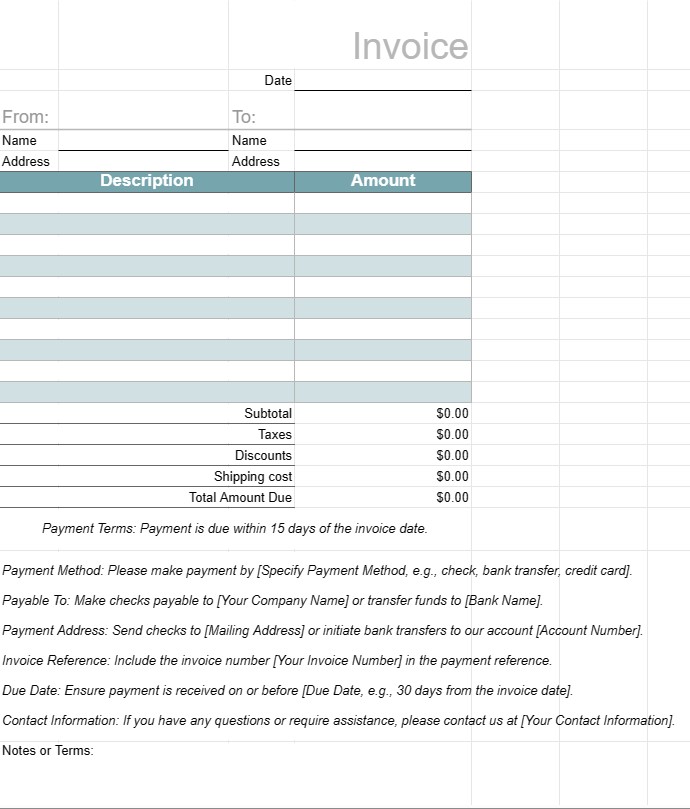
Šablóna faktúry je štandardizovaný dokument, ktorý používajú firmy na fakturáciu za poskytnuté tovary alebo služby svojim klientom alebo zákazníkom. Slúži ako formálna žiadosť o platbu a obsahuje podrobnosti o produktoch alebo službách, ich nákladoch, platobných podmienkach a kontaktné informácie pre firmu aj klienta. Faktúry sú nevyhnutné na sledovanie transakcií, správu peňažných tokov a udržiavanie finančných záznamov.
Kľúčové súčasti šablóny faktúry:
- Hlavička: The horná časť faktúry zvyčajne obsahuje názov firmy, logo a kontaktné informácie, ako aj číslo faktúry a dátum vystavenia.
- Informácie o klientovi: Táto časť obsahuje informácie o klientovi meno, spoločnosť (ak existuje), fakturačná adresa a kontaktné údaje.
- Podrobnosti o faktúre: Táto sekcia obsahuje rozpis poskytovaných produktov alebo služieb. Každá riadková položka obsahuje popis, množstvo, jednotkovú cenu a celkovú sumu.
- Medzisúčet: Medzisúčet predstavuje súčet všetkých riadkových položiek pred zdanením alebo dodatočnými poplatkami.
- Dane: Ak je to potrebné, všetky dane z obratu, DPH alebo iné dane sú uvedené samostatne.
- Zľavy: Všetky príslušné zľavy, kupóny , alebo propagačné ponuky sú uvedené v tejto sekcii.
- Doprava a manipulácia: Ak faktúra obsahuje poplatky za dopravu alebo manipuláciu, sú uvedené samostatne.
- Celková splatná suma: Toto je celková suma faktúry vrátane všetkých poplatkov, daní, zliav a poplatkov.
- Platobné podmienky: Platba podmienky špecifikujú dátum splatnosti, akceptované spôsoby platby (napr. bankový prevod, šek, kreditná karta) a všetky sankcie za oneskorenú platbu.
- Platobné pokyny: Údaje o bankovom účte alebo platobné pokyny sa poskytujú na uľahčenie procesu platby.
- Poznámky alebo podmienky: Môžu byť zahrnuté akékoľvek ďalšie podmienky, pokyny alebo špeciálne poznámky súvisiace s faktúrou alebo transakciou.
- Päta faktúry: Niektoré faktúry obsahujú pätu s dodatočnými kontaktnými informáciami alebo ďakovnou správou.
Výhody používania šablóny faktúry:
- Profesionalita: Prezentuje klientom profesionálny imidž, čo dokazuje, že firma funguje efektívne a systematicky.
- Zrozumiteľnosť: Jasne popisuje poskytované produkty alebo služby. , ich náklady a podrobnosti o platbách, čím sa znižuje riziko sporov alebo nedorozumení.
- Vedenie záznamov: pomáha firmám udržiavať presné záznamy o finančných transakciách na účely účtovníctva, daní a auditu.
- Efektívnosť: Šetrí čas poskytovaním štandardizovaného formátu, ktorý je možné prispôsobiť pre každého klienta alebo transakciu.
- Právna ochrana: Poskytuje formálny záznam o dohode medzi podnikom a klientom, ktorý môže byť užitočný v prípade sporov.
- Okamžitá platba: Nabáda klientov, aby platili rýchlo uvedením dátumov splatnosti a platobné pokyny.
- Konzistentnosť: Zabezpečuje, aby boli faktúry konzistentné vo formáte a obsahu, čo je dôležité pre firmy, ktoré jednajú s viacerými klientmi.
Záverom možno povedať, že šablóna faktúry je základným nástrojom pre podniky na fakturáciu klientov a zákazníkov štruktúrovaným a profesionálnym spôsobom. Pomáha to zefektívniť platobný proces, udržiavať finančné záznamy a stanoviť jasné očakávania týkajúce sa platieb a podmienok.
Jednoduchý náhľad a stiahnutie šablóny tabuľky
Prezrite si plnú verziu šablóny tabuľky bez obmedzení a zistite, či sa vám páči, potom si môžete stiahnuť excelovú šablónu, uložiť ju do svojho zariadenia a používať ju zadarmo.
Získajte prístup k šablóne tabuľky odkiaľkoľvek
Toto funguje na všetkých populárnych operačných systémoch, ako sú Windows, MacOS, Linux, iOS. Šablóny tabuliek si môžete pozrieť a stiahnuť bez ďalších programov.
Ako používať šablónu
Zistite, ako zobraziť ukážku, stiahnuť a potom použiť šablónu tabuľky podľa krokov, ktoré sú veľmi jednoduché
Viac podobných šablón
Pozrite si ďalšie šablóny tabuliek, ktoré sú v rovnakej kategórii ako vybratá.













