
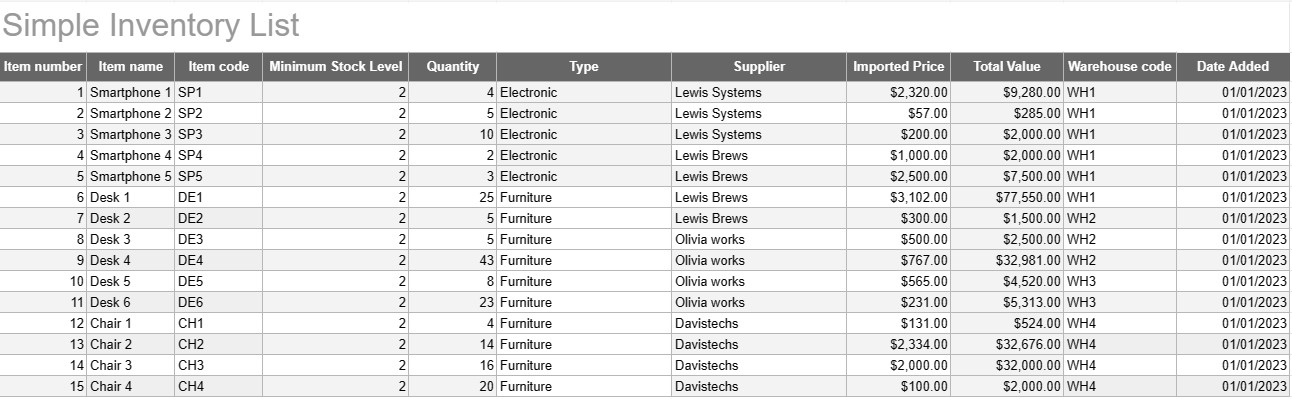
Простой инвентарный список
Категория : Трекеры
Запишите все названия и описания вашего инвентаря, чтобы вы могли видеть их все в одном месте.
Простий шаблон списку запасів — це простий, але ефективний інструмент, який використовують окремі особи та компанії для відстеження та керування запасами товарів, продуктів або активів. Цей шаблон забезпечує структурований формат для запису деталей товару, кількості, розташування та іншої відповідної інформації, що полегшує моніторинг рівня запасів і полегшує ефективне управління.
Ключові компоненти простого шаблону списку запасів:
- Відомості про товар: Шаблон містить стовпці або розділи для інформації про товар, як-от назва товару, опис, унікальний ідентифікатор (наприклад, SKU або серійний номер) і будь-які додаткові примітки.
- Кількість: користувачі можуть записувати кількість або одиниці кожного товару на складі. Цей стовпець необхідний для точного відстеження рівня запасів.
- Місцезнаходження: для підприємств із кількома місцями зберігання або складами шаблон може містити стовпець для вказівки фізичного розташування кожного елемента. Це допомагає спростити пошук і поповнення запасів.
- Ціна за одиницю: користувачі можуть вводити ціну за одиницю або вартість кожного товару. Ця інформація є цінною для розрахунку загальної вартості запасів.
- Загальна вартість: Деякі шаблони автоматично обчислюють загальну вартість кожного товару на основі кількості та ціни за одиницю. Це забезпечує швидкий огляд загальної вартості запасів.
- Дата додавання/оновлення: Щоб відстежувати зміни та оновлення в інвентарі, користувачі можуть записувати дату додавання або зміни кожного елемента.
- Категорія/Тип: Предмети можна класифікувати за різними групами або типами (наприклад, електроніка, канцелярське приладдя, одяг) для кращої організації та звітності.
- Мінімальний рівень запасу: користувачі можуть установити мінімальний рівень запасу для кожного товару. Коли кількість падає нижче цього рівня, це слугує тригером для повторного замовлення або поповнення товару.
- Інформація про постачальника: у бізнес-налаштуваннях користувачі можуть включати інформацію про постачальника, як-от ім’я постачальника, контактну інформацію та інформацію про повторне замовлення.
Переваги використання простого шаблону списку запасів:
- Відстеження запасів: забезпечує чіткий, актуальний знімок рівня запасів, допомагаючи запобігти вичерпанню запасів і надлишку.
- Контроль витрат: дає змогу компаніям відстежувати вартість своїх запасів і приймати обґрунтовані рішення щодо поповнення запасів і закупівлі.
- Ефективність: спрощує управління запасами, централізуючи інформацію та роблячи її легкодоступною.
- Точність даних: Зменшує ризик помилок під час відстеження запасів, оскільки вся інформація записується систематично.
- Керування замовленнями: допомагає визначити, коли потрібно повторно замовляти товари та від яких постачальників, покращуючи керування ланцюгом поставок.
- Відповідність. У деяких галузях ведення точного обліку запасів є важливим для дотримання нормативних вимог і фінансової звітності.
- Оптимізація ресурсів: дає змогу компаніям ефективніше розподіляти ресурси та зменшувати поточні витрати.
На завершення, простий шаблон переліку запасів є практичним інструментом для окремих осіб і компаній, які хочуть вести організований і точний облік своїх запасів. Цей шаблон спрощує керування запасами, зменшує ризик дефіциту або надмірних запасів, а також сприяє кращому фінансовому контролю та прийняттю рішень.
Простой просмотр и загрузка шаблона электронной таблицы
Просмотрите полную версию шаблона электронной таблицы без ограничений, чтобы узнать, нравится ли он вам, затем вы можете загрузить шаблон Excel, сохранить его на своем устройстве и использовать его бесплатно.
Доступ к шаблону электронной таблицы из любого места
Это работает на всех популярных операционных системах, таких как Windows, MacOS, Linux, iOS. Вы можете просмотреть шаблоны таблиц и скачать их без дополнительных программ.
Как использовать шаблон
Выясните, как просмотреть, загрузить и затем использовать шаблон электронной таблицы, выполнив чрезвычайно простые шаги.
Еще похожие шаблоны
Посмотрите больше шаблонов электронных таблиц, которые относятся к той же категории, что и выбранный.













