
گزارش ماهانه
Категория : Планировщики
مدیر این الگو را به اعضای تیم اختصاص می دهد تا آنها را وادار کند که عملیات ماهانه را به سرپرستان خود گزارش دهند.
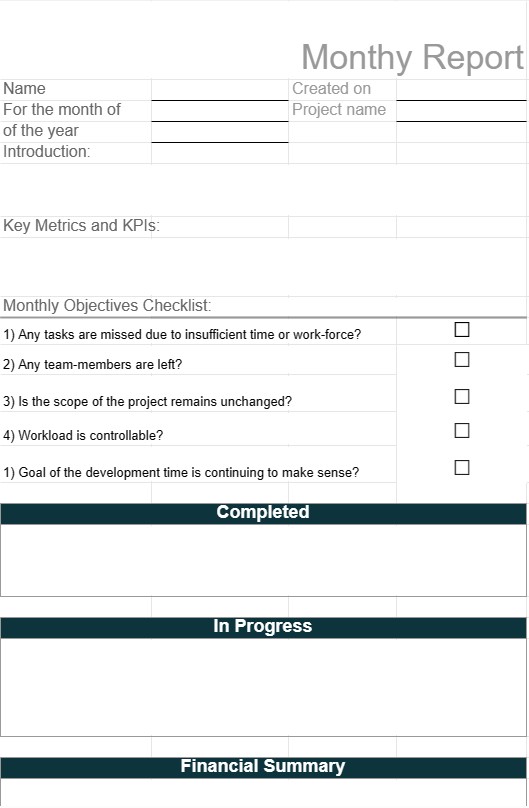
الگوی گزارش ماهانه یک سند ساختاری است که توسط افراد، مشاغل و سازمانها برای خلاصه کردن فعالیتها، دستاوردها و معیارهای کلیدی در یک ماه خاص استفاده میشود. این گزارشها اهداف مختلفی از جمله ارزیابی عملکرد، بهروزرسانیهای پروژه، خلاصههای مالی و ارتباط با ذینفعان را انجام میدهند. گزارشهای ماهانه به اطلاع ذینفعان کمک میکند و تصمیمگیری مبتنی بر داده را تسهیل میکند.
اجزای اصلی یک الگوی گزارش ماهانه:
- صفحه جلد: برخی گزارشها با یک صفحه جلد شروع میشوند که شامل عنوان گزارش، ماه و سال تحت پوشش، نام نویسنده و اطلاعات تماس است.
- خلاصه اجرایی: این بخش یک نمای کلی ارائه میدهد. از یافتههای اصلی و نکات برجسته گزارش. این یک تصویر لحظهای از دستاوردها، چالشها و اهداف کلیدی ارائه میدهد.
- مقدمه: ممکن است یک مقدمه کوتاه برای ارائه زمینهای برای گزارش و تشریح هدف و اهداف آن گنجانده شود.
- معیارهای کلیدی و KPI: گزارشها اغلب شامل بخشهایی هستند که به شاخصهای عملکرد کلیدی (KPI) و معیارهای مرتبط با تمرکز گزارش، مانند ارقام فروش، درآمد، رضایت مشتری یا پروژه اختصاص داده شده است. نقاط عطف.
- بهروزرسانیهای پیشرفت: بسته به هدف گزارش، این بخش پیشرفتهای انجامشده در طول ماه را در زمینههایی مانند توسعه پروژه، کمپینهای بازاریابی یا بهبودهای عملیاتی شرح میدهد.
- خلاصه مالی: برای گزارشهای مالی، این بخش یک نمای کلی از عملکرد مالی، از جمله درآمد، هزینهها، حاشیه سود و هر رویداد مالی قابلتوجهی ارائه میکند.
- چالشها و مشکلات: گزارشها ممکن است چالشها، مسائل یا موانعی را که در طول ماه با آنها مواجه میشوند، همراه با راهحلهای پیشنهادی یا برنامههای اقدام برجسته کنند.
- فرصتها: فرصتهای بالقوه را شناسایی میکند. برای رشد، بهبود یا بهینهسازی بر اساس فعالیتها و نتایج ماه.
- نتیجهگیری: خلاصهای از نکات اصلی گزارش و بیانیه پایانی ممکن است در بخش نتیجهگیری گنجانده شود.
- توصیهها: گزارشها اغلب حاوی توصیههایی برای اقدامات یا استراتژیهایی برای رسیدگی به چالشها، استفاده از فرصتها یا دستیابی به اهداف خاص هستند.
- ضمیمهها: اطلاعات اضافی، نمودارها، نمودارها یا دادههای دقیق ممکن است در ضمیمهها گنجانده شود تا مستندات یا زمینههای پشتیبان ارائه شود.
- مرجع: اگر گزارش به منابع خارجی یا تحقیقات ارجاع میدهد. ، ممکن است یک بخش مرجع گنجانده شود.
مزایای استفاده از الگوی گزارش ماهانه:
- ارتباطات: شفاف و ساختارمند را تسهیل میکند. ارتباط پیشرفت، دستاوردها و چالش ها با ذینفعان.
- مسئولیت پذیری: افراد یا تیم ها را برای دستیابی به اهداف و اهداف با مستندسازی عملکرد مسئول می داند.
- تصمیم گیری مبتنی بر داده: داده ها و بینش هایی را ارائه می دهد که از تصمیم گیری آگاهانه برای اقدامات و استراتژی های آینده پشتیبانی می کند.
- ارزیابی عملکرد: ارزیابی عملکرد و محک زدن را فعال می کند. در طول زمان، به شناسایی روندها و زمینههای بهبود کمک میکند.
- شفافیت: شفافیت در عملیات، مالی یا وضعیت پروژه را برای ایجاد اعتماد با سهامداران نشان میدهد.
- اسناد: یک سابقه تاریخی از فعالیتها و نقاط عطف ایجاد میکند که برای مرجع و ممیزی ارزشمند است.
- برنامهریزی: به برنامهریزی و تنظیم اهداف آینده کمک میکند. اهداف مبتنی بر عملکرد گذشته است.
در نتیجه، یک الگوی گزارش ماهانه ابزار ارزشمندی برای خلاصه کردن و انتقال اطلاعات مهم، عملکرد و نتایج در یک ماه خاص است. این گزارشها بهعنوان وسیلهای برای ثبت پیشرفت، اطلاعرسانی به ذینفعان، و تصمیمگیری مبتنی بر دادهها برای بهبود عملیات، پروژهها یا نتایج مالی عمل میکنند.
Простой просмотр и загрузка шаблона электронной таблицы
Просмотрите полную версию шаблона электронной таблицы без ограничений, чтобы узнать, нравится ли он вам, затем вы можете загрузить шаблон Excel, сохранить его на своем устройстве и использовать его бесплатно.
Доступ к шаблону электронной таблицы из любого места
Это работает на всех популярных операционных системах, таких как Windows, MacOS, Linux, iOS. Вы можете просмотреть шаблоны таблиц и скачать их без дополнительных программ.
Как использовать шаблон
Выясните, как просмотреть, загрузить и затем использовать шаблон электронной таблицы, выполнив чрезвычайно простые шаги.
Еще похожие шаблоны
Посмотрите больше шаблонов электронных таблиц, которые относятся к той же категории, что и выбранный.













