
Коробка Эйзенхауэра
Категория : Планировщики
Это шаблон электронной таблицы, имитирующий известную научную модель, которую вы можете использовать для своего проекта или личных целей.
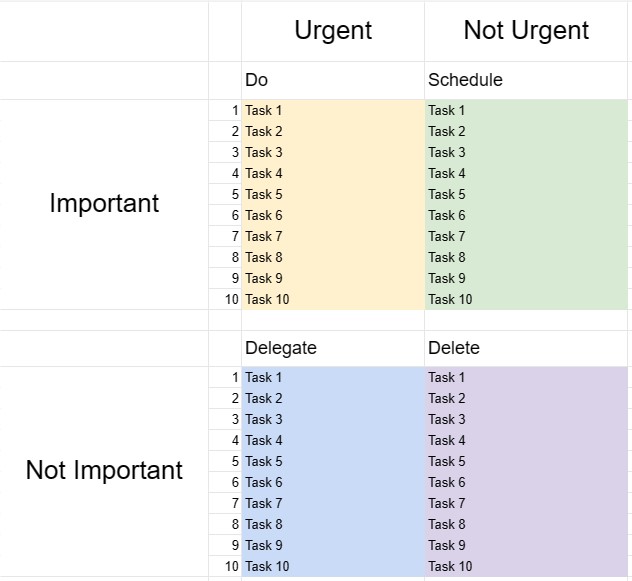
Скринька Ейзенхауера, також відома як матриця Ейзенхауера або матриця терміново-важливих, — це інструмент для прийняття рішень і управління часом, натхненний цитатою президента Дуайта Д. Ейзенхауера: те, що важливо, рідко є терміновим, а те, що є термінове рідко буває важливим. Цей шаблон розроблено, щоб допомогти людям визначати пріоритети завдань і приймати рішення про те, як ефективно розподіляти свій час і ресурси.
Ключові компоненти шаблону ящика Ейзенхауера:
- Чотири квадранти: Шаблон поділено на чотири квадранти, кожен з яких представляє окрему категорію завдань на основі їх терміновості та важливості.
- Квадрант I – термінові та важливі: Завдання в цьому квадранті одночасно термінові та важливі. Вони вимагають негайної уваги, і їх слід вирішувати як найвищий пріоритет.
- Квадрант II – не термінові, але важливі: Завдання в цьому квадранті важливі, але не термінові. Вони представляють проактивну та довгострокову діяльність, яка сприяє особистому та професійному зростанню та успіху. Планування та розклад цих завдань є ключовим.
- Квадрант III – термінові, але не важливі: завдання в цьому квадранті є терміновими, але не особливо важливими. Вони можуть включати переривання, відволікання або завдання, які можна делегувати або звести до мінімуму, щоб звільнити час для більш важливих справ.
- Квадрант IV – не термінові та не важливі: завдання в цьому квадранті не є ні терміновими, ні важливими. Вони часто забирають час, тому їх слід звести до мінімуму або виключити.
- Список завдань: користувачі перераховують свої завдання у відповідному квадранті на основі своїх оцінка терміновості та важливості кожного завдання.
- План дій: Для завдань у квадрантах I і II користувачі можуть створювати плани дій, встановлювати терміни та вказувати кроки, необхідні для їх виконання .
- Перегляд і оновлення: Регулярний перегляд і оновлення «Ящика Ейзенхауера» допомагає людям залишатися зосередженими на тому, що справді важливо, і за потреби змінювати свої пріоритети.
Переваги використання шаблону коробки Ейзенхауера:
- Налаштування пріоритетів: надає структуровану структуру для встановлення пріоритетів завдань і прийняття рішень про те, куди розподілити час і зусилля.
- Керування часом: Допомагає користувачам зосередитися на завданнях, які сприяють досягненню довгострокових цілей, і зменшує час, витрачений на неважливу або реактивну діяльність.
- Продуктивність: Підвищує продуктивність, акцентуючи увагу на важливих завданнях і скорочуючи час, витрачений на менш важливі.
- Зменшення стресу: дозволяє користувачам оперативно вирішувати термінові справи, а також приділяти час важливим, але не -термінові завдання, зменшення стресу та відчуття постійного реагування на кризи.
- Досягнення цілей: Підтримує просування до довгострокових цілей і особистий розвиток, наголошуючи на важливих завданнях.
- Ефективність: допомагає людям працювати розумніше, визначаючи завдання, які можна делегувати, виключити чи мінімізувати.
- Усвідомлення часу: сприяє усвідомленню як витрачається час, і заохочує до більш цілеспрямованого використання часу.
На завершення, шаблон коробки Ейзенхауера є цінним інструментом для людей, які прагнуть ефективно керувати своїм часом, розставляти пріоритети завдань і приймати обґрунтовані рішення про те, куди вкладати свої зусилля. Класифікуючи завдання на основі їх терміновості та важливості, користувачі можуть підвищити продуктивність, зменшити стрес і ефективніше працювати над досягненням своїх цілей.
Простой просмотр и загрузка шаблона электронной таблицы
Просмотрите полную версию шаблона электронной таблицы без ограничений, чтобы узнать, нравится ли он вам, затем вы можете загрузить шаблон Excel, сохранить его на своем устройстве и использовать его бесплатно.
Доступ к шаблону электронной таблицы из любого места
Это работает на всех популярных операционных системах, таких как Windows, MacOS, Linux, iOS. Вы можете просмотреть шаблоны таблиц и скачать их без дополнительных программ.
Как использовать шаблон
Выясните, как просмотреть, загрузить и затем использовать шаблон электронной таблицы, выполнив чрезвычайно простые шаги.
Еще похожие шаблоны
Посмотрите больше шаблонов электронных таблиц, которые относятся к той же категории, что и выбранный.













