
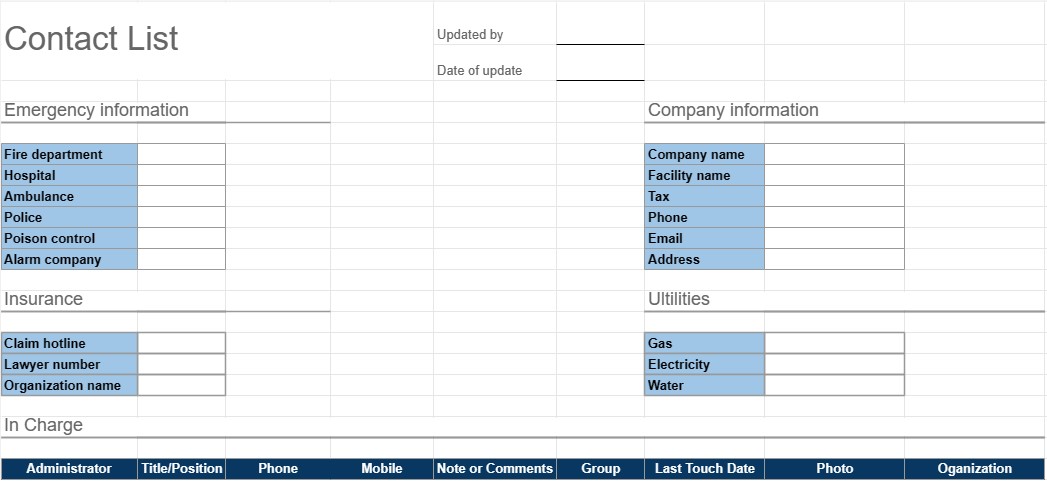
Список контактов
Категория : Планировщики
Это похоже на вашу телефонную книгу, но гораздо более специализировано для управления вашими собственными контактами.
Шаблон списку контактів – це практичний і організований інструмент, який використовується для збирання та керування контактною інформацією для окремих осіб або груп. Він зазвичай використовується як для особистих, так і для професійних цілей, полегшуючи доступ до повного списку контактів і його підтримку. Цей шаблон особливо корисний для того, щоб залишатися на зв’язку, працювати в мережі та ефективно керувати важливими контактами.
Ключові компоненти шаблону списку контактів:
- Ім’я: Шаблон містить місце для введення повного імені кожного контакту. Він також може дозволяти окреме введення імені та прізвища.
- Контактна інформація: Цей розділ зазвичай містить поля для різних контактних даних, які можуть включати номери телефонів, адреси електронної пошти, фізичні адреси та номери факсів.
- Організація: користувачі можуть зазначити організацію чи компанію, до якої належить контакт. Це особливо корисно для ділових контактів.
- Звання/Посада: Для професійних контактів можна додати посаду особи або посаду в організації.
- Примітки чи коментарі: розділ для додавання приміток, коментарів або додаткової інформації про кожен контакт, як-от характер стосунків чи будь-які конкретні деталі.
- Категорія або Група: Користувачі можуть класифікувати або групувати контакти на основі таких критеріїв, як ділові контакти, особисті контакти, друзі, родина або конкретні проекти чи інтереси.
- Фото: Деякі шаблони може дозволити користувачам додавати фото контакту, що полегшує розпізнавання людей.
- Дата додавання/оновлення: дата додавання контакту або останньої інформації про нього оновлені можна записати.
- Сортування та фільтрація: Багато шаблонів пропонують параметри сортування та фільтрації для впорядкування контактів в алфавітному порядку, за категоріями чи на основі інших критеріїв.
Переваги використання шаблону списку контактів:
- Організація: зберігає всю контактну інформацію в одному централізованому місці, що полегшує пошук і оновлення деталей, потрібен.
- Доступність: Забезпечує швидкий доступ до важливих контактних даних, скорочуючи час, витрачений на пошук номерів телефонів або адрес електронної пошти.
- Ефективність: Спрощує спілкування та допомагає користувачам залишатися на зв’язку з колегами, друзями та родиною.
- Мережа: корисно для мережевих цілей, дозволяючи людям підтримувати список професійних контактів і ділових партнерів.
- Резервне копіювання: служить резервним копіюванням важливої контактної інформації у разі втрати пристрою чи пошкодження даних.
- Керування відносинами: Допомагає користувачам вести облік стосунків і взаємодії з контактами, що може бути цінним для подальших дій.
- Налаштування: Користувачі можуть налаштувати шаблон відповідно до своїх конкретних потреб і вподобання.
Підсумовуючи, шаблон списку контактів є практичним інструментом для ефективної організації контактної інформації та керування нею. Незалежно від того, чи використовується він для особистих чи професійних цілей, він спрощує процес зберігання, доступу та оновлення контактних даних, що зрештою полегшує спілкування та керування стосунками.
Простой просмотр и загрузка шаблона электронной таблицы
Просмотрите полную версию шаблона электронной таблицы без ограничений, чтобы узнать, нравится ли он вам, затем вы можете загрузить шаблон Excel, сохранить его на своем устройстве и использовать его бесплатно.
Доступ к шаблону электронной таблицы из любого места
Это работает на всех популярных операционных системах, таких как Windows, MacOS, Linux, iOS. Вы можете просмотреть шаблоны таблиц и скачать их без дополнительных программ.
Как использовать шаблон
Выясните, как просмотреть, загрузить и затем использовать шаблон электронной таблицы, выполнив чрезвычайно простые шаги.
Еще похожие шаблоны
Посмотрите больше шаблонов электронных таблиц, которые относятся к той же категории, что и выбранный.













