Daily Appoinment Calendar
Категория : Календари
Your daily schedule will be more clearer if you use this to point out all of the appointments of the day.
A Daily Appointment Calendar Template is a planning tool used by individuals, professionals, and businesses to schedule and manage their daily appointments, meetings, and tasks. It provides a structured layout for organizing daily activities, setting priorities, and ensuring that time is allocated efficiently.
Key Components of a Daily Appointment Calendar Template:
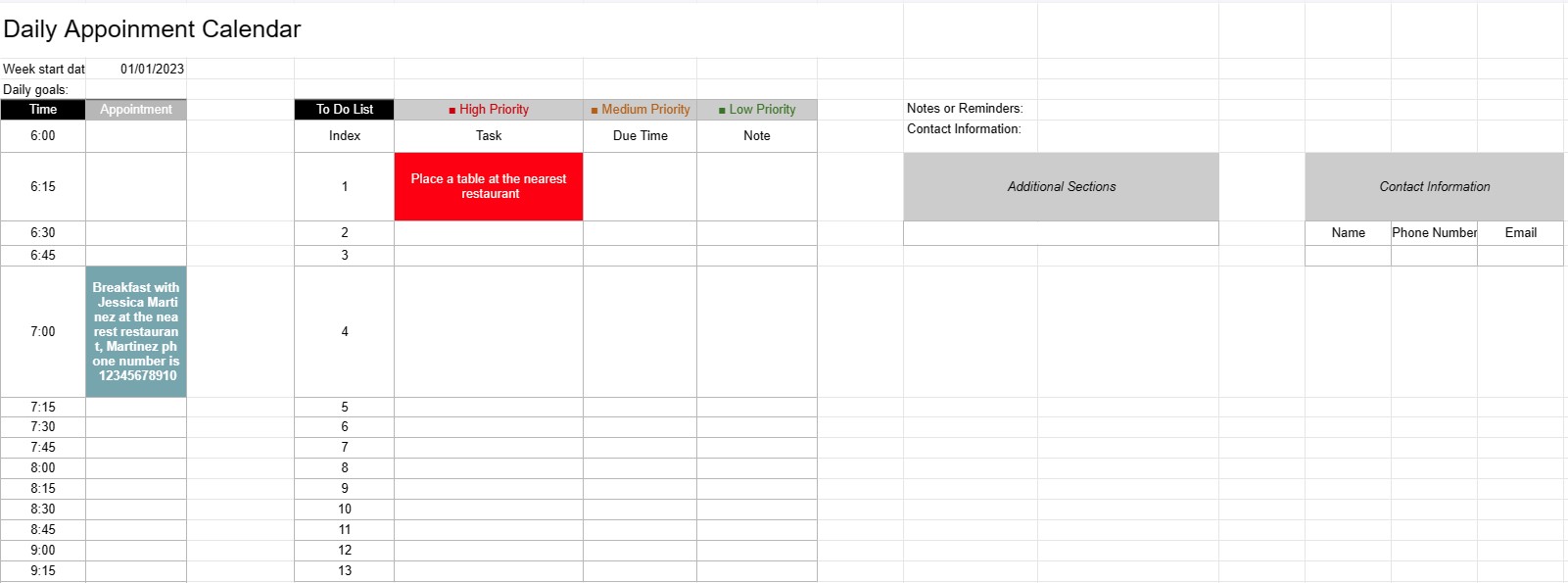
- Date: The template typically displays the date at the top of each daily page, allowing users to navigate through different days.
- Time Slots: The day is divided into time slots or hours, usually starting in the morning and ending in the evening. Each time slot represents a specific period during the day.
- Appointment Details: Users can enter appointment details within each time slot, including:
- Appointment time
- Title or description of the appointment
- Location or meeting room
- Contact information of individuals involved
- To-Do List: Some templates include a section for listing tasks or to-do items that need to be completed during the day. These can be categorized by priority or due time.
- Notes or Reminders: A space for general notes or reminders can be provided at the bottom of the page.
- Priorities or Goals: Some templates may include a section for setting daily priorities or goals, helping users stay focused on essential tasks.
- Contact Information: Contact details for important individuals or clients may be included for quick reference.
- Additional Sections: Depending on the template, additional sections for tracking expenses, mileage, or other specific information may be included.
Benefits of Using a Daily Appointment Calendar Template:
- Time Management: Helps users allocate their time effectively by scheduling appointments and tasks.
- Organization: Provides a structured way to keep track of daily commitments, reducing the risk of overbooking or missing appointments.
- Prioritization: Allows users to prioritize tasks and appointments, ensuring that the most important items are addressed first.
- Productivity: Facilitates better time management and increased productivity by providing a visual overview of the day's activities.
- Communication: Ensures that users are well-prepared for meetings and appointments by having all relevant information at their fingertips.
- Time Tracking: Can be used to track billable hours for professionals who charge by the hour.
- Reference: Serves as a reference point for reviewing past appointments and tasks.
- Efficiency: Enhances efficiency by reducing time wasted on disorganized scheduling and planning.
In conclusion, a Daily Appointment Calendar Template is a valuable tool for managing daily schedules, appointments, and tasks efficiently. It helps individuals and professionals stay organized, prioritize their activities, and make the most of their time.
Простой просмотр и загрузка шаблона электронной таблицы
Просмотрите полную версию шаблона электронной таблицы без ограничений, чтобы узнать, нравится ли он вам, затем вы можете загрузить шаблон Excel, сохранить его на своем устройстве и использовать его бесплатно.
Доступ к шаблону электронной таблицы из любого места
Это работает на всех популярных операционных системах, таких как Windows, MacOS, Linux, iOS. Вы можете просмотреть шаблоны таблиц и скачать их без дополнительных программ.
Как использовать шаблон
Выясните, как просмотреть, загрузить и затем использовать шаблон электронной таблицы, выполнив чрезвычайно простые шаги.
Еще похожие шаблоны
Посмотрите больше шаблонов электронных таблиц, которые относятся к той же категории, что и выбранный.