Conference or Training Week Calendar
Категория : Календари
You have a lot of meetings and agenda, how can you manage to do them all? This is where this spreadsheet template kicks in and you can use it to manage the period.
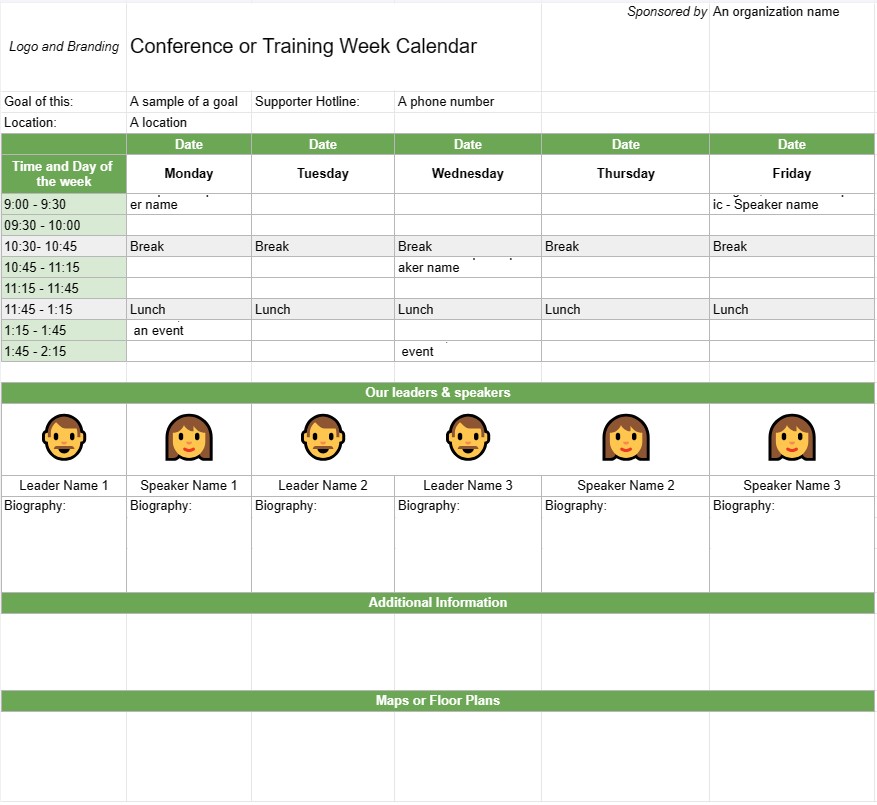
A Conference or Training Week Calendar Template is a planning tool used by organizations and event planners to schedule and organize conferences, training sessions, or workshops that span multiple days or a full week. It helps outline the event's daily agenda, including session topics, speakers, locations, and other relevant details. This template ensures that all participants are well-informed about the event's schedule and logistics.
Key Components of a Conference or Training Week Calendar Template:
- Event Title: The template typically includes the name of the conference or training event at the top.
- Date Range: Specifies the start and end dates of the conference or training week.
- Location: Provides information about the event's venue or venues, including addresses and room names.
- Daily Agenda:Each day of the event is outlined with details such as:
- Date and day of the week
- Schedule of sessions, workshops, or activities
- Start and end times for each session
- Session titles, topics, or themes
- Names of speakers, trainers, or facilitators
- Room or location assignments
- Breaks and meal times
- Special events or networking opportunities
- Session Descriptions:Provides brief descriptions or objectives for each session or workshop, helping participants understand the content and purpose.
- Speaker Bios: Includes biographical information about the speakers or trainers, highlighting their expertise and qualifications.
- Additional Information: This section may include details on registration, check-in procedures, contact information for event organizers, and emergency contact numbers.
- Maps or Floor Plans: If necessary, the template may include maps or floor plans of the event venue(s) to help participants navigate the location.
- Logo and Branding: Incorporates the event's logo, branding, or theme to maintain consistency and recognition.
Benefits of Using a Conference or Training Week Calendar Template:
- Organization: Helps organizers plan and structure multi-day events with clarity and efficiency.
- Communication: Provides a detailed schedule for participants, speakers, and staff, ensuring that everyone is on the same page.
- Efficiency: Reduces confusion and logistical challenges by clearly outlining the event's daily agenda.
- Resource Allocation: Ensures that rooms, equipment, and materials are properly allocated for each session or workshop.
- Participant Engagement: Allows participants to plan their attendance and select sessions of interest in advance.
- Professionalism: Enhances the professionalism of the event by presenting a well-organized and visually appealing schedule.
- Networking: Helps participants identify networking opportunities and social events during the conference or training week.
- Reference: Serves as a reference document for participants to refer to during the event.
In conclusion, a Conference or Training Week Calendar Template is an essential tool for planning and executing multi-day events. It provides a structured and organized schedule, allowing participants to make the most of their experience and ensuring that event logistics run smoothly.
Простой просмотр и загрузка шаблона электронной таблицы
Просмотрите полную версию шаблона электронной таблицы без ограничений, чтобы узнать, нравится ли он вам, затем вы можете загрузить шаблон Excel, сохранить его на своем устройстве и использовать его бесплатно.
Доступ к шаблону электронной таблицы из любого места
Это работает на всех популярных операционных системах, таких как Windows, MacOS, Linux, iOS. Вы можете просмотреть шаблоны таблиц и скачать их без дополнительных программ.
Как использовать шаблон
Выясните, как просмотреть, загрузить и затем использовать шаблон электронной таблицы, выполнив чрезвычайно простые шаги.
Еще похожие шаблоны
Посмотрите больше шаблонов электронных таблиц, которые относятся к той же категории, что и выбранный.