
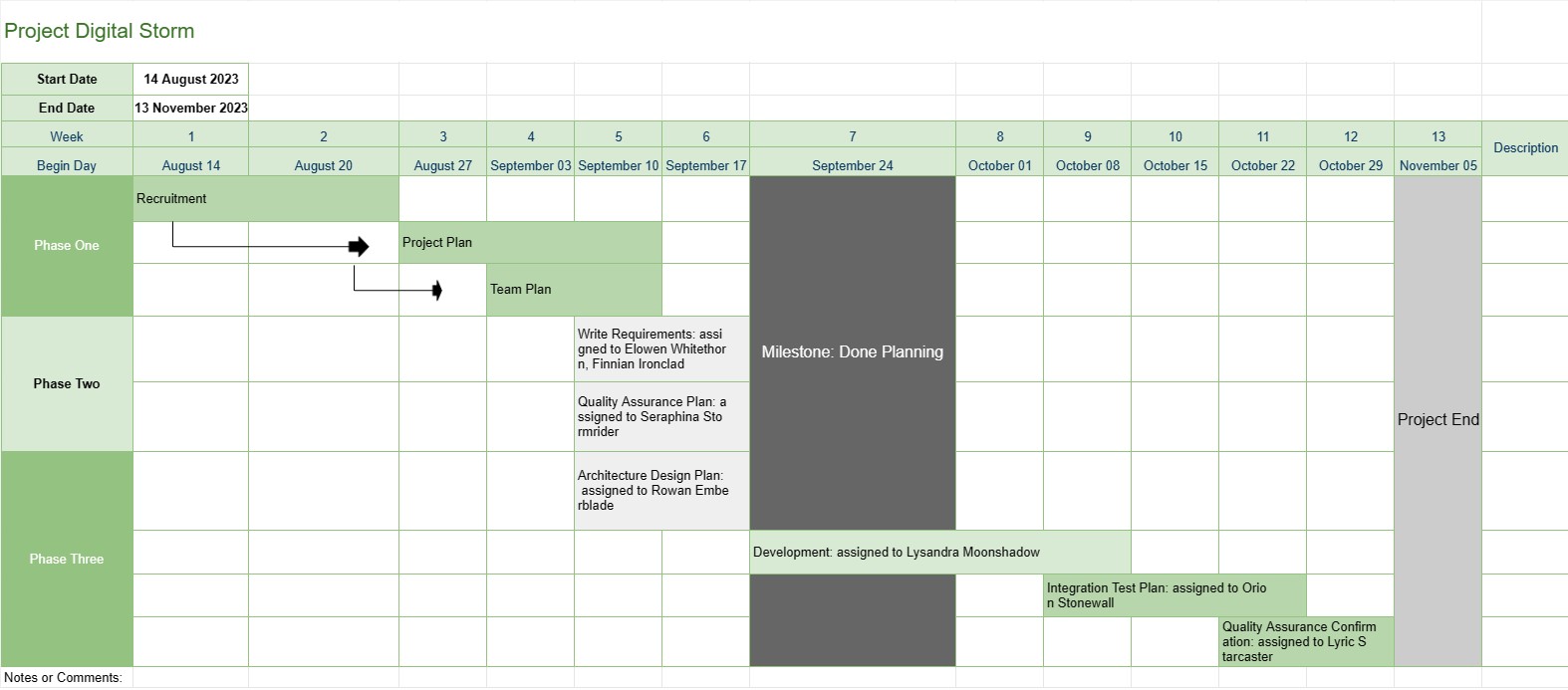
Cronologia proiectului
Categorie : Următoarele
Acest lucru oferă managerului de proiect o imagine de ansamblu mai bună asupra unui proiect, include etapele sarcinilor și data scadentă a întregii progresii de dezvoltare, plus toate datele au fost vizualizate într-un mod atrăgător.
Șablonul Cronologie al proiectului este un instrument fundamental de management al proiectelor care oferă o reprezentare vizuală a reperelor, sarcinilor și termenelor-cheie ale proiectului într-o anumită perioadă. Acesta servește ca foaie de parcurs pentru echipele de proiect și părțile interesate, oferind o imagine de ansamblu clară și concisă a progresului și a programului proiectului.
Iată componentele și caracteristicile cheie incluse de obicei într-un șablon Cronologie a proiectului:
- Numele proiectului: șablonul începe cu numele sau titlul proiectului pentru o identificare ușoară.
- Durata proiectului: specifică începutul data și data de încheiere a proiectului, definind intervalul de timp în care proiectul va fi finalizat.
- Etape de reper: Etapele sunt evenimente sau realizări semnificative în cadrul proiectului care marchează puncte importante de progres. Ele sunt de obicei reprezentate ca date specifice pe cronologia și servesc drept puncte de referință pentru urmărirea progresului proiectului.
- Sarcini sau activități: șablonul prezintă diferitele sarcini, activități sau faze implicate. în proiect. Fiecare sarcină este asociată cu o dată de începere și o durată estimată.
- Dependențe: unele șabloane de cronologie a proiectului includ săgeți sau linii care conectează sarcinile pentru a ilustra dependențele sarcinilor. Acest lucru ajută echipele de proiect să înțeleagă ordinea în care trebuie finalizate sarcinile.
- Resurse alocate: Managerii de proiect pot indica ce membri ai echipei sau resursele sunt responsabile pentru fiecare sarcină. Acest lucru facilitează alocarea resurselor și alocarea sarcinilor.
- Duratele sarcinilor: Durata estimată pentru fiecare sarcină este adesea afișată, permițând echipelor să evalueze cât timp va dura fiecare activitate.
- Urmărirea progresului: șablonul poate include indicatori vizuali pentru a urmări finalizarea sarcinii și progresul general al proiectului.
- Cale critică: în cronologia proiectului mai avansată șabloane, poate fi identificată calea critică, care reprezintă succesiunea de sarcini care determină durata minimă a proiectului.
- Note sau comentarii: utilizatorii pot adăuga note, comentarii sau descrieri. pentru a oferi context sau detalii suplimentare pentru anumite sarcini sau etape.
Șablonul Cronologie a proiectului joacă un rol esențial în managementul proiectului, oferind câteva beneficii cheie:
- Vizualizarea: oferă o reprezentare vizuală a proiectului, facilitând echipelor de proiect și părților interesate să înțeleagă domeniul de aplicare, calendarul și rezultatele cheie ale proiectului.
- Comunicare: Cronologia servește ca instrument de comunicare, permițând managerilor de proiect să transmită progresul și statutul proiectului membrilor echipei, clienților și directorilor.
- Planificare și coordonare: echipele de proiect poate folosi cronologia pentru a planifica sarcini, a aloca resurse și a coordona activități pentru a se asigura că proiectul rămâne pe drumul cel bun.
- Gestionarea riscurilor: prin identificarea dependențelor sarcinilor și a căilor critice, managerii de proiect pot gestionați în mod proactiv riscurile potențiale și blocajele.
- Documentare: Cronologia oferă o înregistrare istorică a progresului proiectului, ajutând la analiza și documentarea post-proiect.
În rezumat, șablonul Cronologia proiectului este un instrument indispensabil de management al proiectelor care îmbunătățește planificarea, execuția și monitorizarea proiectului. Se asigură că echipele de proiect au o înțelegere clară a obiectivelor, calendarului și dependențelor proiectului, contribuind în cele din urmă la finalizarea cu succes a proiectului.
Previzualizare ușoară și descărcare șablon de foaie de calcul
Vizualizați versiunea completă a unui șablon de foaie de calcul fără limitări pentru a vedea dacă vă place, apoi puteți descărca șablonul Excel pentru a-l stoca pe dispozitiv și a-l utiliza gratuit.
Accesați șablonul de foaie de calcul de oriunde
Acesta funcționează pe toate sistemele de operare populare, cum ar fi Windows, MacOS, Linux, iOS. Puteți vedea șabloanele foilor de calcul și le puteți descărca fără programe suplimentare.
Cum se folosește un șablon
Aflați cum să previzualizați, să descărcați și apoi să utilizați șablonul foii de calcul urmând pașii care sunt extrem de ușor de urmat
Mai multe șabloane similare
Vedeți mai multe șabloane de foi de calcul care se află în aceeași categorie cu cel ales.














