
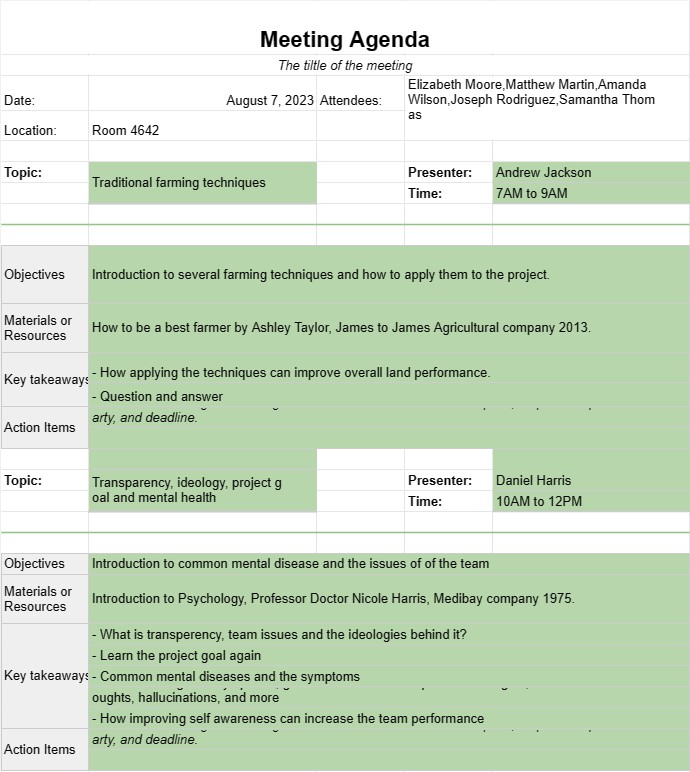
Ordinea de zi a ședinței
Categorie : Planificatori
Gestionați ora și subiectul întâlnirilor folosind aceste șabloane simple.
Un șablon de agendă a ședinței este un document structurat folosit pentru a sublinia subiectele, obiectivele și activitățile care trebuie discutate și realizate în timpul unei întâlniri. Acesta servește drept ghid pentru participanți, asigurându-se că întâlnirea rămâne pe drumul cel bun, obiectivele sunt atinse și timpul este gestionat eficient. Ordinea de zi a întâlnirilor este esențială atât pentru întâlnirile formale de afaceri, cât și pentru întâlnirile informale ale echipelor.
Componentele cheie ale unui șablon de agendă pentru întâlniri:
- Detalii despre întâlnire: șablonul include în mod obișnuit titlul întâlnirii, data, ora, locația (fizică sau virtuală) și numele participanților sau participanților.
- Publicările agendei: Fiecare punct de pe ordinea de zi este listat cu un titlu sau subiect clar. Punctele ar trebui să fie organizate într-o secvență logică, iar ordinea lor de discuție poate fi prioritizată în funcție de importanță sau sensibilitate la timp.
- Durata: Timpul estimat alocat este specificat pentru fiecare punct de pe ordinea de zi. pentru a ajuta la gestionarea duratei generale a întâlnirii. Acest lucru asigură că discuțiile nu sunt grăbite și că există suficient timp pentru fiecare subiect.
- Prezentator: numele persoanei responsabile cu prezentarea sau conducerea discuției pe fiecare punct de pe ordinea de zi este menționate.
- Obiective: este furnizată o scurtă descriere a scopurilor sau obiectivelor care trebuie atinse pentru fiecare punct de pe ordinea de zi. Acest lucru ajută la menținerea participanților concentrați asupra rezultatelor dorite.
- Materiale sau resurse: dacă există documente, rapoarte, prezentări sau resurse legate de un punct de pe ordinea de zi, se poate face referire la ele în această secțiune.
- Articole de acțiune: O secțiune dedicată la sfârșitul agendei listează punctele de acțiune, deciziile sau sarcinile ulterioare care apar în timpul întâlnirii. Fiecare element de acțiune include o descriere, o parte responsabilă și un termen limită.
- Amânare a ședinței: O declarație de încheiere sau un rezumat este inclusă pentru a suspenda oficial întâlnirea, mulțumind participanților pentru prezență și contribuții. .
Beneficiile utilizării unui șablon de agendă pentru întâlniri:
- Concentrare: Menține întâlnirea concentrată pe subiecte și obiective specifice, reducând probabilitatea de a devia în afara subiectului.
- Gestionarea timpului: ajută la alocarea eficientă a timpului pentru fiecare punct de pe ordinea de zi, prevenind depășirile și asigurând o întâlnire bine ritmată.
- Pregătire: Permite participanților să se pregătească în avans, revizuind punctele de pe ordinea de zi și materialele relevante.
- Responsabilitate: Documentează acțiunile și responsabilitățile, asigurându-se că deciziile sunt luate urmată.
- Claritate: oferă o structură clară pentru întâlnire, facilitând înțelegerea de către participanți a fluxului discuțiilor.
- Implicare. : Încurajează participarea activă a participanților, subliniind în mod clar rolurile și responsabilitățile acestora.
- Păstrarea evidenței: servește ca o evidență a ceea ce a fost discutat, decis și atribuit în timpul întâlnire, care poate fi utilă pentru referințe viitoare.
- Profesionalism: Demonstrează abilități organizatorice și angajament pentru comunicarea eficientă în cadrul echipei sau organizației.
În concluzie, un șablon de agendă a întâlnirilor este un instrument valoros pentru planificarea și desfășurarea de întâlniri productive. Ajută la asigurarea faptului că întâlnirile sunt bine organizate, intenționate și orientate spre rezultate, economisind în cele din urmă timp și îmbunătățind comunicarea între participanți.
Previzualizare ușoară și descărcare șablon de foaie de calcul
Vizualizați versiunea completă a unui șablon de foaie de calcul fără limitări pentru a vedea dacă vă place, apoi puteți descărca șablonul Excel pentru a-l stoca pe dispozitiv și a-l utiliza gratuit.
Accesați șablonul de foaie de calcul de oriunde
Acesta funcționează pe toate sistemele de operare populare, cum ar fi Windows, MacOS, Linux, iOS. Puteți vedea șabloanele foilor de calcul și le puteți descărca fără programe suplimentare.
Cum se folosește un șablon
Aflați cum să previzualizați, să descărcați și apoi să utilizați șablonul foii de calcul urmând pașii care sunt extrem de ușor de urmat
Mai multe șabloane similare
Vedeți mai multe șabloane de foi de calcul care se află în aceeași categorie cu cel ales.













