
Cutia Eisenhower
Categorie : Planificatori
Acesta este șablonul de foaie de calcul simulează un model științific faimos pe care îl puteți utiliza pentru proiectul dvs. sau scopul personal.
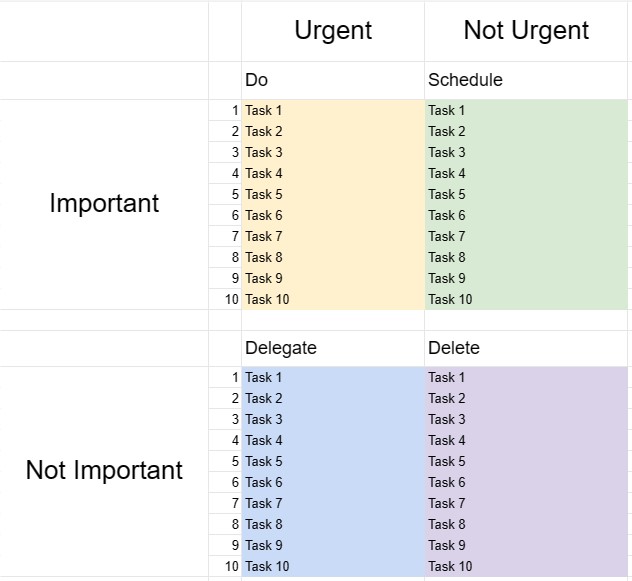
Cutia Eisenhower, cunoscută și sub numele de Matricea Eisenhower sau Matricea Urgent-Importante, este un instrument de luare a deciziilor și de gestionare a timpului inspirat dintr-un citat atribuit președintelui Dwight D. Eisenhower: Ceea ce este important este rareori urgent și ceea ce este urgent este rareori important. Acest șablon este conceput pentru a ajuta persoanele să prioritizeze sarcinile și să ia decizii cu privire la modul în care să-și aloce timpul și resursele în mod eficient.
Componentele cheie ale unui șablon de cutie Eisenhower:
- Patru cadrane: Șablonul este împărțit în patru cadrane, fiecare reprezentând o categorie diferită de sarcini în funcție de urgența și importanța lor.
- Cadrant I - Urgent și important: Sarcinile din acest cadran sunt atât urgente, cât și importante. Ele necesită atenție imediată și ar trebui abordate ca o prioritate de vârf.
- Cadrant II - Nu este urgent, ci important: Sarcinile din acest cadran sunt importante, dar nu urgente. Ele reprezintă activități proactive și pe termen lung care contribuie la creșterea și succesul personal și profesional. Planificarea și programarea acestor sarcini este cheia.
- Cadrant III - Urgent, dar nu important: Sarcinile din acest cadran sunt urgente, dar nu deosebit de importante. Acestea pot include întreruperi, distrageri de atenție sau sarcini care pot fi delegate sau minimizate pentru a elibera timp pentru chestiuni mai importante.
- Cadrantul IV - Nu este urgent și nu este important: Sarcini din acest articol. cadranele nu sunt nici urgente, nici importante. Acestea sunt adesea activități care irosesc timp și ar trebui reduse la minimum sau eliminate.
- Lista de sarcini: utilizatorii își listează sarcinile în cadranul corespunzător pe baza lor. evaluarea urgenței și importanței fiecărei sarcini.
- Plan de acțiune: pentru sarcinile din Cadranele I și II, utilizatorii pot crea planuri de acțiune, pot stabili termene limită și pot specifica pașii necesari pentru a le îndeplini .
- Examinare și actualizare: revizuirea și actualizarea regulată a Eisenhower Box îi ajută pe indivizi să rămână concentrați pe ceea ce contează cu adevărat și să își adapteze prioritățile după cum este necesar.
Beneficiile utilizării unui șablon de cutie Eisenhower:
- Setarea priorităților: oferă un cadru structurat pentru prioritizarea sarcinilor și luarea deciziilor cu privire la locul în care să aloce timp și efort.
- Gestionarea timpului: ajută utilizatorii să se concentreze asupra sarcinilor care contribuie la obiectivele pe termen lung și să reducă timpul petrecut cu activități neimportante sau reactive.
- Productivitate: Crește productivitatea punând accent pe sarcinile importante și reducând timpul pierdut cu cele mai puțin importante.
- Reducerea stresului: Permite utilizatorilor să abordeze cu promptitudine problemele urgente, alocând, de asemenea, timp celor importante, dar care nu -sarcini urgente, reducând stresul și senzația de reacție constantă la crize.
- Atingerea obiectivelor: Susține progresul către obiectivele pe termen lung și dezvoltarea personală prin accentuarea sarcinilor importante.
- Eficiență: ajută persoanele să lucreze mai inteligent prin identificarea sarcinilor care pot fi delegate, eliminate sau minimizate.
- Conștientizarea timpului: promovează conștientizarea modul în care timpul este petrecut și încurajează utilizarea mai intenționată a timpului.
În concluzie, un șablon de cutie Eisenhower este un instrument valoros pentru persoanele care doresc să-și gestioneze timpul în mod eficient, să prioritizeze sarcinile și să ia decizii informate despre unde să-și investească eforturile. Prin clasificarea sarcinilor în funcție de urgență și importanță, utilizatorii pot crește productivitatea, pot reduce stresul și pot lucra pentru a-și atinge obiectivele mai eficient.
Previzualizare ușoară și descărcare șablon de foaie de calcul
Vizualizați versiunea completă a unui șablon de foaie de calcul fără limitări pentru a vedea dacă vă place, apoi puteți descărca șablonul Excel pentru a-l stoca pe dispozitiv și a-l utiliza gratuit.
Accesați șablonul de foaie de calcul de oriunde
Acesta funcționează pe toate sistemele de operare populare, cum ar fi Windows, MacOS, Linux, iOS. Puteți vedea șabloanele foilor de calcul și le puteți descărca fără programe suplimentare.
Cum se folosește un șablon
Aflați cum să previzualizați, să descărcați și apoi să utilizați șablonul foii de calcul urmând pașii care sunt extrem de ușor de urmat
Mai multe șabloane similare
Vedeți mai multe șabloane de foi de calcul care se află în aceeași categorie cu cel ales.













