Calendar anual simplu
Categorie : Calendare
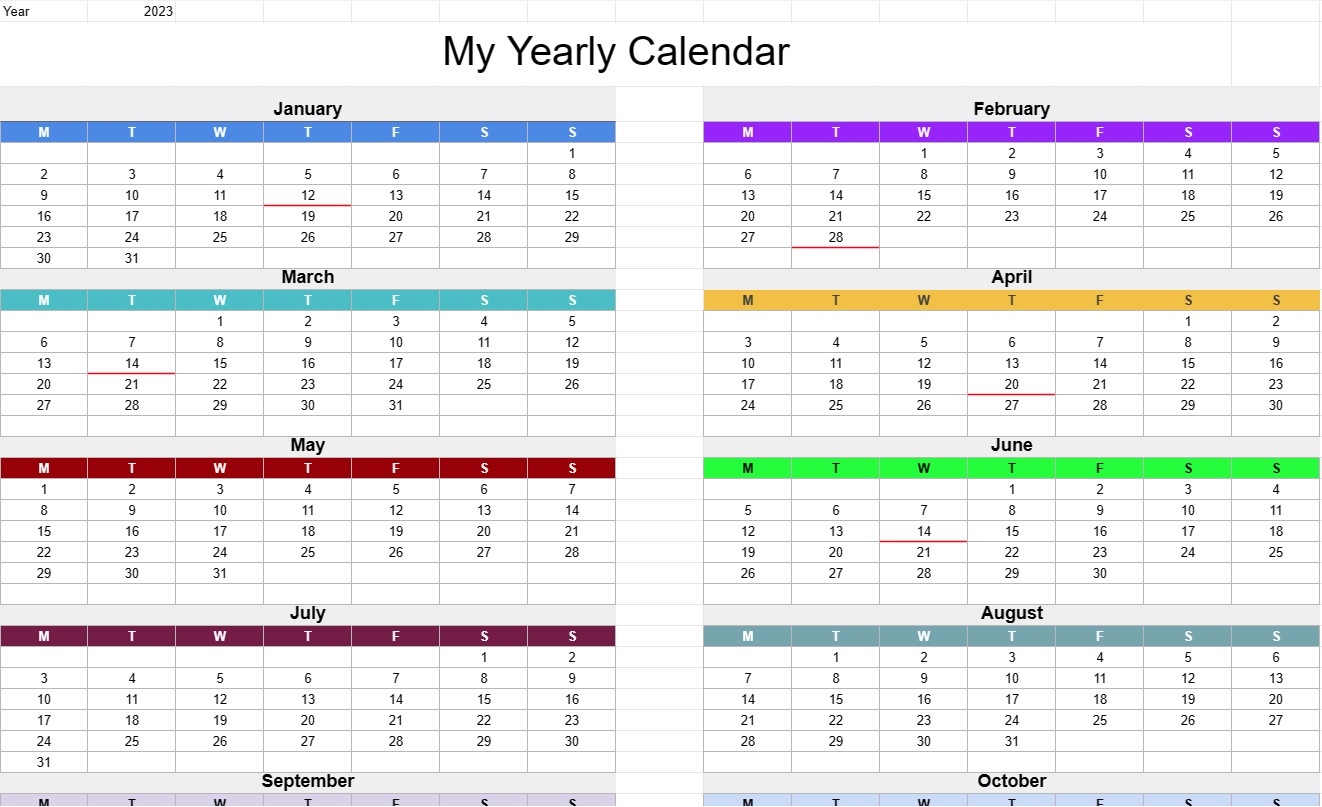
Acest șablon Excel este inteligent, introduci anul în care te afli și va genera un calendar pentru tine.
Șablonul de calendar anual simplu este un instrument versatil și practic care oferă o imagine de ansamblu asupra unui întreg an pe o singură pagină. Este folosit în mod obișnuit pentru planificarea, programarea și organizarea de evenimente, întâlniri, termene limită și alte date importante în scopuri personale, profesionale sau academice. Acest șablon oferă o modalitate clară și concisă de a vizualiza anul următor, facilitând gestionarea timpului și a angajamentelor.
Să explorăm componentele și elementele cheie incluse de obicei într-un șablon de calendar anual simplu:
- Anul: șablonul afișează în mod vizibil anul pentru care este creat calendarul. Utilizatorii pot identifica cu ușurință și pot face referire la anul specific de care sunt interesați.
- Luni: calendarul împarte de obicei anul în luni, fiecare lună fiind reprezentată printr-o secțiune sau o coloană separată. Fiecare lună include numele lunii și zilele și datele corespunzătoare.
- Zilele săptămânii: zilele săptămânii (luni, marți, miercuri etc.) sunt enumerate în partea de sus a calendarului, facilitând identificarea zilelor în care se încadrează anumite date.
- Grilă de date: caracteristica principală a șablonului este grila de date, unde fiecare zi a luna este reprezentată de o celulă numerotată. Utilizatorii pot introduce evenimente, întâlniri sau alte informații importante în celulele corespunzătoare unor date specifice.
- Sărbători: unele șabloane includ marcatori sau indicatori pentru sărbători legale, sărbători speciale sau alte date semnificative. Acest lucru îi ajută pe utilizatori să planifice în preajma sărbătorilor și a evenimentelor speciale.
- Note sau secțiune de note: Spațiul este adesea oferit în partea de jos sau în partea laterală a șablonului pentru ca utilizatorii să își noteze note, obiective, sau mementouri pentru anul.
- Date evidențiate sau personalizabile: utilizatorii pot avea opțiunea de a evidenția sau de a personaliza anumite date pentru a atrage atenția asupra anumitor evenimente, repere sau termene limită.
- Codificarea culorilor: Pentru a ajuta la organizare, unii utilizatori folosesc scheme de codare a culorilor pentru a clasifica și diferenția tipurile de evenimente sau angajamente.
- Opțiuni de imprimare: Șablonul este conceput pentru a fi ușor de imprimat, permițând utilizatorilor să imprime cu ușurință o copie tipărită pentru referință sau pentru a le partaja altora.
Șablonul de calendar anual simplu oferă câteva avantaje cheie pentru persoane fizice și organizații:
- Planificare pe tot parcursul anului: oferă o imagine cuprinzătoare a întregului an, permițând utilizatorilor să planifice și să programeze evenimente și angajamente cu mult timp înainte.
- Organizare: utilizatorii pot urmări datele importante, termenele limită și întâlnirile, reducând riscul de a le uita sau de a le trece cu vederea.
- Gestionarea timpului. : Calendarul facilitează gestionarea eficientă a timpului, oferind o reprezentare vizuală a modului în care timpul este alocat pe parcursul anului.
- Setarea obiectivelor: acceptă stabilirea și urmărirea obiectivelor, permițând utilizatorilor să stabilească obiective și să aloce timp pentru a le atinge.
- Comunicare: calendarele anuale pot fi partajate cu membrii familiei, colegii sau membrii echipei pentru a coordona programe și activități.
- Planificarea vacanțelor: utilizatorii pot planifica vacanțe și activități în preajma sărbătorilor legale și a ocaziilor speciale.
În rezumat, șablonul de calendar anual simplu este un model versatil și instrument ușor de utilizat pentru planificarea și organizarea anului următor. Îmbunătățește gestionarea timpului, facilitează stabilirea de obiective și promovează programarea eficientă atât pentru uz personal, cât și profesional.
Previzualizare ușoară și descărcare șablon de foaie de calcul
Vizualizați versiunea completă a unui șablon de foaie de calcul fără limitări pentru a vedea dacă vă place, apoi puteți descărca șablonul Excel pentru a-l stoca pe dispozitiv și a-l utiliza gratuit.
Accesați șablonul de foaie de calcul de oriunde
Acesta funcționează pe toate sistemele de operare populare, cum ar fi Windows, MacOS, Linux, iOS. Puteți vedea șabloanele foilor de calcul și le puteți descărca fără programe suplimentare.
Cum se folosește un șablon
Aflați cum să previzualizați, să descărcați și apoi să utilizați șablonul foii de calcul urmând pașii care sunt extrem de ușor de urmat
Mai multe șabloane similare
Vedeți mai multe șabloane de foi de calcul care se află în aceeași categorie cu cel ales.