Calendarul zilnic al programărilor
Categorie : Calendare
Programul tău zilnic va fi mai clar dacă îl folosești pentru a indica toate întâlnirile zilei.


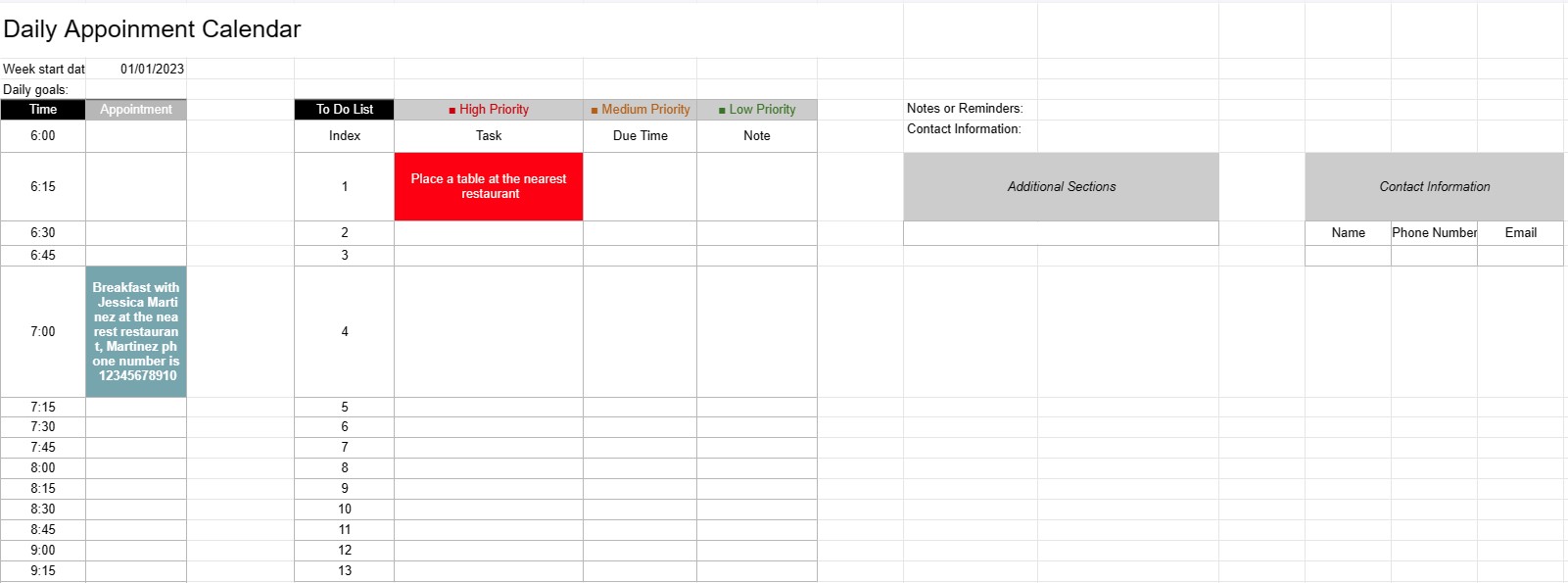
Un șablon de calendar pentru întâlniri zilnice este un instrument de planificare utilizat de persoane fizice, profesioniști și companii pentru a programa și gestiona întâlnirile, întâlnirile și sarcinile zilnice. Oferă un aspect structurat pentru organizarea activităților zilnice, stabilirea priorităților și asigurarea că timpul este alocat eficient.
Componentele cheie ale unui șablon de calendar pentru întâlniri zilnice:
- Data: șablonul afișează de obicei data în partea de sus a fiecărei pagini zilnice, permițând utilizatorilor să navigheze prin diferite zile.
- Flocuri de timp: ziua este împărțită în intervale de timp sau ore, începând de obicei dimineața și se termină seara. Fiecare interval orar reprezintă o anumită perioadă în timpul zilei.
- Detalii privind întâlnirea: utilizatorii pot introduce detalii despre întâlnire în fiecare interval orar, inclusiv:
- Ora întâlnirii
- Titlul sau descrierea întâlnirii
- Locația sau sala de ședințe
- Informații de contact ale persoanelor implicate
- Lista de sarcini: unele șabloane includ o secțiune pentru listarea sarcinilor sau a elementelor de făcut care trebuie finalizate în timpul zilei. Acestea pot fi clasificate în funcție de prioritate sau de timp.
- Note sau mementouri: un spațiu pentru note generale sau memento-uri poate fi furnizat în partea de jos a paginii.
- Priorități sau obiective: unele șabloane pot include o secțiune pentru stabilirea priorităților sau a obiectivelor zilnice, ajutând utilizatorii să rămână concentrați asupra sarcinilor esențiale.
- Informații de contact: Detaliile de contact pentru persoane sau clienți importanți pot fi incluse pentru referință rapidă.
- Secțiuni suplimentare: În funcție de șablon, pot fi incluse secțiuni suplimentare pentru urmărirea cheltuielilor, a kilometrajului sau a altor informații specifice. să fie incluse.
Beneficiile utilizării unui șablon de calendar pentru întâlniri zilnice:
- Gestionarea timpului: ajută utilizatorii să-și aloce timpul în mod eficient prin programarea întâlnirilor și sarcinilor.
- Organizare: oferă o modalitate structurată de a ține evidența angajamentelor zilnice, reducând riscul de suprarezervare sau lipsă de întâlniri.
- Prioritizare: Permite utilizatorilor să prioritizeze sarcinile și programările, asigurându-se că cele mai importante elemente sunt abordate mai întâi.
- Productivitate: facilitează o mai bună gestionare a timpului și o productivitate crescută, oferind o privire de ansamblu vizuală a activităților zilei.
- Comunicare: se asigură că utilizatorii sunt bine pregătiți pentru întâlniri și întâlniri, având toate informațiile relevante la îndemână.
- Urmărirea timpului: poate fi folosit pentru a urmări orele facturabile pentru profesioniștii care taxează la oră.
- Referință: servește ca punct de referință pentru examinarea trecutului numiri și sarcini.
- Eficiență: Îmbunătățește eficiența prin reducerea timpului pierdut cu programarea și planificarea dezorganizate.
În concluzie, un calendar zilnic de întâlniri Șablonul este un instrument valoros pentru gestionarea eficientă a programelor zilnice, a programelor și a sarcinilor. Ajută indivizii și profesioniștii să rămână organizați, să-și prioritizeze activitățile și să profite la maximum de timpul lor.
Previzualizare ușoară și descărcare șablon de foaie de calcul
Vizualizați versiunea completă a unui șablon de foaie de calcul fără limitări pentru a vedea dacă vă place, apoi puteți descărca șablonul Excel pentru a-l stoca pe dispozitiv și a-l utiliza gratuit.
Accesați șablonul de foaie de calcul de oriunde
Acesta funcționează pe toate sistemele de operare populare, cum ar fi Windows, MacOS, Linux, iOS. Puteți vedea șabloanele foilor de calcul și le puteți descărca fără programe suplimentare.
Cum se folosește un șablon
Aflați cum să previzualizați, să descărcați și apoi să utilizați șablonul foii de calcul urmând pașii care sunt extrem de ușor de urmat
Mai multe șabloane similare
Vedeți mai multe șabloane de foi de calcul care se află în aceeași categorie cu cel ales.