Calendarul Săptămânii de Conferință sau Training
Categorie : Calendare
Ai o mulțime de întâlniri și agendă, cum poți să le faci pe toate? Aici începe acest șablon de foaie de calcul și îl puteți folosi pentru a gestiona perioada.
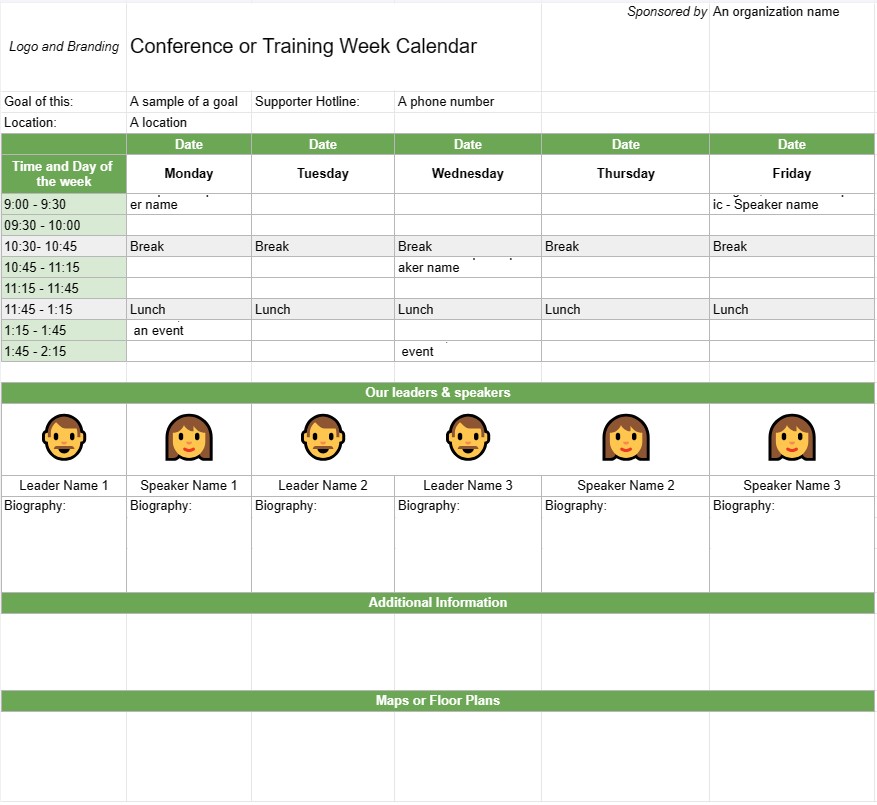
Un șablon de calendar pentru săptămâna de conferințe sau de formare este un instrument de planificare utilizat de organizații și planificatorii de evenimente pentru a programa și organiza conferințe, sesiuni de formare sau ateliere care se desfășoară pe mai multe zile sau pe o săptămână întreagă. Ajută la conturarea agendei zilnice a evenimentului, inclusiv subiecte ale sesiunii, vorbitori, locații și alte detalii relevante. Acest șablon asigură că toți participanții sunt bine informați cu privire la programul și logistica evenimentului.
Componentele cheie ale unui șablon de calendar de conferință sau săptămâna de antrenament:
- Titlul evenimentului : Șablonul include de obicei numele conferinței sau al evenimentului de formare în partea de sus.
- Interval de date: specifică datele de începere și de sfârșit ale conferinței sau săptămânii de formare .
- Locație: furnizează informații despre locația sau locațiile evenimentului, inclusiv adrese și numele sălilor.
- Agendă zilnică:Fiecare ziua evenimentului este subliniată cu detalii precum:
- Data și ziua săptămânii
- Programul sesiunilor, atelierelor sau activităților
- Orele de începere și de sfârșit pentru fiecare sesiune
- Titlurile sesiunii, subiectele sau temele
- Numele vorbitorilor, formatorilor sau facilitatorilor
- Trecari pentru încăpere sau locație
- Pauze și orele meselor
- Evenimente speciale sau oportunități de creare de rețele
- Descrierea sesiunii:Oferă descrieri scurte sau obiective pentru fiecare sesiune sau atelier , ajutând participanții să înțeleagă conținutul și scopul.
- Biografia vorbitorului: include informații biografice despre vorbitori sau formatori, subliniind expertiza și calificările acestora.
- Informații suplimentare: această secțiune poate include detalii despre înregistrare, proceduri de check-in, informații de contact pentru organizatorii de evenimente și numere de contact pentru urgențe.
- Hărți sau planuri: Dacă este necesar, șablonul poate include hărți sau planuri ale locului(e) evenimentului pentru a ajuta participanții să navigheze în locație.
- Sigla și branding: încorporează sigla evenimentului, branding , sau o temă pentru a menține coerența și recunoașterea.
Beneficiile utilizării unui șablon de calendar pentru conferințe sau săptămâna de formare:
- Organizație: ajută organizatorii să planifice și structurați evenimentele de mai multe zile cu claritate și eficiență.
- Comunicare: oferă un program detaliat pentru participanți, vorbitori și personal, asigurându-se că toată lumea este pe aceeași pagină.
- Eficiență: Reduce confuzia și provocările logistice prin conturarea clară a agendei zilnice a evenimentului.
- Alocarea resurselor: asigură că camerele, echipamentele și materialele sunt alocate corespunzător pentru fiecare sesiune sau atelier.
- Implicarea participanților: Permite participanților să își planifice prezența și să aleagă sesiunile de interes în avans.
- Profesionalism: îmbunătățește profesionalismul evenimentului prin prezentarea unui program bine organizat și atrăgător din punct de vedere vizual.
- Rețea: ajută participanții să identifice oportunitățile de creare de rețele și evenimentele sociale în timpul conferință sau săptămâna de formare.
- Referință: servește ca document de referință pentru participanți la care să se refere în timpul evenimentului.
În concluzie, un Șablonul de calendar al săptămânii de conferințe sau de antrenament este un instrument esențial pentru planificarea și executarea evenimentelor de mai multe zile. Oferă un program structurat și organizat, permițând participanților să profite la maximum de experiența lor și asigurându-se că logistica evenimentului funcționează fără probleme.
Previzualizare ușoară și descărcare șablon de foaie de calcul
Vizualizați versiunea completă a unui șablon de foaie de calcul fără limitări pentru a vedea dacă vă place, apoi puteți descărca șablonul Excel pentru a-l stoca pe dispozitiv și a-l utiliza gratuit.
Accesați șablonul de foaie de calcul de oriunde
Acesta funcționează pe toate sistemele de operare populare, cum ar fi Windows, MacOS, Linux, iOS. Puteți vedea șabloanele foilor de calcul și le puteți descărca fără programe suplimentare.
Cum se folosește un șablon
Aflați cum să previzualizați, să descărcați și apoi să utilizați șablonul foii de calcul urmând pașii care sunt extrem de ușor de urmat
Mai multe șabloane similare
Vedeți mai multe șabloane de foi de calcul care se află în aceeași categorie cu cel ales.