
Acompanhamento de problemas simples
Categoria : Rastreadores
Problemas na vida, problemas de projeto podem ser facilmente rastreados usando esses modelos de planilha.
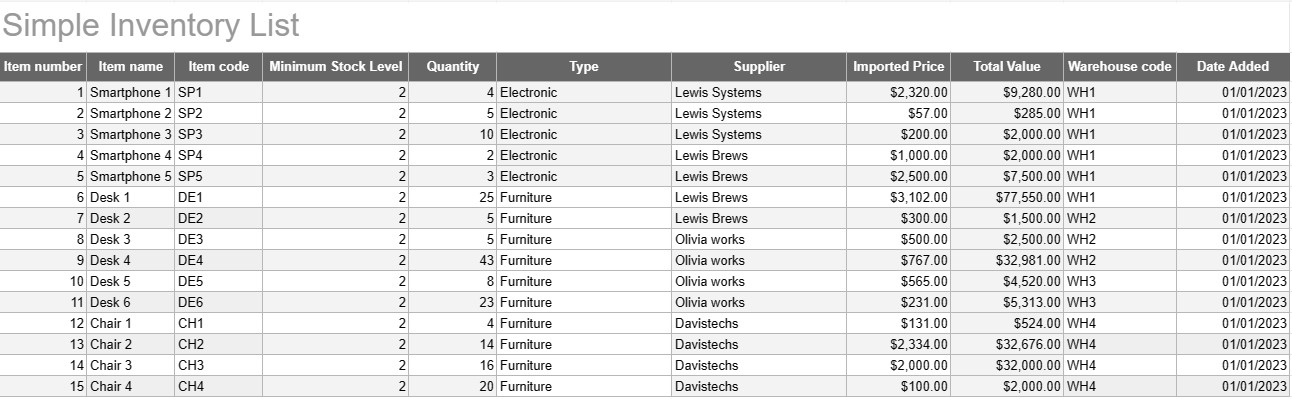
Um modelo simples de lista de inventário é uma ferramenta básica, porém eficaz, usada por indivíduos e empresas para rastrear e gerenciar seu estoque de bens, produtos ou ativos. Este modelo fornece um formato estruturado para registrar detalhes de itens, quantidades, localizações e outras informações relevantes, facilitando o monitoramento dos níveis de estoque e facilitando o gerenciamento eficiente.
Principais componentes de um modelo simples de lista de inventário:
- Detalhes do item: O modelo inclui colunas ou seções para informações específicas do item, como nome do item, descrição, identificador exclusivo (por exemplo, SKU ou número de série) e quaisquer notas adicionais.
- Quantidade: Os usuários podem registrar a quantidade ou unidades de cada item em estoque. Esta coluna é essencial para rastrear os níveis de estoque com precisão.
- Localização: Para empresas com vários locais de armazenamento ou armazéns, o modelo pode incluir uma coluna para especificar a localização física de cada item. Isso ajuda a agilizar a recuperação e o reabastecimento.
- Preço unitário: Os usuários podem inserir o preço unitário ou custo de cada item. Essas informações são valiosas para calcular o valor total do estoque.
- Valor total: Alguns modelos calculam automaticamente o valor total de cada item com base na quantidade e no preço unitário. Isso fornece uma visão geral rápida do valor total do estoque.
- Data de adição/atualização: Para rastrear alterações e atualizações no inventário, os usuários podem registrar a data em que cada item foi adicionado ou modificado.
- Categoria/Tipo: Os itens podem ser categorizados em diferentes grupos ou tipos (por exemplo, eletrônicos, material de escritório, roupas) para melhor organização e relatórios.
- Nível mínimo de estoque: Os usuários podem definir um nível mínimo de estoque para cada item. Quando a quantidade cai abaixo desse nível, serve como gatilho para reordenar ou reabastecer o item.
- Informações do fornecedor: Em um ambiente empresarial, os usuários podem incluir detalhes do fornecedor, como o nome do fornecedor, informações de contato e informações de novo pedido.
Benefícios de usar um modelo simples de lista de inventário:
- Acompanhamento de inventário: Fornece um instantâneo claro e atualizado dos níveis de estoque, ajudando a evitar rupturas e excesso de estoque.
- Controle de custos: permite que as empresas monitorem o valor de seu estoque e tomem decisões informadas sobre reabastecimento e compras.
- Eficiência: Simplifica o gerenciamento de estoque centralizando informações e tornando-as facilmente acessíveis.
- Precisão dos dados: Reduz o risco de erros no rastreamento do inventário, pois todas as informações são registradas de forma sistemática.
- Gerenciamento de pedidos: Ajuda a identificar quando reordenar itens e de quais fornecedores, melhorando o gerenciamento da cadeia de suprimentos.
- Conformidade: Em alguns setores, manter registros de inventário precisos é essencial para conformidade regulatória e relatórios financeiros.
- Otimização de recursos: permite que as empresas aloquem recursos de forma mais eficaz e reduzam os custos de manutenção.
Concluindo, um modelo simples de lista de inventário é uma ferramenta prática para indivíduos e empresas que buscam manter registros organizados e precisos de seu inventário. Quer seja usado para um inventário doméstico pequeno ou como parte de uma operação comercial maior, este modelo simplifica o gerenciamento de inventário, reduz o risco de escassez ou excesso de estoque e contribui para um melhor controle financeiro e tomada de decisões.
Visualização fácil e download de modelo de planilha
Visualize a versão completa de um modelo de planilha sem limitações para ver se você gosta, então você pode baixar o modelo Excel para armazená-lo em seu dispositivo e usá-lo gratuitamente.
Acesse o modelo de planilha de qualquer lugar
Isso está funcionando em todos os sistemas operacionais populares, como Windows, MacOS, Linux, iOS. Você pode ver os modelos de planilhas e baixá-los sem programas adicionais.
Como usar um modelo
Descubra como visualizar, baixar e usar o modelo de planilha seguindo as etapas extremamente fáceis de seguir
Mais modelos semelhantes
Veja mais modelos de planilhas que estão na mesma categoria da escolhida.













